
This guide explains how to use the provisioning script provided by OPSWAT to create an GCP GKE and generate all the Kubernetes components needed to run MetaDefender Core.
MetaDefenderK8S script details
GitHub Project OPSWAT/metadefender-k8s --> Script path: ./metadefenderk8s.sh
Programming Language: Bash
Installation Pre-requisites for provisioning:
GCP Credentials
The Cloud SQL Admin API is enabled. (Optional, enabled when Cloud SQL database is going to be used)
Download the credentials for the service account, it should have the following permissions
Editor
Compute Network Admin
Set in your environment variable the path to the JSON key with the credentials for the service account to use
GCP_JSON_CREDENTIALS_PATH
MetaDefender Core License Key (Required with --mdcore parameter)
Set it in your local environment credentials under MDCORE_LICENSE_KEY
How to run script
The script will deploy a single Worker Node for the cluster with enough space for 1 replica of MD Core. GCP compute size is e2-standard-8 (8 vCPU & 32 GB Memory). Each pod would need a minimum of 4 vCPU and 8 GB Memory. To change the request to adapt each pod to the specific case go to values.yml To change the size of the node pool for having more MD Core replicas or install additional MetaDefender products go to terraform file terraform/gcloud/main.tf
Script Parameters
Parameter | Flags | Options | Default | Description | Required/Optional |
|---|---|---|---|---|---|
Action |
| Action to indicate the script if we want to provision (Create resources + install Core) or install (Install Core) | Required | ||
Location | -l or --location |
| Where is going to be the K8S cluster | Required | |
MetaDefender Flag Installation | Combination of
| Install MetaDefender Core in the cluster provisioned | Required | ||
Project ID | --project_id | GCP project where the resources will be created | Required | ||
Image Version | --image | latest 5.0.1 | latest | MetaDefender Core image version to install | Optional |
Region | --region | us-central1 | AWS region where all the resources will be provisioned | Optional | |
Cluster Name | --name | Not uppercase allowed | md-k8s | Name of the cluster that will be used for naming all the resources | Optional |
Number of Replicas | --replicas | [0-9]* | 1 | Number of replicas for MetaDefender Core service | Optional |
Namespace | --namespace | [A-Za-z]{1,10} | Namespace where MetaDefender products will be installed in the K8S Cluster | Optional Max Characters: 10 |
Connection to Cloud SQL Database from GKE
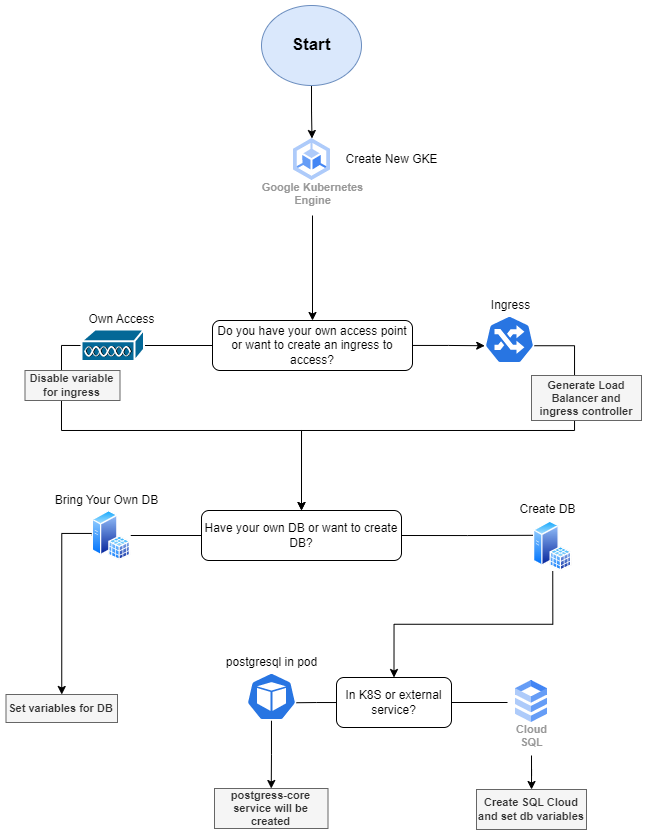
MetaDefender Core Flowchart Provisioning in GCP
The following flowchart represents how the provisioning script will configure the environment based on the options selected for provisioning GCP GKE.
Summary options to be selected
Access to the K8S cluster. Generate Ingress or provide own access.
An Ingress and an internal load balancer will be created per each product flag added as parameter to the script
Own Access, you decide how to access to the cluster so it won't generate any ingress but will still create the internal load balancer for the product service deployed
Have your own database or create new database
Own database, will be asked if you want the script to set up the credentials and database host url for you or the script will just indicate the secrets to edit, later on by you, for connecting the MetaDefender Core with your database.
Create new DB in K8S or external DB that for GCP we will provision a Cloud SQL Server
If external, indicate how to connect to it, by private connection or SQL Proxy pod
For having GKE of type Autopilot it is needed to change AUTOPILOT_GKE variable to true from terraform.tfvars. Database has to be external (Cloud SQL)