
What are the permissions on the shared folder for the temp directory?
This article applies to all MetaDefender Core V4 and V5 releases deployed on Windows systems.
Kindly adhere to the following steps to ensure the appropriate permissions are granted for the Shared folder:
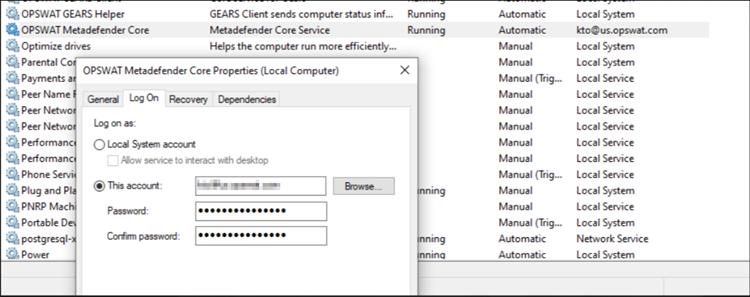
Initially, the customer should modify the Log on credentials, transitioning from SYSTEM admin to a user possessing the necessary permissions for reading and writing data in Core’s folders and their related components.
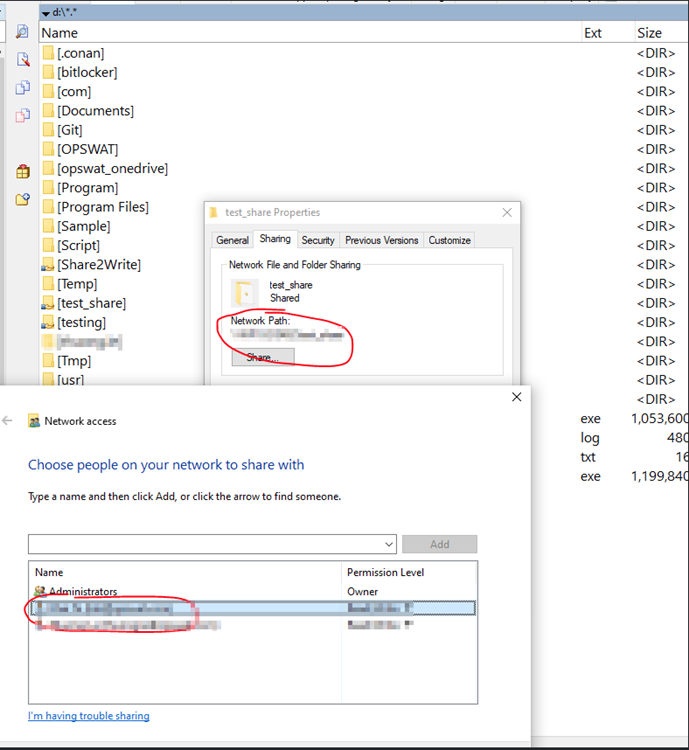
Subsequently, when sharing a folder across a network, it is recommended to share the folder using the same account.
For instance, if you have a Core operating on a machine, let's refer to it as A, and you alter the Log on credentials from SYSTEM to a user associated with the AD server (also linked to machine A)
On the other machine that you want to share the folder, add this user to the folder that you want to share
If Further Assistance is required, please proceed to log a support case or chat with our support engineer.