
This article applies to all MetaDefender Core releases subsequent to V4.8.0, including all MetaDefender Core V5 releases, deployed on Windows or Linux systems.
This sample script is provided for illustrative purposes only and is not guaranteed to be functional in a production environment.
MetaDefender Core V4.8.0 and all subsequent releases include the External Scanners feature:
This feature allows you to define an External Scanner which is then invoked through a command line executable or script.
This executable/script will be called for each scanned file, after all the other engines have scanned - but before the final verdict is decided.
Additional documentation for this feature can be found here: External Scanners And Post Actions.
The script in the sample below is a Powershell script. For this script to work properly, we need to call the Powershell executable in the External Scanners screen of MetaDefender Core, as follows:
V5:

V4:
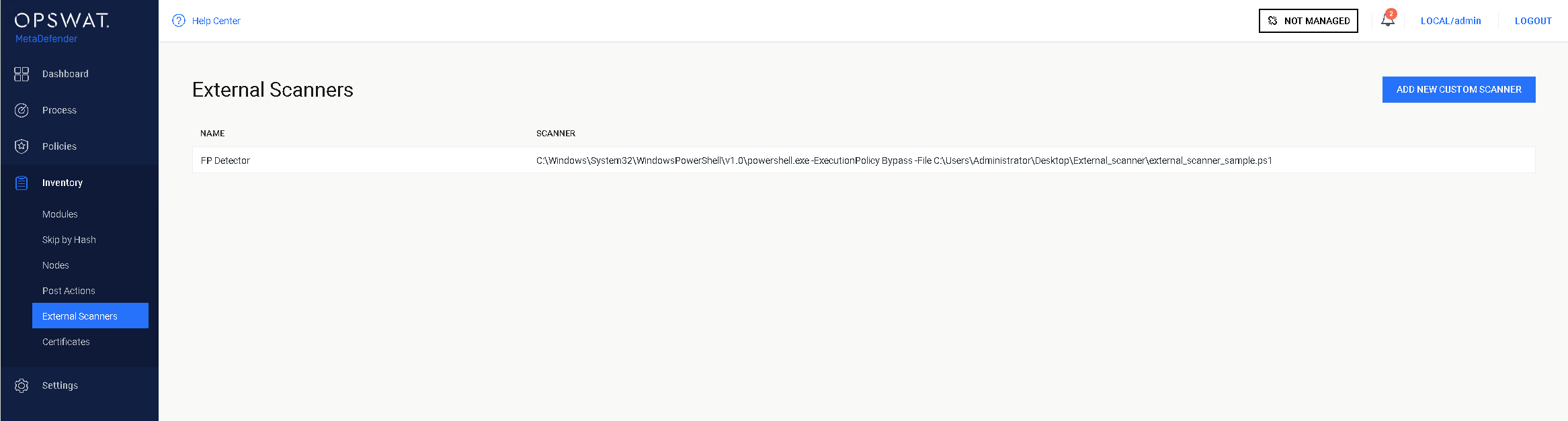
You will need to specify the location from where Powershell is running in your system, followed by:
ExecutionPolicy Bypass
-File TheNameAndPathOfYourScriptFile.ps1
We created a sample Powershell script that attempts to flag suspicious files as False Positive:
The script checks the scan results of the current file and, if the file is flagged as infected by only one engine, the file's hash is subsequently sent to MetaDefender Cloud.
MetaDefender Cloud's results are then analyzed:
In case the file is flagged as Infected in MetaDefender Cloud by ONLY the same one engine that flagged the file in MetaDefender Core, OR if the file is found to be clean by MetaDefender Cloud, the file will be copied to a $false_positive folder for later investigation, and the verdict will be Suspicious (2) and threat_ found will be Suspected False Positive.
If the file is flagged by any other engine on MetaDefender Cloud then, verdict will be Infected (1) and threat_found will be Infected - Probably
If the file is not flagged by any local engine, the script will return the verdict
No Threat Detected*(0).
Input:
It is your responsibility to create and populate the system context variable with a valid folder name before running the script
It is your responsibility to create and populate the system context variable with your valid MetaDefender Cloud license key.
The script accepts the currently scanned file location as its last command-line argument, and stores it in the variable $current_file_path.
The script expects to find the scan results JSON on STDIN. it is read into the variable $scan_results.
Output:
The script will add its verdict (based on results from MetaDefender Cloud) to the result JSON and write it to the STDOUT.
if only the same engine (or no engine at all) flag the file as malicious the script will copy the file to the folder $false_positive for later investigation
The script has 6 possible return values:
"0" - Success
"1" - Input JSON Parse error
"2" - Copy error
"3" - file path of the currently scanned file is invalid
"4" - the destination path of "false positive" is invalid.
"5" - call to MetaDefender hash lookup failed
"6" - hash not found on MetaDefender Cloud
The script itself can be found and downloaded from the following link:
If you have any issues navigating MetaDefender Core’s External Scanners feature, please follow these instructions on How to Create Support Package With Bundle Tools?, before creating a support case or chatting with our support engineer.