
Last Update | 24 Mar 2020 |
|---|---|
Authentication | YES |
HTTP Method | POST |
Content Type | application/json |
Response Format | JSON |
Requirements | Only applicable for enterprise accounts |
Changes |
MetaDefender IT-OT Access now supports webhook to allow an account to push a notification to a 3rd-party vendor when an event is triggered. The 3rd party vendor can leverage this feature to continuously monitor device compliance status while a device is connecting to a protected resources/applications.
Configuration
An administrator can enable this feature by following the below steps
Log into MetaDefender IT-OT Access console
Navigate to Settings > Integrations
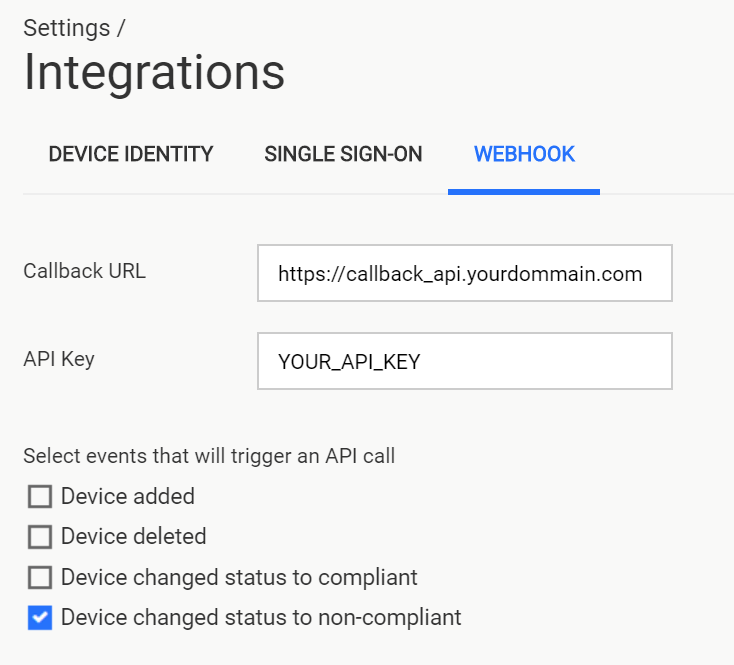
On the Webhook tab,
Enter a callback API which you would like MetaDefender IT-OT Access push a notification to
Enter an API Key to authenticate with the callback API server
Check on events to trigger a notification.
**
**
Warning:
This feature will be auto-disabled if MetaDefender IT-OT Access could not reach out to a configured callback API. Administrators need to log into MetaDefender IT-OT Access console and enable this feature manually in that case.
Callback API Definition
API URL
Request Header
Key | Value | Description |
|---|---|---|
Content-Type | application/json | |
Authorization | API Key value | 3rd party vendor needs to issue an API key for authentication purpose |
Request Parameters
Key | DataType | Description |
|---|---|---|
device_id | string | Device ID |
status | string | device status Values can be:
Note: this can be extended in future |
timestamp | long | Timestamp when an even is triggered (Unix timestamps in milliseconds) |
Response Code
HTTP Code | Description |
|---|---|
2xx For example: 200, 202 | Successful |
other codes | Failed MetaDefender IT-OT Access will retry 2 times after 4 seconds and 1 min. And MetaDefender IT-OT Access will auto-disable the Webhook settings if it fails 100 consecutive pushes |
Example Request
Example Response successful (HTTP 2xx)
Example Response failed (HTTP code is not equal 2xx)
Logs
MetaDefender IT-OT Access records an event log when it pushes a notification to a configured callback API with a HTTP status code from the API. Administrators can check event logs for this feature at Event Log > Webhook