
Overview
Prevalence Search provides context about how common an Indicator of Compromise (IOC) (e.g., IP/hash/domain) has been observed across available data sources. This helps quickly determine whether an IOC is rare (potentially more suspicious) or widely seen (often common infrastructure) and supports faster triage during investigations.
In the results table, Prevalence appears as one or more count badges (for example 10+), representing observed frequency across one or multiple prevalence sources/counters.
Note: Prevalence is a reputation/enrichment signal. It is not a standalone proof of benign or malicious activity.
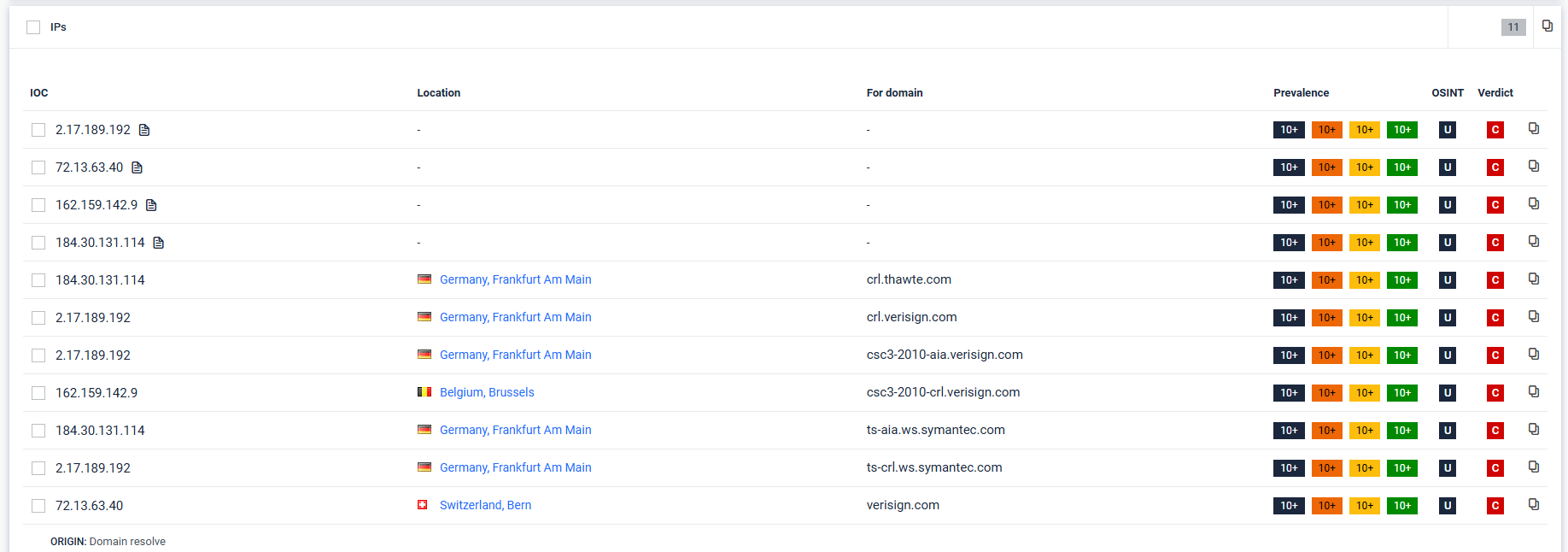
Prevalence Search results are displayed in IOC result tables (example: IPs) alongside other enrichment fields:
IOC: the indicator value (e.g., IP address)
Location: geolocation context (if available)
For domain: domain context if the IOC was derived from a domain resolution step
Prevalence: occurrence counts (how common the IOC is)
OSINT: open-source intelligence availability/links (if provided)
Verdict: classification outcome shown for the IOC (e.g., confirmed threat/low risk/no threat detected depending on your system’s verdict model)
Key Capabilities
Prevalence Search operates as a pivot point during malware analysis. Its primary functions include:
Contextual Analysis: Identifies other reports that share the same IOCs (Hashes, IPs, Domains, URLs) within a specified time frame.
Infrastructure Reuse Hunting: Pivots from a single sample to an adversary's broader toolset by finding overlapping network artifacts.
Campaign Clustering: Correlates novel samples with historical data to anchor them to known malware families even when file hashes differ.
OSINT Integration: Cross-references internal prevalence data with external Open-Source Intelligence (OSINT) to validate threat severity.
The Impact on Verdict Scoring
The final verdict is an aggregation of evidence from multiple layers. Prevalence influences this through three primary mechanisms:
A. High Prevalence = Noise Reduction
If suspicious behavior is detected (e.g., a process injecting code) but the associated file hash has a very high prevalence in clean environments (seen in 1,000+ reports with "Clean" verdicts), the system may downgrade the threat level.
Result: Prevents false positives caused by common administrative tools or legitimate system updates that behave like malware.
B. Low Prevalence = Targeted/Zero-Day Alert
A sample with very low prevalence (seen in < 3 reports) that triggers "High Risk" behavioral indicators is flagged with much higher confidence as a Zero-Day or Targeted Attack.
Result: Escalates the verdict from "High Risk" to "Confirmed Threat" because the lack of global presence suggests a bespoke payload.
C. Cluster-Based Verdicts
Even if a specific file hash is new, if its fuzzy hash (imphash or ssdeep) has high prevalence in reports already marked as "Malicious," the new file inherits that reputation.
Result: The verdict is "Confirmed Threat" via family attribution, even without a perfect signature match.
2. Verdict Influence Matrix
The following table illustrates how Prevalence Search and OSINT reputation interact to finalize a verdict:
Behavior Severity | Prevalence Score | OSINT Reputation | Final Verdict |
|---|---|---|---|
High (Malicious) | Low (Unique) | Unknown | Confirmed Threat (Zero-Day) |
High (Malicious) | High (Widespread) | Malicious | Confirmed Threat (Known Campaign) |
Medium (Suspicious) | High (Common) | Clean | No Threat Detected (Likely Noise) |
Medium (Suspicious) | Low (New) | Unknown | High Risk (Requires Review) |
The "Verdict Pivot" in the UI
In the MetaDefender Aether report, the prevalence data is typically located next to the IOCs. If an analyst sees a "Neutral" verdict but notices a prevalence of "1" for a suspicious IP, they can manually pivot:
Click the Prevalence Count: See the 1 other report where this appeared.
Compare Verdicts: If that 1 report was a "Confirmed Threat," the analyst can manually override the current session's verdict.
Graph Analysis: Use the Threat Graph to see if both reports share the same C2 infrastructure.
Pro Tip: In the MetaDefender Aether 3.0 pipeline, prevalence is automatically correlated with the Threat Scoring layer to reduce alert fatigue, ensuring SOC teams only see unified, high-confidence verdicts.