
This article applies to all OPSWAT Central Management V7.5.0+ releases deployed on Windows or Linux systems.
OPSWAT Central Management includes the option to integrate with your third-party single sign-on service (SSO). This enables the seamless provisioning of new manager-users to your account.
When a user logs into the OPSWAT Central Management Console via your SSO service, OPSWAT Central Management will provision that user as a read-only user on your account, but this role and its associated limitations can be updated as you see fit.
OPSWAT Central Management utilizes the secure and widely adopted industry standard Security Assertion Markup Language 2.0 (SAML 2.0), allowing users to seamlessly integrate with any popular identity provider that also supports SAML 2.0.
To begin the integration process, navigate to your identity provider’s (IdP’s) website and follow their instructions for configuring an SSO application. In this case, the SSO application is being configured for OPSWAT Central Management.
To integrate OPSWAT Central Management with your own SSO service
Log into the OPSWAT Central Management Console with administrator permissions.
Navigate to Settings>Integrations>Single Sign-On, then select the Enable Single Sign On checkbox.
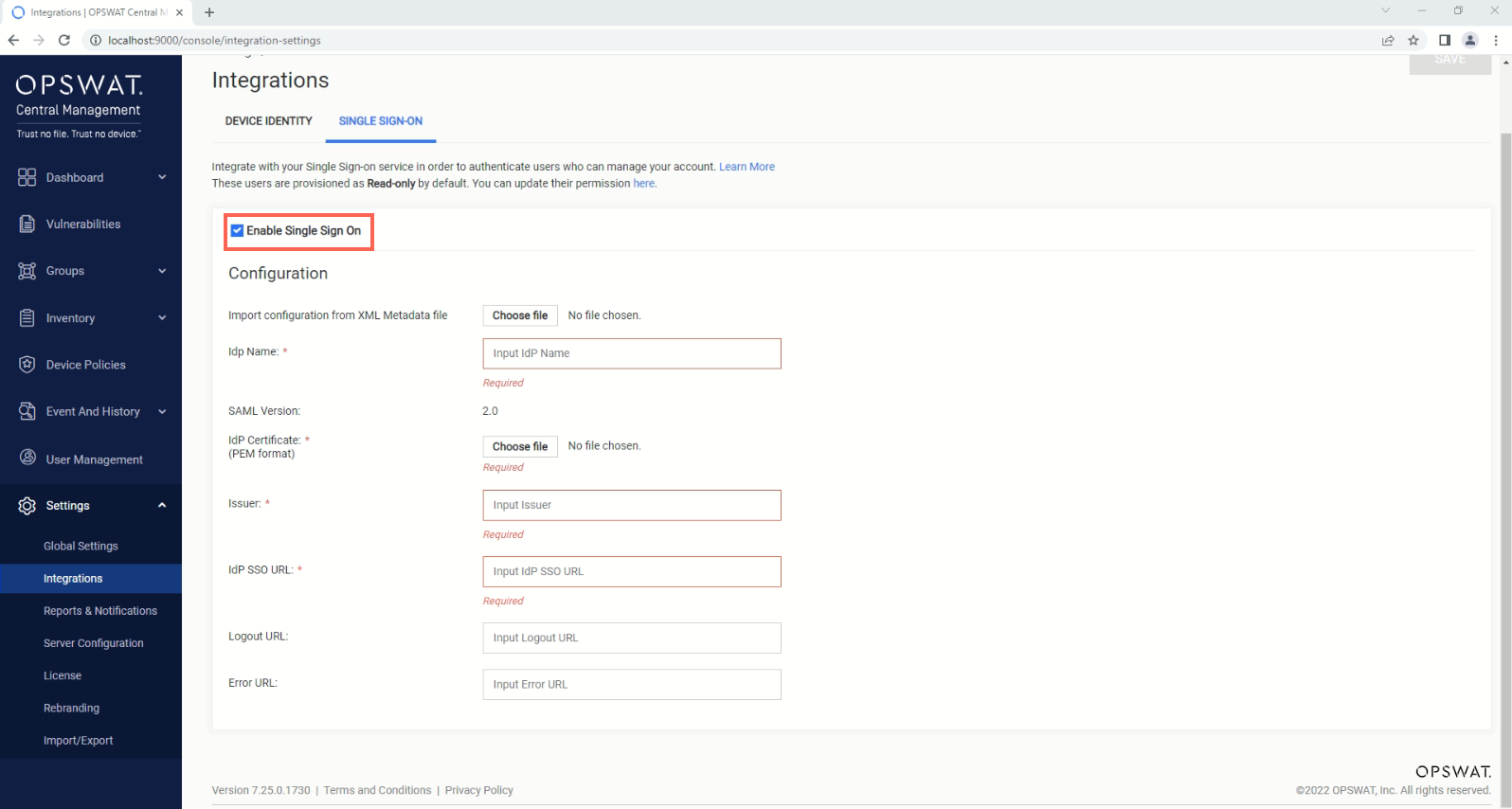
For your own reference purposes, enter an IdP Name in the field provided.
Click the Choose File button to upload the IdP X.509 certificate .pem file, downloaded/received from your IdP.
Enter the Issuer information that you received from your IdP in the relevant field.
Enter the Idp SSO URL that you received from your IdP in the relevant field.
Enter the IdP Logout URL and Error URL, if any, that you received from your IdP in the relevant field.
Click the Save button to implement your changes.
Following this implementation, OPSWAT Central Management will issue an OPSWAT Central Management Login URL that you must copy and use to update the Postback SSO URL (also known as the Assertion Consumer Service URL) of the SSO application for OPSWAT Central Management that you configured via your IdP.
The information required for step 4 though step 8 above can be imported from the IdP metadata file that you received earlier from your IdP, if such a file was made available.
If you have followed the instructions above but have been unable to Provision Users From Your Own Single Sign-On Service To OPSWAT Central Management, please open a Support Case with the OPSWAT team via phone, online chat or form, or feel free to ask the community on our OPSWAT Expert Forum.