FAQs
2026.2.3
Search this version
FAQs
FAQs
Title
Message
Create new category
What is the title of your new category?
Edit page index title
What is the title of the page index?
Edit category
What is the new title of your category?
Edit link
What is the new title and URL of your link?
Where can I find file hashes for OPSWAT executables?
AI Tools
Summarize Page
Copy Markdown
Open in ChatGPT
Open in Claude
Connect to Cursor
Connect to VS Code
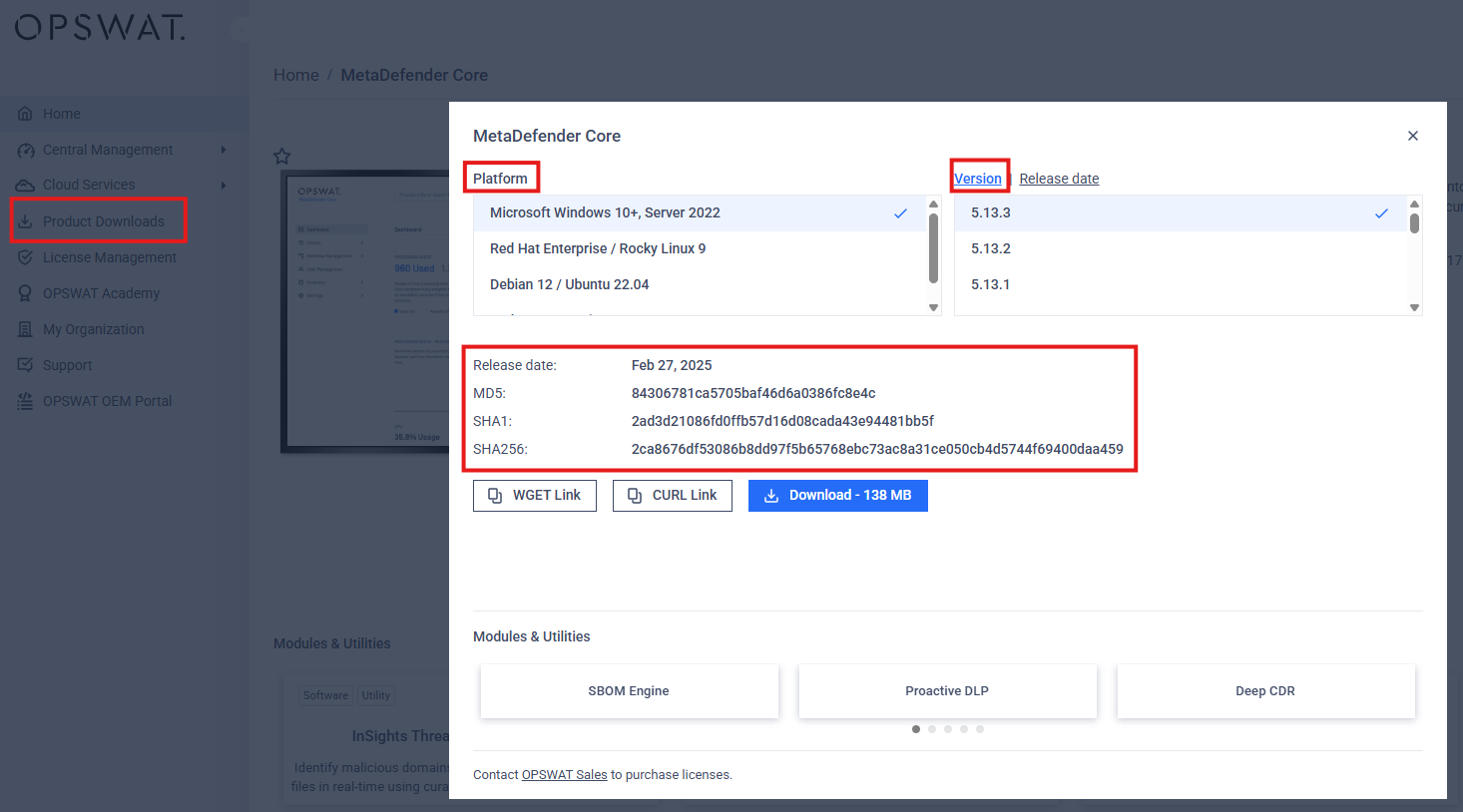
File hashes for OPSWAT executables can be found within Product Downloads in My OPSWAT Portal. Please note that you will have to check the file hashes for OPSWAT executables manually and for each product you have installed. Please follow the steps below on how to navigate to the file hashes for OPSWAT executables:
Log in to your My OPSWAT Portal
Next, click on Product Download on the left side menu
Then click on the specific Product you've installed or wanting to know the file hash for
Now, click on the Download button
Click on the Platform and version as needed
From here you should be able to view the file hashes for OPSWAT executables
Last updated on
Was this page helpful?
Next to read:
Which product I can download from My OPSWAT Portal?null
Discard Changes
Do you want to discard your current changes and overwrite with the template?
Archive Synced Block
Message
Create new Template
What is this template's title?
Delete Template
Message