License Management
2025.2.1
Search this version
License Management
Page
Code Steps
Category
Label
Link
Separator
Title
Message
Page icon
No icon. This page keeps the plain index row.
orSVG or PNG, square, at least 32×32.
Create new category
What is the title of your new category?
Edit page index title
What is the title of the page index?
Edit category
What is the new title of your category?
Edit link
What is the new title and URL of your link?
Activate License
AI Tools
Summarize Page
Copy Markdown
Open in ChatGPT
Open in Claude
Connect to Cursor
Connect to VS Code
Who can use this feature?
User type: Organization user
Role: View only or Full access on License Management
To start managing your product instances on My OPSWAT, you need to activate the product-specific licenses for your account.
In the left sidebar, select License Management > Activate License
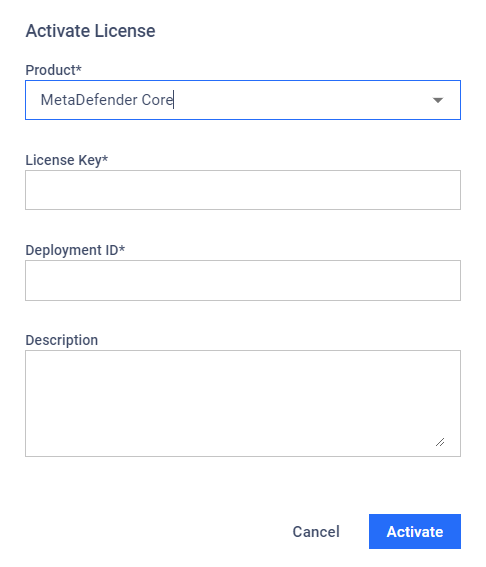
In the Activate License dialog, fill in all required fields.
Product: The name of the OPSWAT Product.
License Key: The license keys associated with the OPSWAT Product.
Deployment ID: The unique identifier associated with a product instance.
Description: The description you want to add for this license.
Select Activate to complete the license activation.
Last updated on
Was this page helpful?
null
Discard Changes
Do you want to discard your current changes and overwrite with the template?
Archive Synced Block
Message
Create new Template
What is this template's title?
Delete Template
Message