
NetApp ONTAP is a powerful data management software that provides unified storage for various protocols, including NFS, SMB/CIFS, iSCSI, and Fibre Channel.
It offers features like high availability, data protection, and storage efficiency, making it a popular choice for enterprise storage needs.
To connect with your NetApp ONTAP storage, we rely on the Service Message Block (SMB) protocol. Please enable SMB on your storage system beforehand for seamless integration.
Product Specification Requirements | Version |
|---|---|
Service Message Block (SMB) protocol | SMB 3.1.1 (or SMB3) |
To use the virus scanning features (VSCAN) of your NetApp ONTAP storage with MetaDefender Storage Security on your Windows deployment, check out this article for detailed instructions.
To integrate your NetApp ONTAP storage with this system, follow these simple steps:
From the left side menu, navigate to Inventory -> Add -> Account -> Choose NetApp
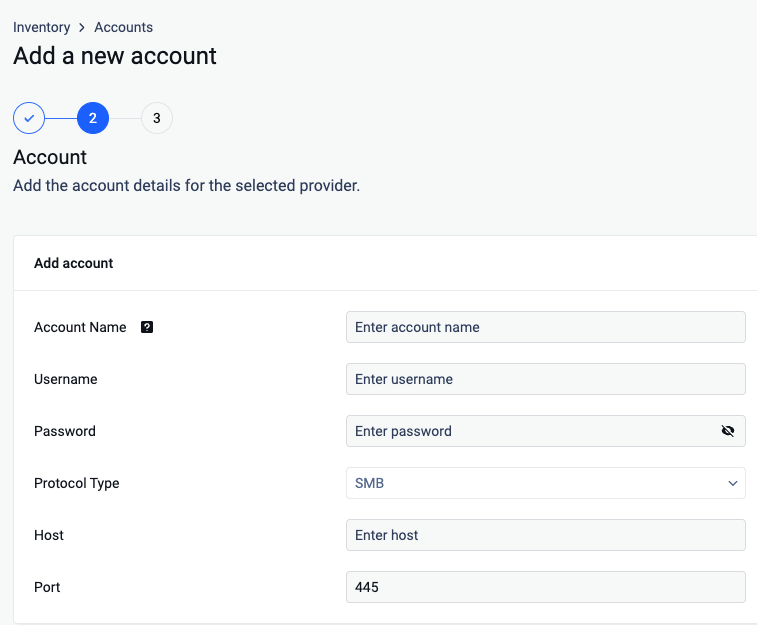
Provide an Account Name: Give your account a name so you can easily identify it later
Enter User Credentials:
Provide the username of an account with at least read and write permissions to the desired share.
For Deep CDR & Remediations capabilities, the user needs modify permissions as well.
Enter the password for the specified user.
Enter the IP address of the SMB server you wish to connect to.
Specify the port number used for the SMB connection, 445 being the default SMB port
Click on Next to finish the process.
From the left side menu, navigate to Inventory -> Add -> Unit -> Choose the previously created account
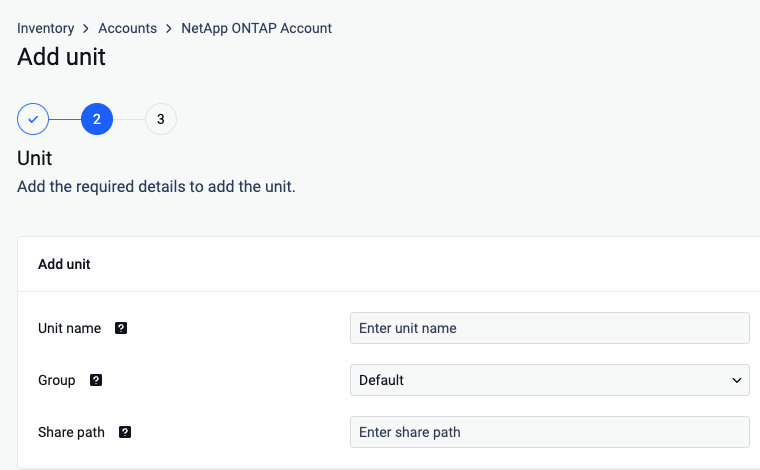
Give your unit an unique name so you can easily identify it later
Assign your unit to a Group
Specify the Share Path. Enter the path to your network share using one of the supported formats:
file://servername/pathToShare
\servername\pathToShare
//servername/pathToShare
smb://servername/pathToShare
Complete the Process: Click Next to finish integrating your NetApp ONTAP storage
Once added, you can use this storage within the system for various functionalities, leveraging the capabilities of NetApp ONTAP for data management and access.