Integrations
3.5.3
Search this version
Add An Azure Files Storage
Copy Markdown
Open in ChatGPT
Open in Claude
In order to integrate Azure Files with MetaDefender Storage Security please follow these steps:
From the left side menu, navigate to Storage units and from the Network-Attached Storage tab, choose Add Azure Files Storage
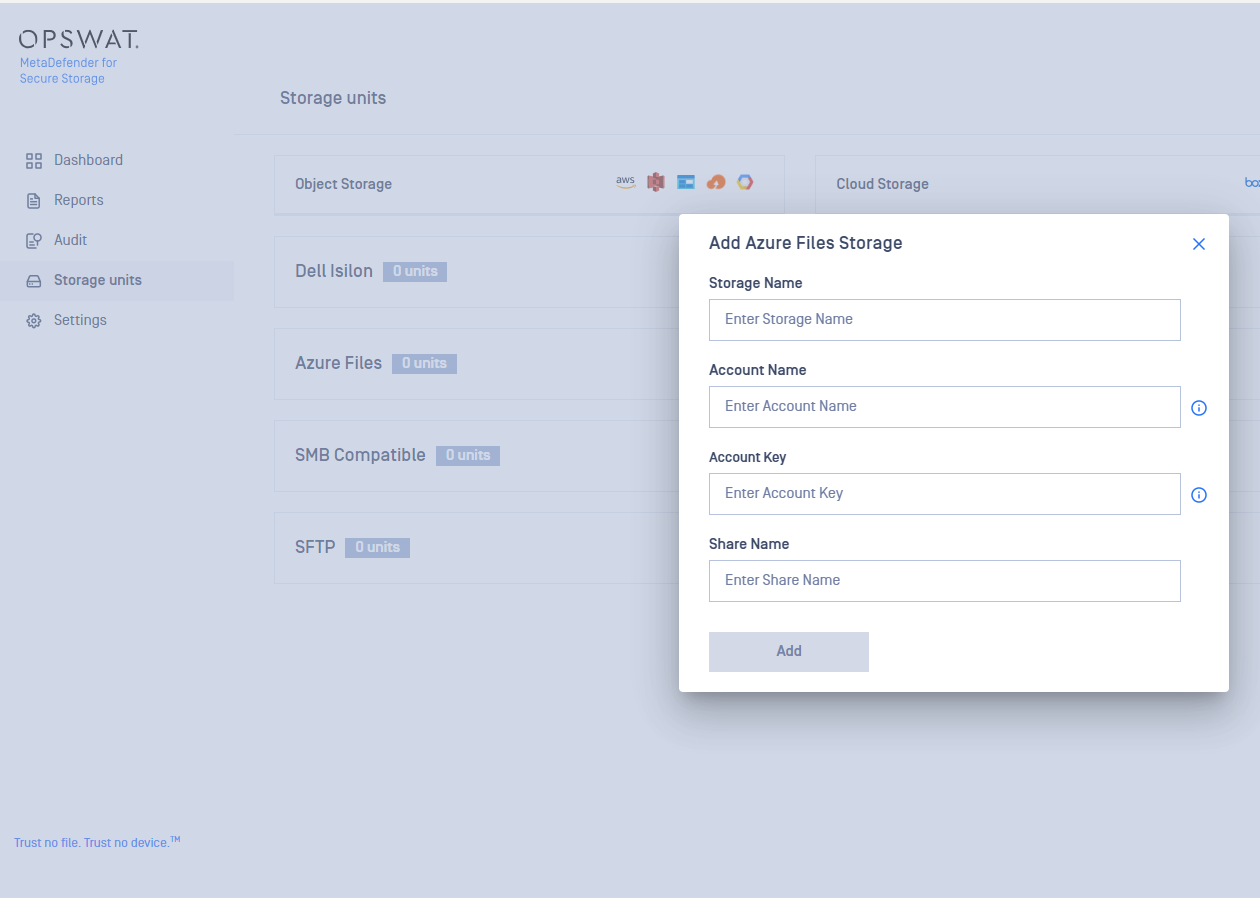
Give your storage a name so you can easily identify it later
Enter the Account Name.
Enter your Account Key. Scroll to the end of this page for more details.
Enter the name of the share you wish to process with MetaDefender Storage Security.
Click Add in order to finish the process.
Where can I find the Access Key?
To find the Account Key, please follow these steps:
https://learn.microsoft.com/en-us/azure/storage/common/storage-account-keys-manage?tabs=azure-portal
Last updated on
Was this page helpful?
Next to read:
Add An Azure Blob Storagenull
Discard Changes
Do you want to discard your current changes and overwrite with the template?
Archive Synced Block
Message
Create new Template
What is this template's title?
Delete Template
Message
Integrations
Integrations
Page
Code Steps
Category
Label
Link
Separator
Title
Message
Page icon
No icon. This page keeps the plain index row.
orSVG or PNG, square, at least 32×32.
Create new category
What is the title of your new category?
Edit page index title
What is the title of the page index?
Edit category
What is the new title of your category?
Edit link
What is the new title and URL of your link?