Overview MetaDefender Managed File Transfer Release Notes
Getting Started
Deployment & Usage
Support
Operating
v3.6.3
Search this version
Operating
Operating
Title
Message
Create new category
What is the title of your new category?
Edit page index title
What is the title of the page index?
Edit category
What is the new title of your category?
Edit link
What is the new title and URL of your link?
Custom MetaDefender Core Workflow rule for Groups
Copy Markdown
Open in ChatGPT
Open in Claude
To apply distinct MetaDefender Core Workflow rules to specific group(s), navigate to the "Groups" menu item.
Beware, the dropdown list only displays workflows that are present on every MetaDefender Core.
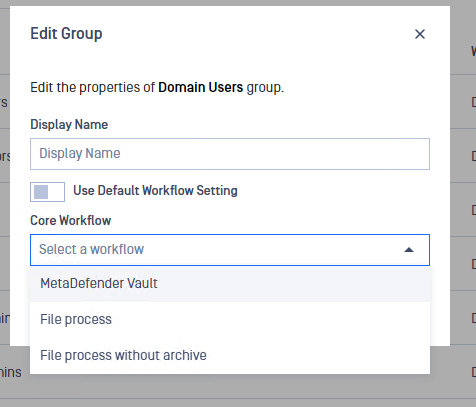
Assign Core Workflow rule for the Group
Assigning a Core Workflow to a Group can be done by following these steps:
- Navigate to the Users/Groups menu and click on the three dots next to the desired Group and select Edit Group

- In the displayed modal, disable the Use Default Workflow Settings option and select the desired workflow rule
Type to search, ESC to discard
Last updated on
Was this page helpful?
Next to read:
Reset users' MFADiscard Changes
Do you want to discard your current changes and overwrite with the template?
Archive Synced Block
Message
Create new Template
What is this template's title?
Delete Template
Message
