Overview
When FIPS Mode is enabled, the web server switches its cryptographic operations to use a FIPS 140-3 validated cryptographic module.
Specifically, the system:
Uses OpenSSL 3.1.2
Activates the OpenSSL FIPS Provider
Reconfigures nginx to use a restricted, NIST-aligned TLS configuration
Enforces modern, FIPS-approved cipher suites
Generates strong Diffie–Hellman parameters (3072-bit)
This ensures that TLS operations are performed using FIPS-approved cryptographic algorithms and a validated cryptographic module.
Please make sure to be aware of the delay on first startup after enabling FIPS mode described at First Startup Behavior.
Enabled Protocols
The nginx configuration is automatically updated to enforce a strict TLS policy aligned with modern NIST recommendations.
Enabled TLS 1.3 Cipher Suites
TLS_AES_256_GCM_SHA384
TLS_AES_128_GCM_SHA256
These use:
AES-GCM (AEAD)
SHA-2
Ephemeral key exchange
Enabled TLS 1.2 Cipher Suites
ECDHE-ECDSA-AES256-GCM-SHA384
ECDHE-RSA-AES256-GCM-SHA384
ECDHE-ECDSA-AES128-GCM-SHA256
ECDHE-RSA-AES128-GCM-SHA256
DHE-RSA-AES256-GCM-SHA384
DHE-RSA-AES128-GCM-SHA256
These provide:
Forward secrecy (ECDHE / DHE)
AES-GCM encryption
SHA-2 integrity
Disabled Cipher Categories
When FIPS Mode is enabled, the following are disabled:
Static RSA key exchange (
Kx=RSA)CBC-mode cipher suites
PSK-based cipher suites
Legacy and weak protocols
This reduces attack surface and aligns with modern cryptographic best practices.
First Startup Behavior
On the first startup after enabling FIPS Mode, the system generates strong Diffie–Hellman parameters. This is required for DHE-based cipher suites and ensures compliance with modern security strength recommendations.
Important
The generation process:
Is CPU intensive
Can take up to 10 minutes, depending on system performance
Happens only once
Is not repeated on subsequent restarts
During this time, startup may appear delayed.
This is expected behavior.
Monitor Startup Process
After enabling FIPS mode, monitor the first startup by checking the <installation folder>\Services\Logs\opswat.mft.helper.service.log file. When the log contains the entry Started Nginx process., the FIPS-mode startup process has completed successfully. An example of the log file after enabling FIPS mode is shown below.
Operational Impact
Enabling FIPS Mode may impact compatibility with older clients.
Clients that rely on:
TLS 1.0 or 1.1
RSA key transport
CBC cipher suites
Legacy embedded TLS stacks
may fail to connect after FIPS Mode is enabled.
Modern browsers and up-to-date TLS libraries are fully supported.
Certificate Compatibility
Existing HTTPS certificates remain valid.
However:
RSA certificates require
ECDHE-RSA-*suites (which remain enabled).ECDSA certificates require
ECDHE-ECDSA-*suites (which remain enabled).
No certificate re-issuance is required when enabling FIPS Mode.
When to Enable FIPS Mode
FIPS Mode is recommended when:
Regulatory compliance requires FIPS 140-3
Operating in government or regulated environments
Formal cryptographic validation is required
A hardened TLS posture is desired
Enabling FIPS Mode
Open Registry Editor (
regedit.exe).Navigate to:
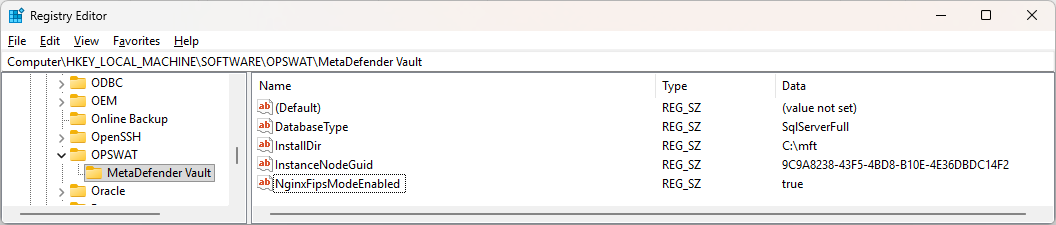
HKEY_LOCAL_MACHINE\SOFTWARE\OPSWAT\MetaDefender VaultCreate or modify the NginxFipsModeEnabled S tring Value (REG_SZ): The value must be set to the string
"true"(case-insensitive).Restart MetaDefender Managed File Transfer™ services. Please be aware that the first FIPS enabled startup can take significantly longer as some parameters are needed to be generated.