
Knowledge Base
v3.11.1
Search this version
Does Managed File Transfer support restricting AD groups from accessing Managed File Transfer?
Summarize Page
Copy Markdown
Open in ChatGPT
Open in Claude
Connect to Cursor
Connect to VS Code
Active Directory groups or users belonging to AD groups can be restricted from being shared with a file by denying them access to MetaDefender Managed File Transfer.
To deny access:
Go to "Managed File Transfer Settings" → "Active Directory" → "Configure"
In STAGE 5, include the security groups that require access
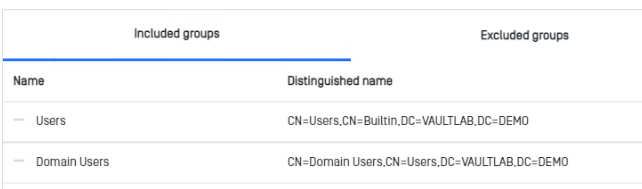
Exclude the security group that should not be shared with a file.
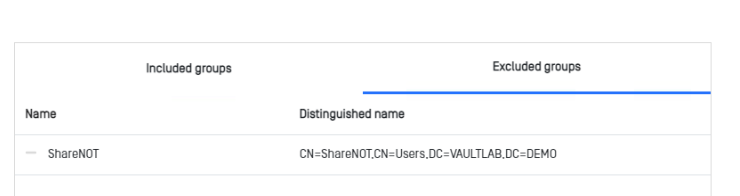
Finish the setup.
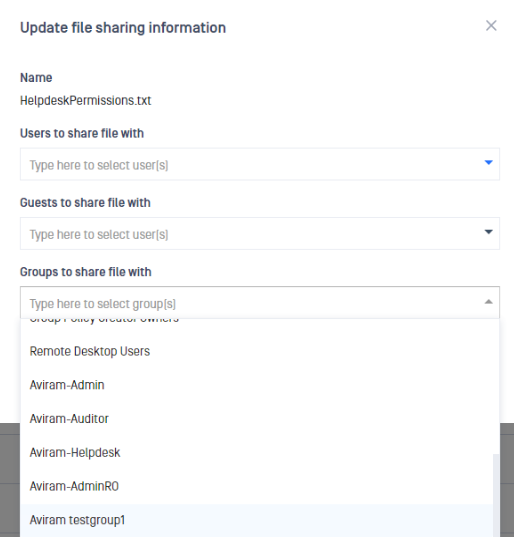
List of available groups to share a file with:
Last updated on
Was this page helpful?
Next to read:
How to change a local administrator's email address?null
Knowledge Base
Knowledge Base
Configuration & Setup
Error and Troubleshooting