
The syslog settings are configured under Settings → Logs → Syslog:
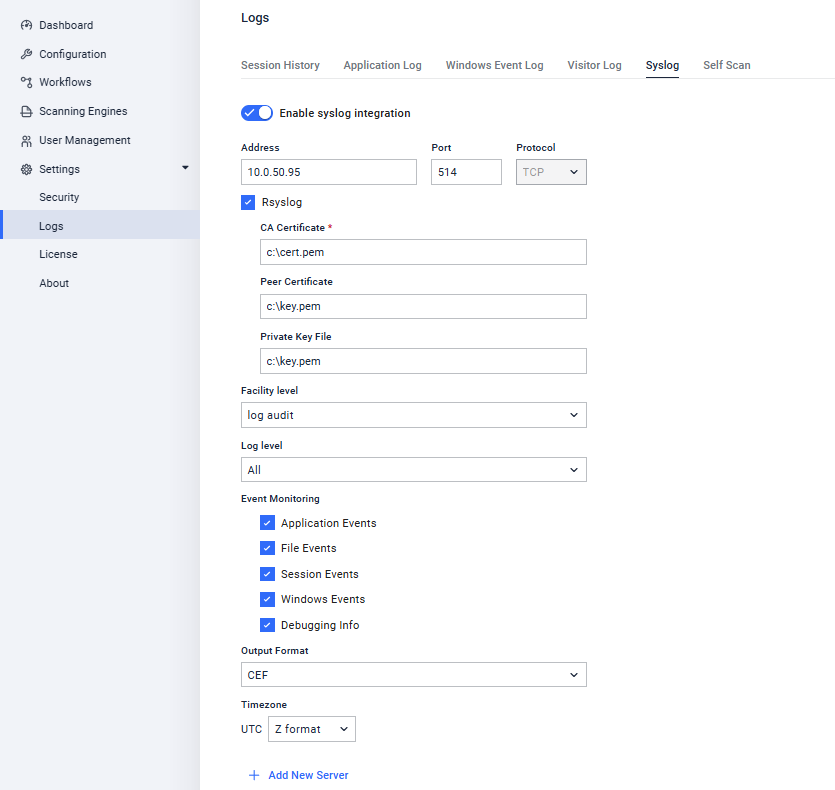
Setting | Description | Default Value |
|---|---|---|
Address | Where the syslog messages are sent | |
Port | The open port for accepting syslog messages | 514 |
Protocol | Select between using UDP or TCP | UDP |
Enabled | Enables usage of the syslog server | Enabled |
Rsyslog | Enables usage of syslog over TLS | Disabled |
| Path to CA certificate. Used to sign all of the other certificates. The CA cert must be trusted by all clients and servers. | <empty> |
| Path to the certificate that conveys the Kiosk client identity | <empty> |
| Path to the private key file, used to properly decrypt the traffic | <empty> |
Facility Level | How Kiosk appears in syslog messages | User-level |
Log Level | Determines which messages get sent to the syslog server, it filters out any message less important than that selected | All |
Event Monitoring | Determines which types of events are logged | Application File Session |
Output Format | Select the format of the message between standard "syslog" or "CEF" | syslog |
Select new server to add a new syslog server to the list; remove to delete a server. Select reset to revert the settings back to how Kiosk is currently configured. Select apply to set Kiosk settings to how they appear on this page.
syslog Message Format
The KIOSK syslog message format follows the BSD syslog standard:
<PRI> <Timestamp> <Hostname> <Product ID> <KIOSK Process ID> <eventCode> <logType> <Message>
Example: <14> 2025-03-07T15:15:15+09:00 Kiosk-K1001 MDM[12752] eventCode='000000', logType='databaseLog', Configuration reloaded
Component | Description | Value(s) |
|---|---|---|
PRI | The priority field, combining the facility and severity level | Following the BSD legacy syslog. <PRI> = ( <facility> * 8) + <severity> Facility values (between 0 and 23) and Severity values (between 0 and 7) |
Timestamp | The timestamp of the message. | Timestamp follows the ISO 8601 standard. |
Hostname | The system name of KIOSK | |
Product ID | Short product ID | MDM |
Kiosk Process ID | The process ID of Kiosk | [#] |
eventCode | 6 digit code to indicate the type of event | 000000 - Unclassified 100000 - Allowed file found 100001 - Blocked file found 100002 - User successful login event 100003 - Configuration changed 100004 - UI event 100005 - Service event 100006 - Authentication event (error or failure) 100007 - Database event 100008 - Device event 100009 - HTTP event 100010 - Session event 100011 - File event 100012 - Low disk space event 100013 - CimTrak deny event 200000 - Session ended |
logType | Event monitoring log type | databaseLog - Application Events fileLog - File Events sessionLog - Session Events windowsEventLog - Windows Events serviceLog - Debugging Info |
Message | The content of the message | Text or JSON formatted content |
CEF Message Format
Base Format: CEF:<Version>|<Vendor>|<Product>|<Version>|<EventCode>|<Message>|<Severity>|<Extension>
Example: CEF:0|OPSWAT|MDM|4.7.3.2454|100010|sessionLog|6|msg=Configuration reloaded
KIOSK syslog severity levels
Numerical Code | Severity |
|---|---|
0 | Emergency |
1 | Alert |
2 | Critical |
3 | Error |
4 | Warning |
5 | Notice |
6 | Information |
7 | Debug |