
Prerequisites
This documentation is based on XONA Critical System Gateway (CSG) v5.3.3 and is the minimum configuration required to integrate XONA CSG and MetaDefender ICAP Server. For more information, please contact XONA Support.
XONA Critical System Gateway version 5.3.3 and above
MetaDefender ICAP Server v5.x (or later) is installed and license is activated
For installation and configuration quick guidelines see:
MetaDefender ICAP Server must have a valid license to function correctly. For license configuration details see MetaDefender ICAP Server Licensing.
MetaDefender Core is installed and license is activated
Web browser access to the XONA CSG management UI. (Please refer to the XONA documentation for details on how to access the XONA CSG UI.
Integration Steps
In the XONA UI, login with an account with administrative privileges
Navigate to Settings -> Files
Within the section labeled ‘ICAP Malware Scanning’, select ‘Scan uploads against ICAP server’
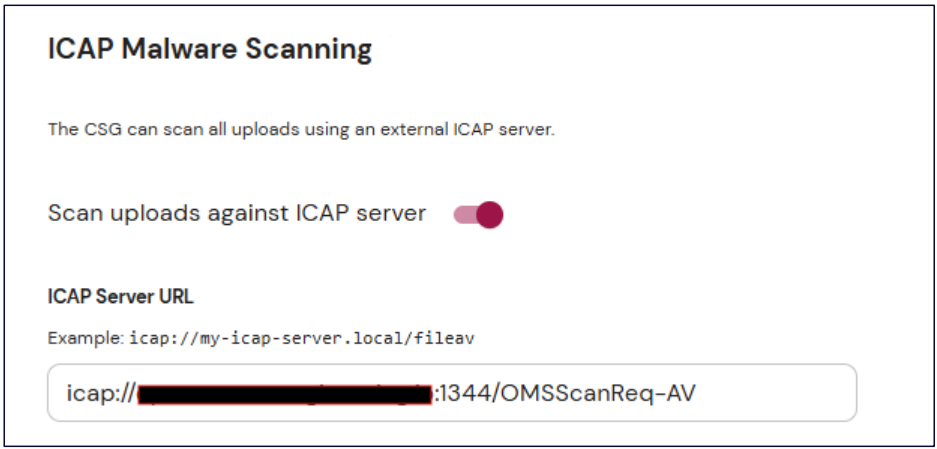
Enter the ICAP Server URL with the format: icap://servername:port/OMSScanReq-AV
Click Save
Compatibility Notes
The XONA platform supports MetaDefender multiscanning only. Deep CDR and Proactive DLP are not currently supported.