Operating system and hardware requirements
Please confirm that your system meets the minimum requirements listed below before installing MetaDefender ICAP Server.
Only 64-bit platforms are supported.
MetaDefender ICAP Server supports a wide range of deployment options, including air-gapped environments, providing the flexibility to choose the environment that best suits customers' requirements and infrastructure.
Physical server.
Virtualization platforms like VMware, Hyper-V and XenServer.
Operating Systems
CentOS 7.x, 8.x, 9.x
Red Hat Enterprise Linux 7.x, 8.x, 9.x
Debian 10.x, 11.x, 12.x
Ubuntu 18.04, 20.04, 22.04, 24.04
Windows 10, 11
Microsoft Windows Server 2016, 2019 or newer (64 bit)
CentOS 7 and Red Hat Enterprise Linux 7 reached end-of-life on June 30, 2024. Please upgrade to Red Hat 8 or 9 before then to maintain security, as no further updates will be provided.
Debian 10 reached end-of-life on June 30, 2024, Please upgrade to Debian 11 or newer
OPSWAT will extend product functionality support for CentOS 7 and Red Hat 7, Debian 10 until the end of 2024.
Hardware Requirements
RAM: min. 2 GB
SSD: 2 GB + (Max size per scan request * [number of scan request in parallels ])
For performance reasons it is not recommended to use a HDD in place of an SSD.
If MetaDefender Core or any other system is installed on the same physical machine as MetaDefender ICAP Server then the additional systems' hardware requirements need also be taken into consideration.
Other software requirements
MetaDefender Core Version Compatibility Matrix
MetaDefender ICAP Server | MetaDefender Core |
|---|---|
4.0.0 | 4.7.0+ |
4.1.0 | 4.8.0+ |
4.2.0+ | 4.8.2+ |
The following scan engines must be active:
Scan engine | Version |
|---|---|
Data sanitization | 5.0.2-6+ |
At least one of the available anti-malware engines | N/A |
Security rules
Under Policy > Security rules on Core, security rules – that are used by MetaDefender ICAP Server's security rules: ** **
Enable Visibility of scan result (recommended):
Role | Visibility |
|---|---|
Everybody | FULL DETAILS |
Without this visibility ICAP Server can still work, but certain details may not be visible within the UI.
Browser Requirements
One of the following desktop browsers is suggested to view the MetaDefender ICAP Server's UI:
Chrome
Firefox
Safari
Microsoft Edge
Chrome, Firefox, Safari and Edge browsers are tested with the latest available version at the time of release. Microsoft IE is no longer supported (replaced by Microsoft Edge).
Mobile layouts are not supported.
Additional installation of Windows services
Name | Service Name | Optional |
|---|---|---|
MetaDefender ICAP Server | mdicapsrv | REQUIRED |
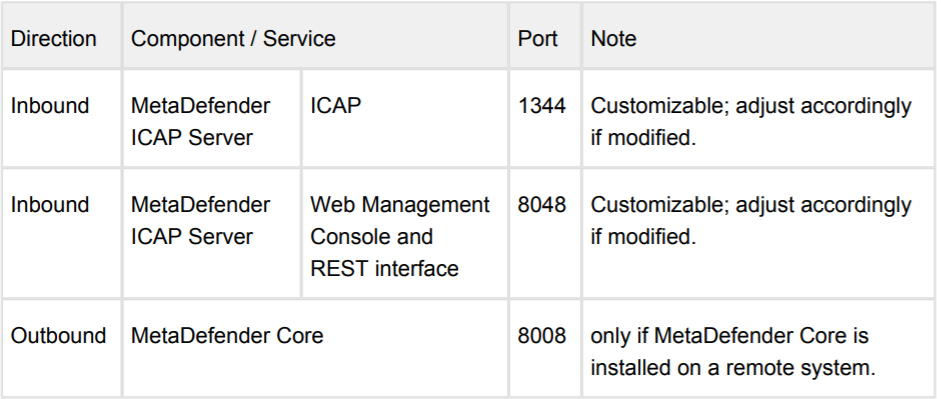
Ports that must be available