Kubernetes Configuration
v5.0.0
Search this version
Kubernetes Configuration
Title
Message
Create new category
What is the title of your new category?
Edit page index title
What is the title of the page index?
Edit category
What is the new title of your category?
Edit link
What is the new title and URL of your link?
Connect the ICAP Client outside K8s to ICAP on K8s
Copy Markdown
Open in ChatGPT
Open in Claude
- MetaDefender ICAP Server has already deploy to K8S environment by MetaDefender ICAP Server helm (refer to: Using your existing Kubernetes (K8S) cluster)
Option 1: using NGINX Ingress

Setup Metallb:
- Clone metallb
- update helm-bitnami/bitnami/metallb/values.yaml
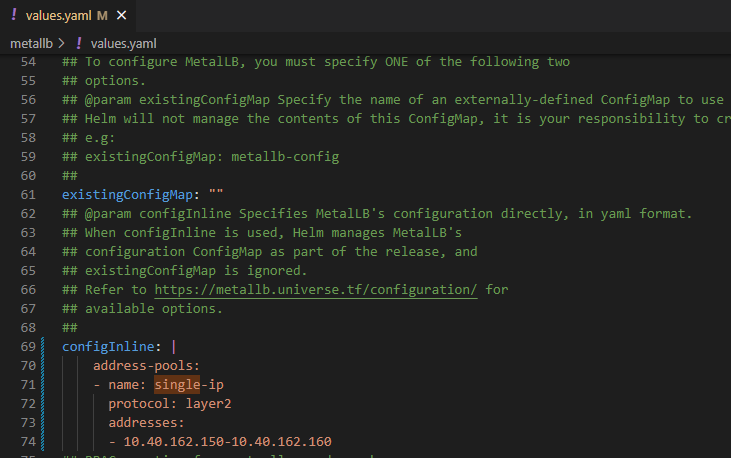
- install helm chart
run
xxxxxxxxxxhelm install metallb .- make sure metallb is running
run
xxxxxxxxxxkubectl get pods | grep metallboutput
xxxxxxxxxxdefault metallb-controller-5ffbcf4b7f-pnnj7 1/1 Running 0 10mdefault metallb-speaker-25j59Setup NGINX ingress:
- get ingress-nginx
run
xxxxxxxxxxgit clone https://github.com/kubernetes/ingress-nginx.git- append below to values.yml
append
xxxxxxxxxx# Need to update it because default Nginx Ingress doesn't support TCP protocoltcp: 1344: "default/md-icapsrv:1344" #Exposing TCP service, <default> is the namespace install md-icapsrv 11344: "default/md-icapsrv:11344"- Helm install Nginx-ingress
run
xxxxxxxxxx$ helm install ingress-nginx .- Create file ingress.yml as below:
the hostname can be changed and this is used as the domain to connect to MD ICAP Server
E.g:
host: md-icapsrv-ui.example.com
ingress.yml
xxxxxxxxxxapiVersion: networking.k8s.io/v1kind: Ingressmetadata: name: icap-ingress namespace: defaultspec: ingressClassName: nginx rules: - host: md-icapsrv-ui.example.com http: paths: - backend: service: name: md-icapsrv port: number: 8048 path: / pathType: Prefix - backend: service: name: md-icapsrv port: number: 8048 path: /* pathType: Prefix - host: md-icapsrv.example.com http: paths: - backend: service: name: md-icapsrv port: number: 1344 path: / pathType: Prefix - backend: service: name: md-icapsrv port: number: 1344 path: /* pathType: Prefix - host: md-icapsrv-tls.example.com http: paths: - backend: service: name: md-icapsrv port: number: 11344 path: / pathType: Prefix - backend: service: name: md-icapsrv port: number: 11344 path: /* pathType: Prefix- Create ingress resources on Kubernetes
run
xxxxxxxxxxkubectl apply -f ./ingress.yml- Verify Metallb assign IP address external to Nginx-ingress
run
xxxxxxxxxxkubectl get ing -Aoutput
NAMESPACE NAME CLASS HOSTS ADDRESS PORTS AGEdefault icap-ingress nginx md-icapsrv-ui.opswat.local,md-icapsrv.opswat.local,md-icapsrv-tls.opswat.local 10.40.162.150 80 18mThe UI to connect to MD ICAP Server
- ICAP: md-icapsrv.opswat.local:1344/OMSScanReq-AV
- ICAPS: md-icapsrv-tls.opswat.local:11344/OMSScanResp-AV
E.g: for Squid integration
- ICAP:
icap_service metascan_req reqmod_precache bypass=0 icap://1md-icapsrv.opswat.local:1344/OMSScanReq-AV
- ICAPS:
icap_service metascan_resp respmod_precache bypass=0 icap://md-icapsrv.opswat.local:11344/OMSScanResp-AV
Option 2: Using NodePort
- Update field service_type from ClusterIP to NodePort in values.yaml of ICAP helm and save to file update_nodeport_values.yml
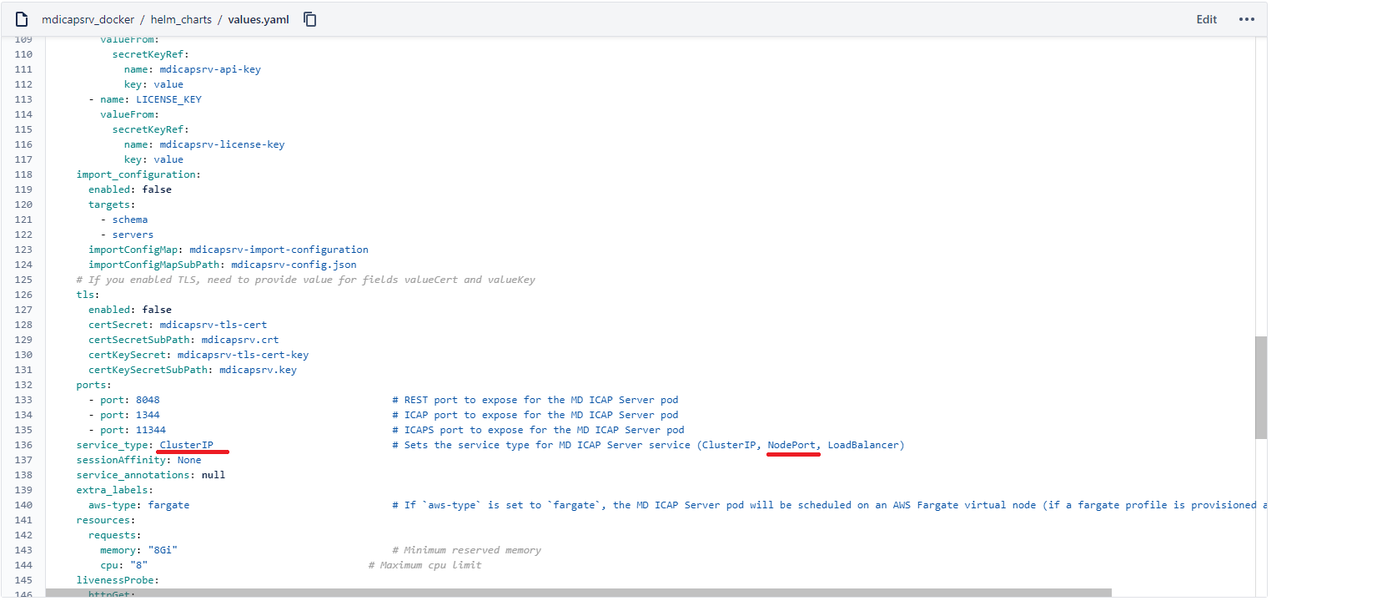
- Update config
update
xxxxxxxxxxhelm install md-icapsrv -f update_nodeport_values.yml .- make sure pod MetaDefender ICAP Server is running
check
xxxxxxxxxxkubectl get pods -AFor example: this case md-icapsrv-5df4bb8547-czp88 is running
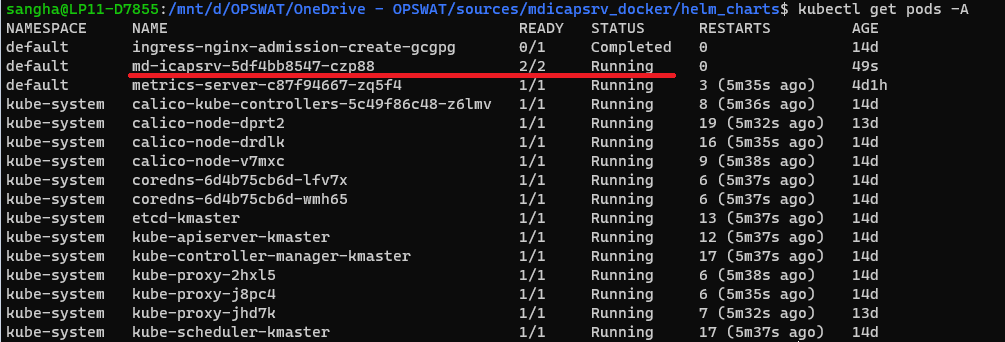
- Get service port with CLI
check
xxxxxxxxxxkubectl get svc -A | grep md-icapsrvFor example: the service port mapping ressult:
- 8048:31988/TCP
- 1344:32233/TCP
- 11344:32568/TCP

- Check the MetaDefender ICAP Server is running on the worker node
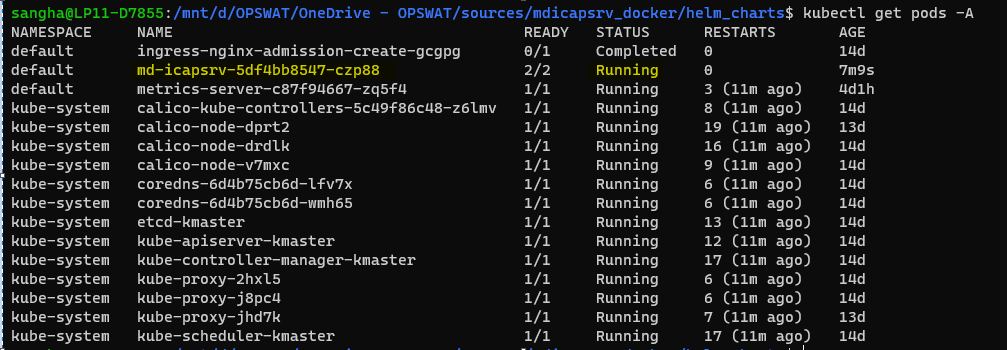
check
xxxxxxxxxxkubectl get pods -A
- Describe pod md-icapsrv-5df4bb8547-czp88 to get the IP address
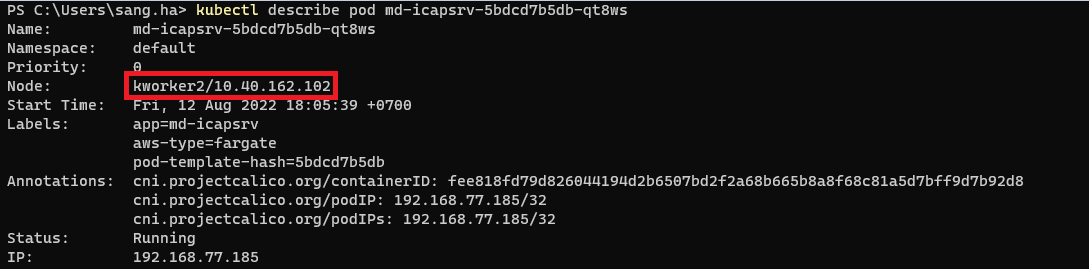
check
xxxxxxxxxxkubectl describe pod md-icapsrv-5df4bb8547-czp88
- ICAP Client will connect to MetaDefender ICAP Server via below IP and Port
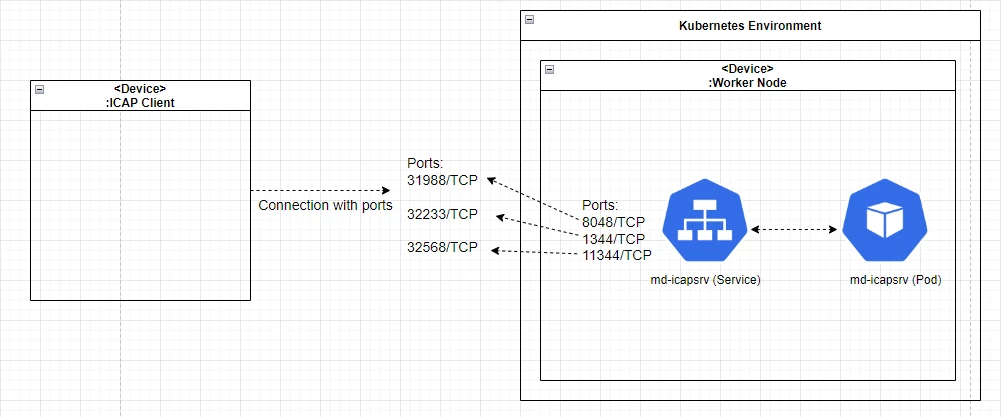
connect
xxxxxxxxxxICAP: 10.40.162.102:32233ICAPS: 10.40.162.102:32568 E.g: for Squid integrationicap_service metascan_req reqmod_precache bypass=0 icap://10.40.162.102:32233/OMSScanReq-AVicap_service metascan_resp respmod_precache bypass=0 icap://10.40.162.102:32568/OMSScanResp-AV
Type to search, ESC to discard
Last updated on
Was this page helpful?
null
Discard Changes
Do you want to discard your current changes and overwrite with the template?
Archive Synced Block
Message
Create new Template
What is this template's title?
Delete Template
Message
