
Overview
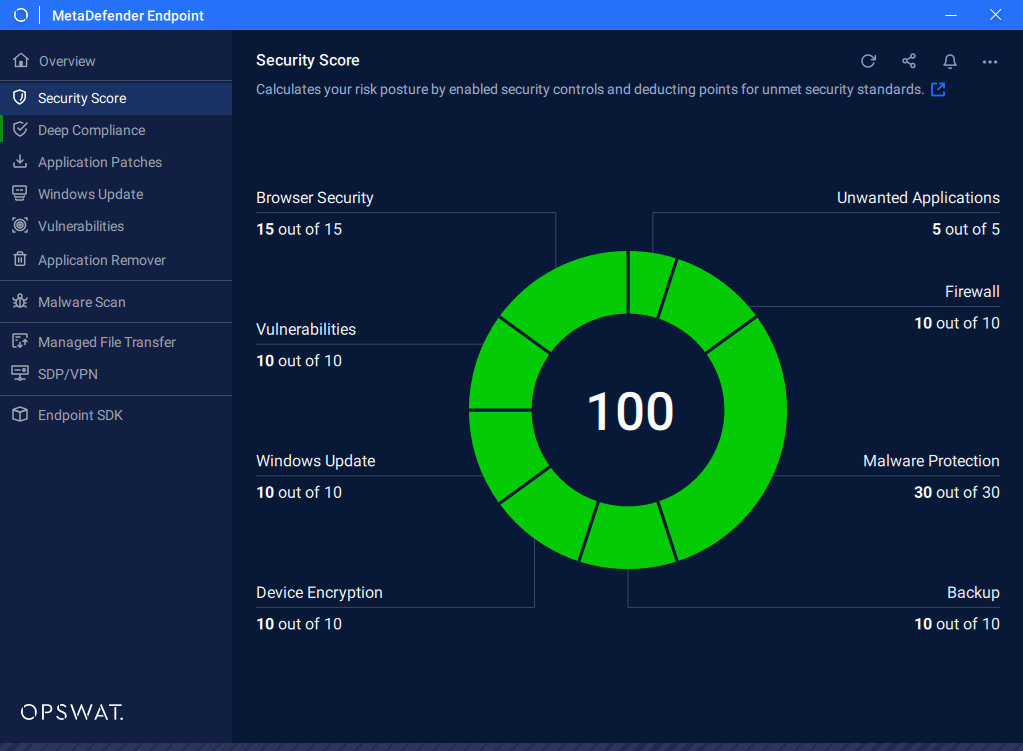
The Security Score is a feature of MetaDefender Endpoint that provides a real-time, quantified measure of an endpoint's overall cybersecurity posture according to best practices recommended by OPSWAT. It aggregates the results of multiple security checks across several categories into a single composite score, giving users and administrators an at-a-glance view of how well a device is protected and where remediation is needed.
The score is expressed on a scale of 0 to 100. A higher score indicates a stronger security posture; a lower score reflects gaps in protection that expose the endpoint to greater risk. Each category contributes to the overall score, and actionable recommendations are provided for each failing or degraded check so that users can take steps to improve their rating.
The score does not reflect an endpoint's adherence to your organization's security policy. It may be possible for an endpoint to have a low security score, but is compliant with the organization's policy.
How the Score Is Calculated
The Security Score is a weighted, aggregate value derived from the status of each security category. Each category is evaluated independently, and its result contributes to the total. Categories with a passing status contribute their full weight to the score; failing or degraded checks reduce the aggregate.
Administrators leveraging MetaDefender Access or My OPSWAT Central Management can also configure compliance policies based on the Security Score—for example, permitting network access only to endpoints whose score meets or exceeds a defined threshold.
Security Score Categories
Malware Protection
This category evaluates the presence, configuration, and health of anti-malware or antivirus software installed on the endpoint. It is one of the most heavily weighted categories because real-time malware protection is a foundational control against the majority of threats.
Sub-items evaluated:
Product Detection Confirms that a recognized anti-malware product is installed. MetaDefender Endpoint supports detection of thousands of anti-malware products, including OPSWAT-certified solutions from partners such as Avira, AVG, Bitdefender, McAfee, and many others.
Real-Time Protection State Verifies that the installed anti-malware product's real-time scanning engine is actively running and enabled. A disabled real-time protection module results in a score penalty.
Definition / Signature up-to-date Reports whether the product's threat definitions are current. This includes the definition version, definition timestamp, and engine version. The check determines whether definitions are up to date.
Last Successful Scan Records the timestamp of the most recent completed scan. Endpoints that have not been scanned within an acceptable window are flagged.
Threat History Surfaces any detected threats recorded by the installed product, alerting the user to infections that may require additional remediation.
OPSWAT Certification Level Displays the OPSWAT Certification tier (Basic, Standard, or Advanced) of the detected anti-malware product. Non-certified or low-certified products may not meet enterprise policy requirements and are flagged accordingly.
Firewall
This category checks whether a network firewall is active and properly configured on the endpoint. The firewall acts as the perimeter control that filters unauthorized inbound and outbound traffic.
Sub-items evaluated:
Firewall Active State Confirms whether the host-based firewall (such as Windows Defender Firewall or a third-party solution) is enabled and running.
Protection Status Verifies that firewall protection is enforced for the active network profile (Domain, Private, or Public on Windows). An inactive firewall on any profile that the device currently uses is flagged as a risk.
Operating System (OS) Update
This category assesses how current the operating system is with respect to available security patches. Unpatched operating systems are among the most common attack vectors exploited in the wild.
Sub-items evaluated:
Update Agent Installed Confirms that an update agent is installed and enabled to keep the system up to date, reducing the risk of patches being overlooked.
Missing OS Patches Enumerates security patches and updates that are available for the installed OS version but have not yet been applied.
OS Version up-to-date Evaluates whether the installed operating system version itself is still in active support and receiving security updates from the vendor.
Vulnerabilities
This category scans installed third-party applications and the OS against a continuously updated vulnerability database to identify software with known Common Vulnerabilities and Exposures (CVEs).
Sub-items evaluated:
CVE Detection Cross-references detected application versions against known CVE records to identify applications or out-of-date OS builds that contain known security flaws.
Browser Security
This category evaluates the security posture of web browsers installed and used on the endpoint. Browsers are a frequent initial attack vector via malicious sites, phishing campaigns, and compromised extensions.
Sub-items evaluated:
Anti-Phishing Protection State Verifies whether anti-phishing features (either native to the browser or provided by a security extension) are active.
Device Encryption
This category verifies that the storage volumes on the endpoint are encrypted. Full disk encryption protects data at rest, preventing unauthorized access to sensitive information if the device is lost or stolen.
Sub-items evaluated:
Volume Encryption State (Signature-Based Detection) Detects recognized disk encryption products (such as BitLocker, FileVault, or third-party encryption tools) and reports whether encryption is active and enforced.
Generic Volume Encryption Detection (Patented Technology) Using OPSWAT's patented technology, MetaDefender Endpoint can detect disk volume encryption state even for solutions that are not explicitly enumerated in the signature database, providing broader coverage across heterogeneous environments.
Unwanted Applications
This category scans installed third-party applications and identifies if any of the applications are known Potentially Unwanted Applications (PUAs).
Sub-items evaluated:
PUA detection Confirms if any known PUA is installed on the system.
Backup
This category evaluates whether the endpoint has performed any backups within the last 7 days. Regular backups help to minimize data loss in case of ransomware, hardware failure, or misplaced device.
Sub-items evaluated:
Backup performed recently Confirms whether a backup product is installed and performed a backup within the past week. Detected backup applications are listed among the status of their actions performed within or over the 7 day threshold.