
This section provides instructions for identifying and resolving operational issues with Patch Management. Please review the information provided to help with troubleshooting any unexpected behavior. If the issue you are experiencing continues to persist or your issue is not described in this section, please open a Support Case with OPSWAT support.
Cache Node
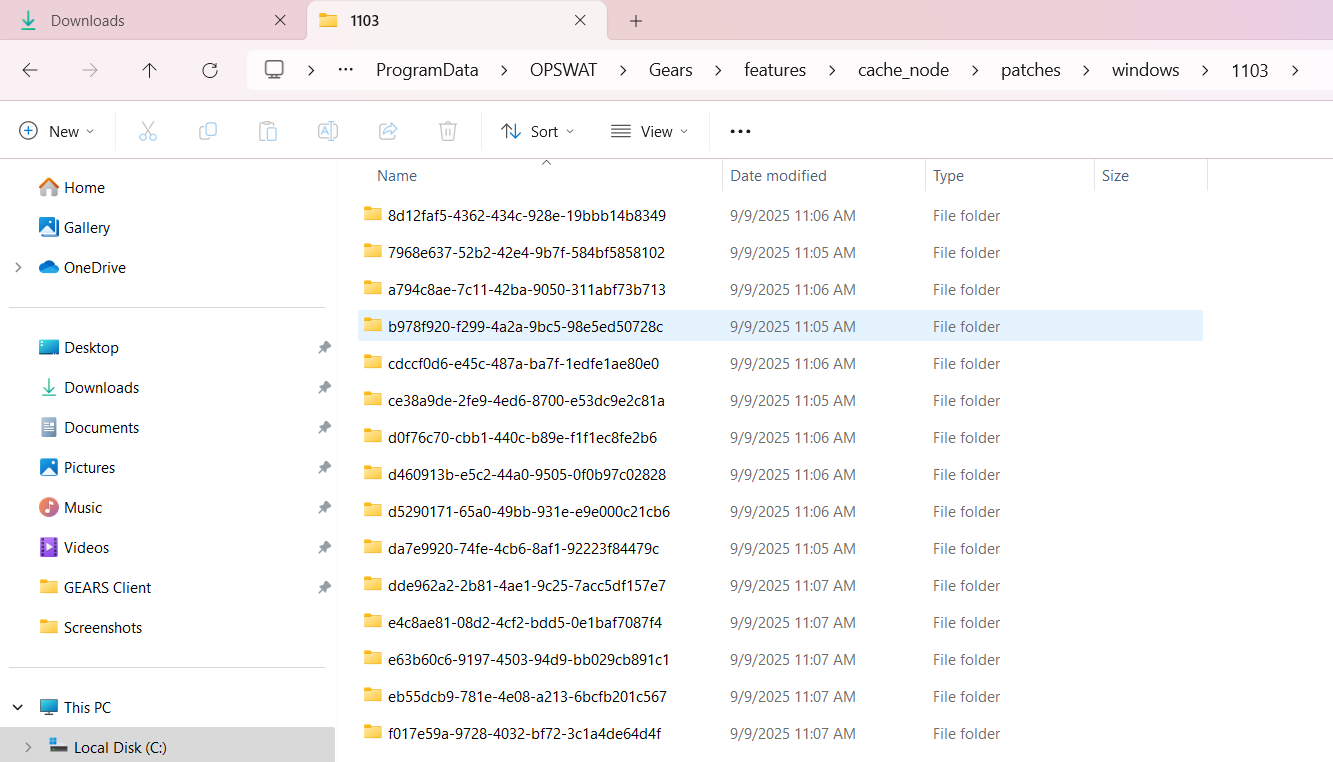
Where patches are stored
To ensure a Cache Node is receiving patches or has a necessary patch available, patches are stored at: %PROGRAMDATA%\OPSWAT\Gears\features\cache_node\patches .
Where to view logging
Logging can be reviewed to understand if Endpoint agents are downloading files from the Cache Node.
On the Cache Node machine
Feature logs:
%PROGRAMDATA%\OPSWAT\Gears\logs\cache_node.logHTTP server logs:
%PROGRAMDATA%\OPSWAT\Gears\logs\cache_node_caddy_server.logCheck to see if another client downloaded files, for example:
"method": "GET"
"User-Agent": ["OPSWAT Client"]
"status": 200
"uri": "/windows/1103/<patch_id>/<patch_file_name>.msu"
On the Endpoint machine
OS update feature:
%PROGRAMDATA%\OPSWAT\Gears\logs\os-updates.logApplication update feature:
%PROGRAMDATA%\OPSWAT\Gears\logs\app-management.log
How to understand a Cache Node is fully synced
Option 1
Check the last time sync in the registry:
Computer\HKEY_LOCAL_MACHINE\SOFTWARE\WOW6432Node\OPSWAT\Gears Client\features\cn
Option 2
Check downloaded patches list from the management server:
%PROGRAMDATA%\OPSWAT\Gears\features\cache_node\patches\downloaded_patches.csv
Option 3
Check the details in feature logs: %PROGRAMDATA%\OPSWAT\Gears\logs\cache_node.log
Downloaded patch from the management server successfully
Patch does not exist in the management server
Patch is already downloaded (synced)
Downloaded patch from the management server hit a rate limit (server is currently handling a lot of download requests)
Status of last sync
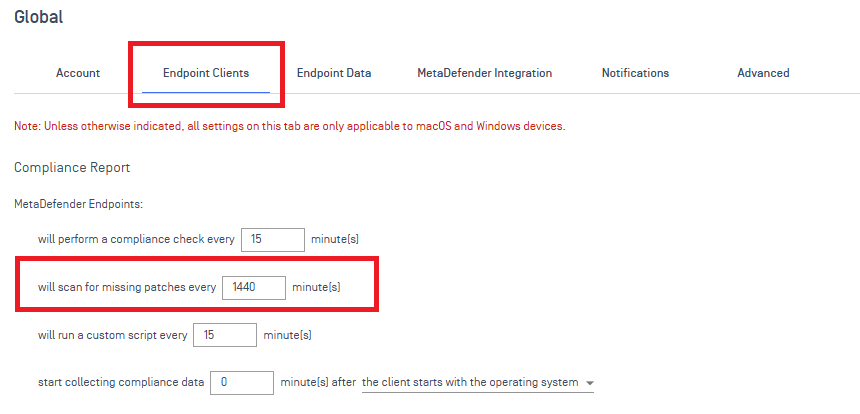
Sync interval between the Cache Node and server is too long
Check the log on the cache node machine: \OPSWAT\Gears\logs\cache_node.log
If the syncIntervalMinutes is too long, the configuration can be changed in Central Management:
Endpoint
How to identify where an endpoint is retrieving patches from
List of IPs of cache nodes received from the management server:
%PROGRAMDATA%\OPSWAT\Gears\features\cache_node\list_cache_node.json
MetaDefender Endpoint will attempt to check for a patch at a cache node using the IP from the list of cache nodes.
If the patch does not exist on the first cache node, it will then check the other cache node (if a secondary cache node is configured).
If the patch does not exist in the secondary cache node, Endpoint will then check the Central Management server. Cache nodes are always prioritized first in attempting to download patches.
At any point a patch is found, Endpoint will remain connected to that source for downloading the patch. Logging will show the specific IP Endpoint is checking and downloading patches from.
Patches not showing as available
Possible Causes
Patch storage synchronization issues
Network or connectivity problems
Investigation Steps
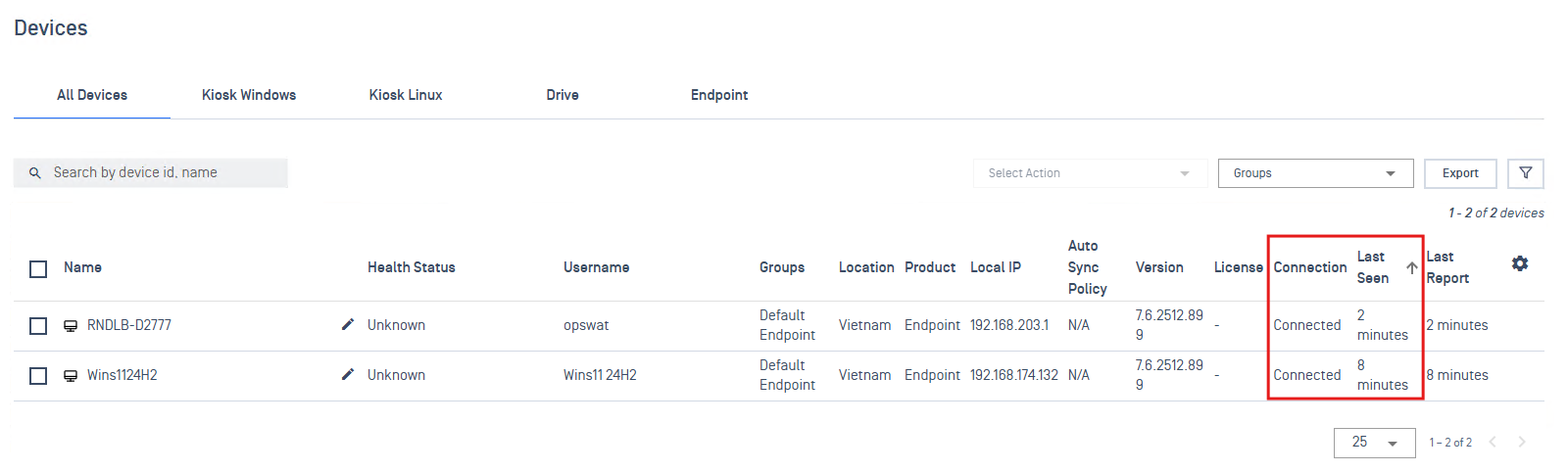
Verify Connection & Last Seen status in Central Management via Inventory > Devices to confirm the device is connecting to the server.
Verify patch packages include the corresponding missing patches reported from the Endpoint:
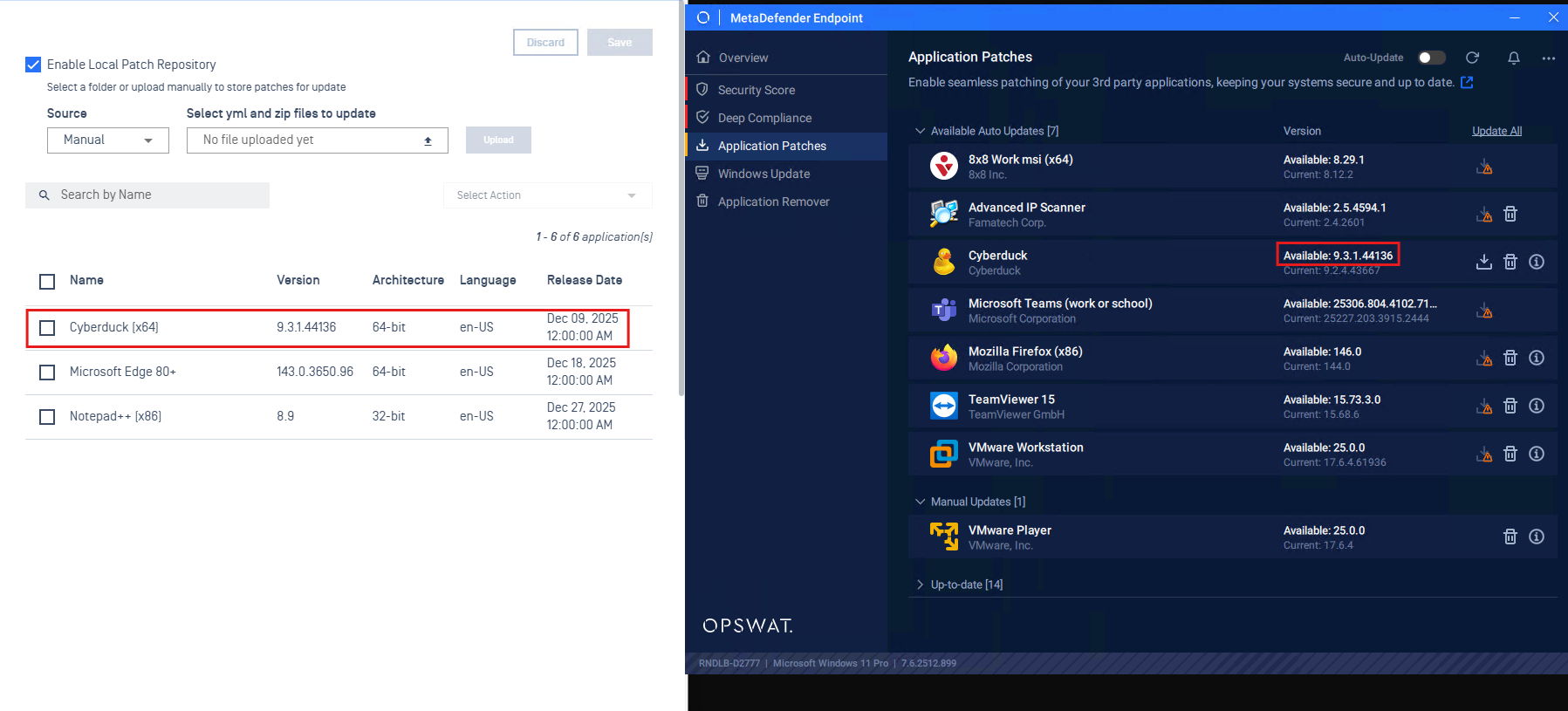
Application Patches: Confirm the patch is uploaded to the Central Management server (Upload Mode). In the Endpoint UI under Application Patches, verify the available version matches the uploaded version to ensure the app version is stored.
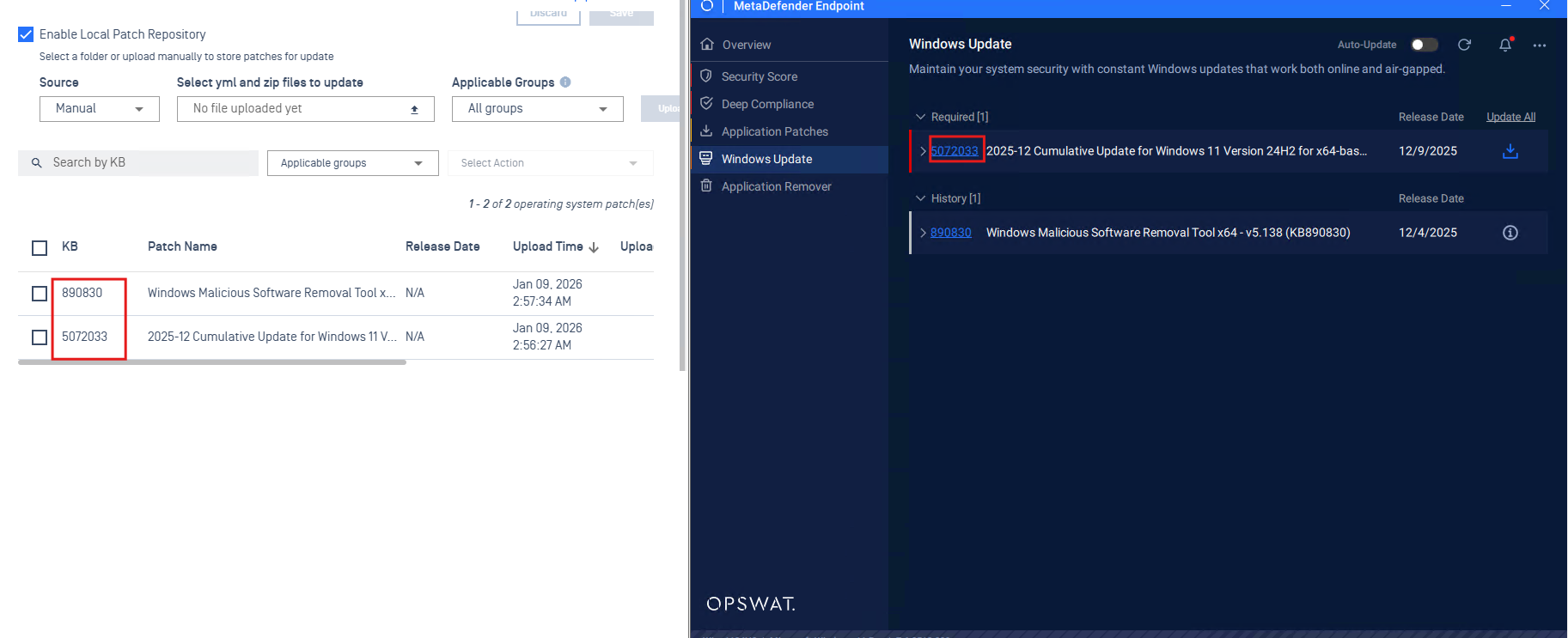
System Patches: Confirm package with corresponding KB ID is uploaded to the server.
Resolution Actions
Press the refresh button on the Endpoint UI or trigger a compliance check from the device's details in Central Management to update the Endpoint rescan patch status
Review logs for details:
Application Patches: Check log
C:\ProgramData\OPSWAT\Gears\logs\product_info.log. Search the product name and find the log “Checked installer existence for signature…” to confirm patch presence.[info] [01-02-26] (11:39:20) +07:00 (52952:55912) [PRODUCT_INFO]: Checked installer existence for signature 312 (Cyberduck): Path 'http://10.40.160.188:9003/gears/files/missing_patch/windows/312/414/9.3.1.44136/64-bit/en-US/Cyberduck-Installer-9.3.1.44136.exe?type=app', exists: trueSystem Patches: Check the log
C:\ProgramData\OPSWAT\Gears\logs\os-updates\service.log. Search the KB ID to find the patch log available in storage to confirm patch presence.Example: Searching kb5072033 in the log shows a head request to the server, returning 200, which means this patch is available in storage.
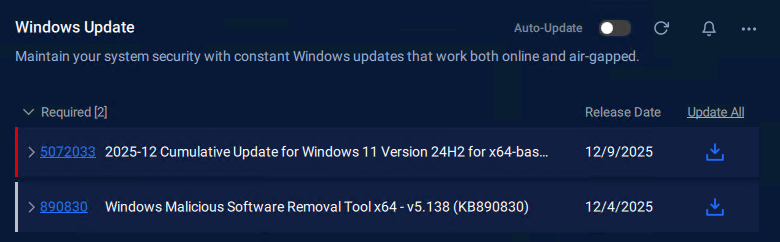
[info] [01-09-26] (09:59:57) +07:00 (1092:8956) [OU_SVC]: OfflinePatchingMode::getPatches - no url existed - remoteFileExists - config.timeout: 180, config.manual: true, patchUrl: http://10.40.160.188:9003/gears/files/missing_patch/windows/1103/9d24a965-8f52-4930-888a-7a54796e3012/windows11.0-kb5072033-x64_a62291f0bad9123842bf15dcdd75d807d2a2c76a.msu?type=os[info] [01-09-26] (09:59:57) +07:00 (1092:8956) [OU_SVC]: Timeouts set - Download: 1800s, Connect: 60s[info] [01-09-26] (09:59:57) +07:00 (1092:8956) [OU_SVC]: Sent HEAD req: http://10.40.160.188:9003/gears/files/missing_patch/windows/1103/9d24a965-8f52-4930-888a-7a54796e3012/windows11.0-kb5072033-x64_a62291f0bad9123842bf15dcdd75d807d2a2c76a.msu?type=os[info] [01-09-26] (09:59:57) +07:00 (1092:8956) [OU_SVC]: Status code: 200Check Endpoint UI to see if the download button is enabled
Patches are not applying
Possible Causes
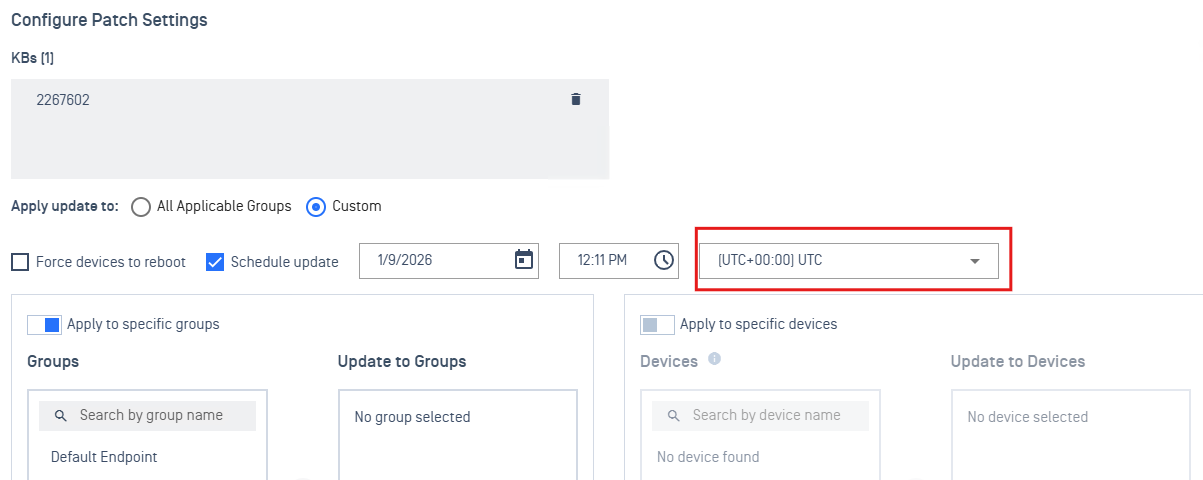
Endpoint time does not match the configured time zone on Central Management
Agent has not received the patch setting config
Agent status: disconnected
Investigation Steps
Review patch deployment logs on Central Management
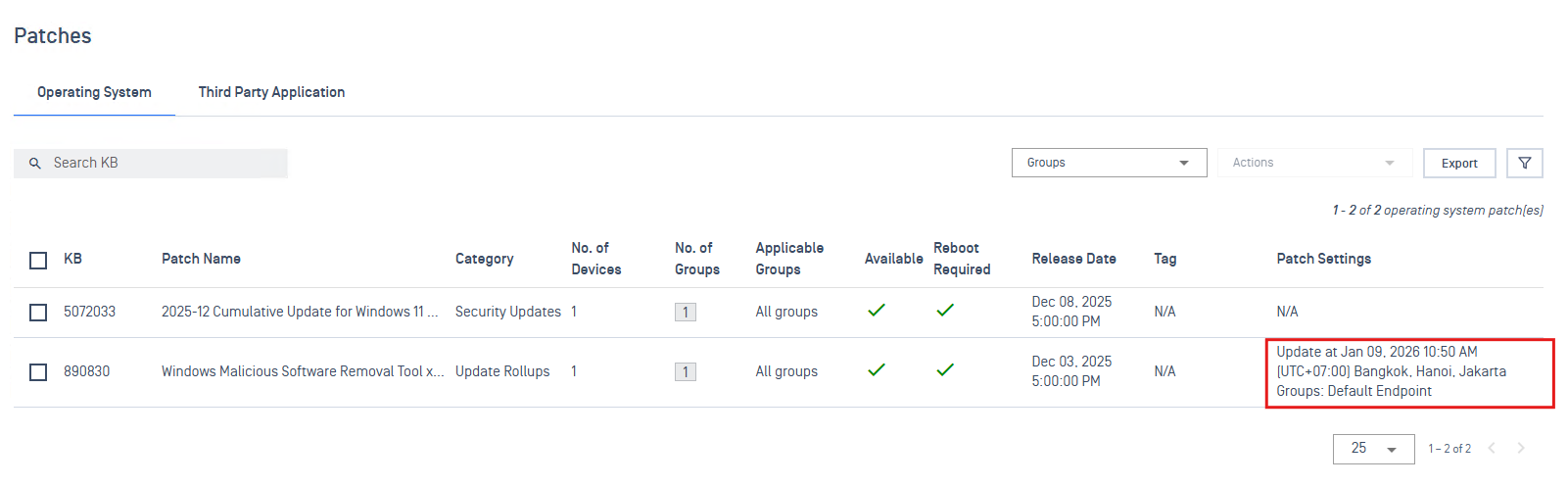
Check patch settings after applying from console
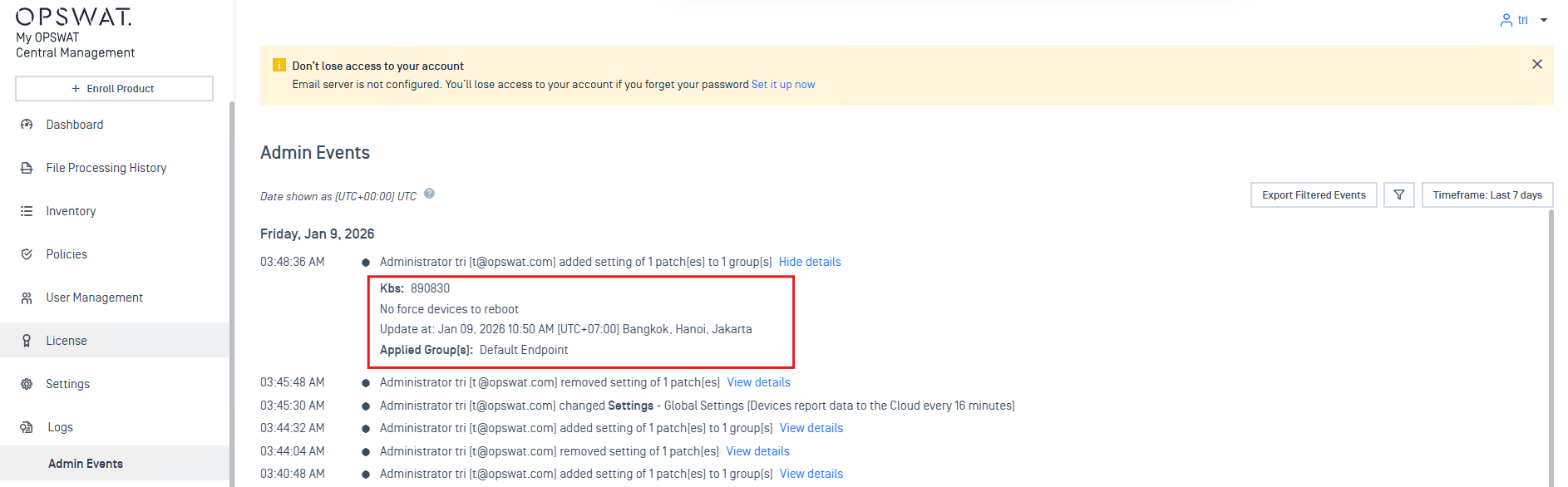
Check admin events to view the patch configuration log from the admin
Review configuration logs from the endpoint.
System Patches:
Open the log at
C:\ProgramData\OPSWAT\Gears\logs\os-updates\ui-mode.logto verify Endpoint receives the correct patch (KBID: 890830, update_time: 1767930600) setting[info] [01-09-26] (10:49:08) +07:00 (1092:7136) [OU_UI]: Scheduled updates config changed: null -> [{"action": "update", "force_reboot": false, "id": "c046df9e-efdd-4234-aa03-4bb6c69c6c51", "kb_id": "890830", "update_time": 1767930600}][info] [01-09-26] (10:49:08) +07:00 (1092:2260) [OU_UI]: Updating scheduled updates configuration[info] [01-09-26] (10:50:00) +07:00 (1092:11964) [OU_UI]: Receive scheduled patching request[info] [01-09-26] (10:50:00) +07:00 (1092:2260) [OU_UI]: Outgoing IPC: update_specific_patches_signal:[info] [01-09-26] (10:50:00) +07:00 (1092:2260) [OU_UI]: - Scheduled patch: KB890830 (c046df9e-efdd-4234-aa03-4bb6c69c6c51)Verify Endpoint can download the patch installer successfully at:
C:\ProgramData\OPSWAT\Gears\logs\os-updates\service.log[info] [01-09-26] (10:50:01) +07:00 (1092:9100) [OU_SVC]: Download successful: http://10.40.160.188:9003/gears/files/missing_patch/windows/1103/c046df9e-efdd-4234-aa03-4bb6c69c6c51/windows-kb890830-x64-v5.138_dc0e0b97d146a92303d881bf9e2912299cbbbac5.exe?type=os[info] [01-09-26] (10:50:01) +07:00 (1092:9100) [OU_SVC]: Patch downloaded successfully: Analog ID c046df9e-efdd-4234-aa03-4bb6c69c6c51 (KB890830) from http://10.40.160.188:9003/gears/files/missing_patch/windows/1103/c046df9e-efdd-4234-aa03-4bb6c69c6c51/windows-kb890830-x64-v5.138_dc0e0b97d146a92303d881bf9e2912299cbbbac5.exe?type=os[info] [01-09-26] (10:50:01) +07:00 (1092:9100) [OU_SVC]: Install missing patches from file: C:\ProgramData\OPSWAT\Gears\features\os-updates\patches\c046df9e-efdd-4234-aa03-4bb6c69c6c51\windows-kb890830-x64-v5.138_dc0e0b97d146a92303d881bf9e2912299cbbbac5.exeVerify Endpoint UI shows patch update progress matching the configured time
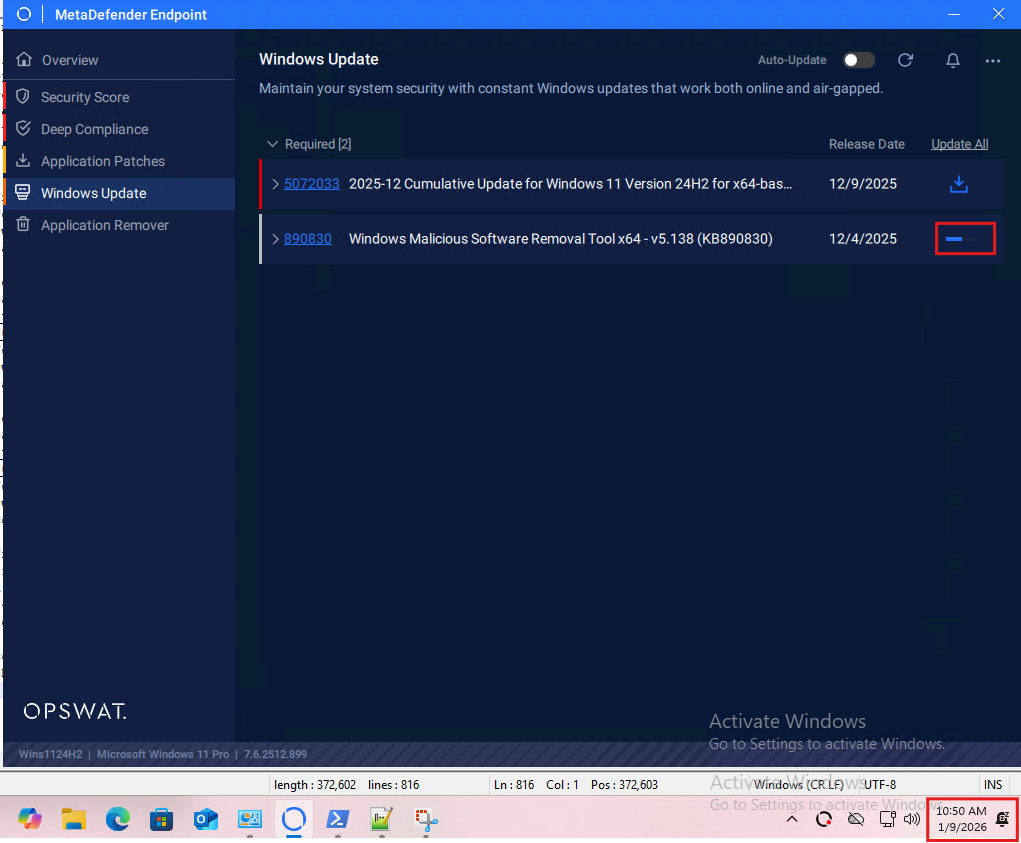
Application Patches:
Open the log at
C:\ProgramData\OPSWAT\Gears\logs\app-management.logand verify that Endpoint receives the correct update setting, for example, updating Notepad++ to version 8.9[info] [01-09-26] (12:22:34) +07:00 (1092:7136) [APP_MANAGEMENT]: App patch settings changed: null -> [{"action": "update", "architecture": "64-bit", "force_close": false, "language": "en-US", "signature": 3241, "target_version": "8.9"}][info] [01-09-26] (12:22:34) +07:00 (1092:7136) [APP_MANAGEMENT]: Cleared all scheduled tasks[info] [01-09-26] (12:22:34) +07:00 (1092:7136) [APP_MANAGEMENT]: All products detected, scheduling app update[info] [01-09-26] (12:22:34) +07:00 (1092:7136) [APP_MANAGEMENT]: Scheduling update for app [signature: 3241, force_close: false, target_version: 8.9, update_time: 01/09/2026 12:22 PM (UTC +07:00)]Verify Endpoint downloads successfully using the app installer with the configured version
[info] [01-09-26] (12:22:34) +07:00 (1092:7136) [APP_MANAGEMENT]: App patch settings changed: null -> [{"action": "update", "architecture": "64-bit", "force_close": false, "language": "en-US", "signature": 3241, "target_version": "8.9"}][info] [01-09-26] (12:22:34) +07:00 (1092:7136) [APP_MANAGEMENT]: Cleared all scheduled tasks[info] [01-09-26] (12:22:34) +07:00 (1092:7136) [APP_MANAGEMENT]: All products detected, scheduling app update[info] [01-09-26] (12:22:34) +07:00 (1092:7136) [APP_MANAGEMENT]: Scheduling update for app [signature: 3241, force_close: false, target_version: 8.9, update_time: 01/09/2026 12:22 PM (UTC +07:00)]Verify that Endpoint installs the app successfully. If the app runs during installation, Endpoint displays the error log
WA_VMOD_ERROR_CANNOT_TERMINATE_PRODUCTand notifies the user to force close the app to continue the update[info] [01-09-26] (12:22:44) +07:00 (1092:5452) [APP_MANAGEMENT]: Installing: C:\ProgramData\OPSWAT\Gears\features\app-management\patching\3241\npp.8.9.Installer.x64.exe[info] [01-09-26] (12:22:46) +07:00 (1092:5452) [APP_MANAGEMENT]: Input: {"input": {"architecture": "64-bit", "force_close": 0, "language": "en-US", "log_dir": "C:\\ProgramData\\OPSWAT\\Gears\\logs\\patching", "method": 50301, "path": "C:\\ProgramData\\OPSWAT\\Gears\\features\\app-management\\patching\\3241\\npp.8.9.Installer.x64.exe", "signature": 3241, "skip_signature_check": 1}}[info] [01-09-26] (12:22:46) +07:00 (1092:5452) [APP_MANAGEMENT]: Output: {"error": {"code": -1030, "define": "WA_VMOD_ERROR_CANNOT_TERMINATE_PRODUCT", "description": "Cannot close all blocking processes.", "errors": [{"code": -1030, "message": "ba1bff28135e27272095b82f507057f8379cc50dee111b3afd66ed8cac724272c77c112b51cba7e2ced87e49754f2bdd", "returned_at": "ac463cd156619205e2d5cf13fa71a30031ec7a8c383e03b4ad8dc298bbeda1b8123b19a507e32f6b59a9fdd0198096c4118da2212e2671df4802abcabbd4aaa6"}, {"code": -1030, "message": "e15f794a93c8d938a8c07398a7c93c56dcfc0ec80eaf93a78f42c4e278c74d50b0c611d5c81c0a65f4df7ace9783047c9b3a396f3527185d54c79da02ba22e3c", "returned_at": "c4d95d15863d5aaad02bbb34d476a77f8ac29fca0b044841b5f3a9902b3ee0444bb549113370c6ef3d5d9c5ff52f8fca4703efa458f3d851ff6909ed59b049c3"}, {"code": -1030, "native": "7c51e61c19efde7ff94a10377eb31406f1f88fcac02436ca54a8b7b076e2b56c", "returned_at": "e909a22f7a752e1c37964b169dfd45913c8f0164b270acc06c079ad921221157fb4260aa47ed628c1fa8221065a279ad816dd93ab95cf1ee54bef86254888f02"}, {"code": -1030, "message": "9b876da4ac762cd33df8c15de86a896c75ee201c3e33437e7c076e6c771fc22618ef6009068555bd0c8a7567490ee74bd627b8fd807b42fe53174f49db0a716c", "returned_at": "9923143377c0413ce50923f105c0a428224fbe942bbb45f96da359112d8fefcb0a44b09b323b9b9a6b890fe7374c608a8f4f60540393618fe8b837ffb64ef918"}, {"code": -1030, "returned_at": "bcf4cbad93858ccd672a4f94c513abed58fff6dabdbae53b75dd9d9ea32aaee783293f905ae36e8d84cf0497dd46a68f6dcd392c8fb955dbf738403a4c189aa6"}, {"code": -1030, "returned_at": "245ff92637a9c84c719d89289cb7a44ab954ed52ecce61b64db2a8364499f692b1be103b68844779cc7fc660fe48af2cb95aaa9b2fc579bb4e698554d84f0863"}], "log_paths": [], "method": 50301, "signature": 3241, "timestamp": "1767936164", "timing": 2406}}[info] [01-09-26] (12:22:46) +07:00 (1092:5452) [APP_MANAGEMENT]: Timing: 2s[info] [01-09-26] (12:22:46) +07:00 (1092:5452) [APP_MANAGEMENT]: Detecting product info for signature 3241 (Notepad++)...[info] [01-09-26] (12:22:47) +07:00 (1092:5452) [APP_MANAGEMENT]: Product info for signature 3241 (Notepad++) is updated![info] [01-09-26] (12:22:57) +07:00 (1092:3676) [APP_MANAGEMENT]: Force close confirmation by user: true - (clicked by user), admin: false[info] [01-09-26] (12:23:00) +07:00 (1092:5252) [APP_MANAGEMENT]: Installing: C:\ProgramData\OPSWAT\Gears\features\app-management\patching\3241\npp.8.9.Installer.x64.exe[info] [01-09-26] (12:23:20) +07:00 (1092:5252) [APP_MANAGEMENT]: Input: {"input": {"architecture": "64-bit", "force_close": 1, "language": "en-US", "log_dir": "C:\\ProgramData\\OPSWAT\\Gears\\logs\\patching", "method": 50301, "path": "C:\\ProgramData\\OPSWAT\\Gears\\features\\app-management\\patching\\3241\\npp.8.9.Installer.x64.exe", "signature": 3241, "skip_signature_check": 1}}[info] [01-09-26] (12:23:20) +07:00 (1092:5252) [APP_MANAGEMENT]: Output: {"result": {"architecture": "64-bit", "blocking_processes": ["C:\\Program Files\\Notepad++\\notepad++.exe"], "code": 0, "language": "en", "log_paths": [], "method": 50301, "patch_id": 136, "require_close_first": 1, "require_restart": 0, "require_uninstall_first": 0, "signature": 3241, "timestamp": "1767936180", "timing": 20093, "version": "8.9"}}[info] [01-09-26] (12:23:20) +07:00 (1092:5252) [APP_MANAGEMENT]: Timing: 20s[info] [01-09-26] (12:23:20) +07:00 (1092:5252) [APP_MANAGEMENT]: Installation successful Notepad++ with new version: 8.9
Check endpoint status to ensure Endpoint is connecting to server
Confirm the configured time zone matches the endpoint device
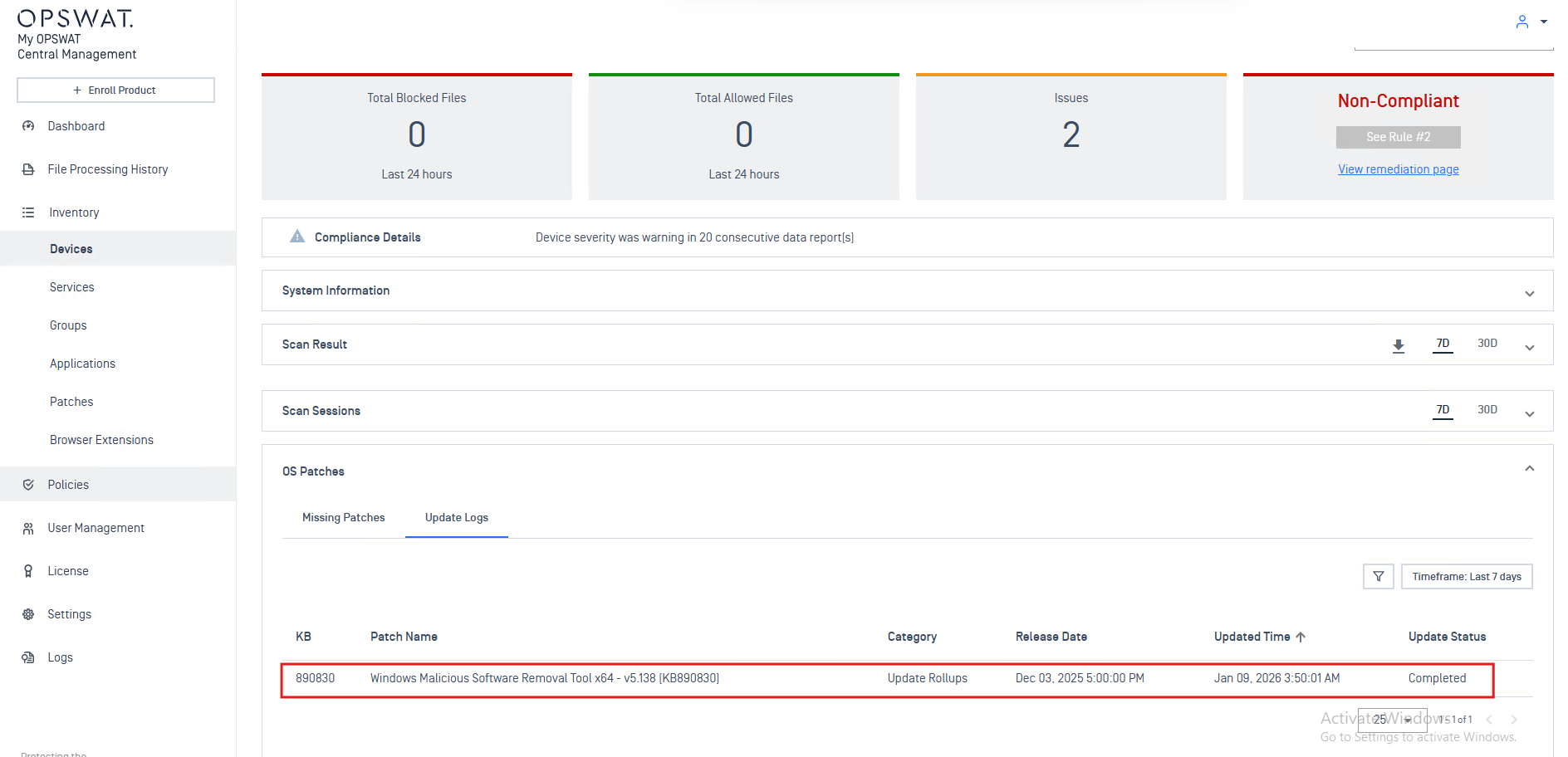
How to confirm patches are applied?
Review endpoint patch status in Device details
Check the Update Logs tab in the OS Patches section for patch update results.
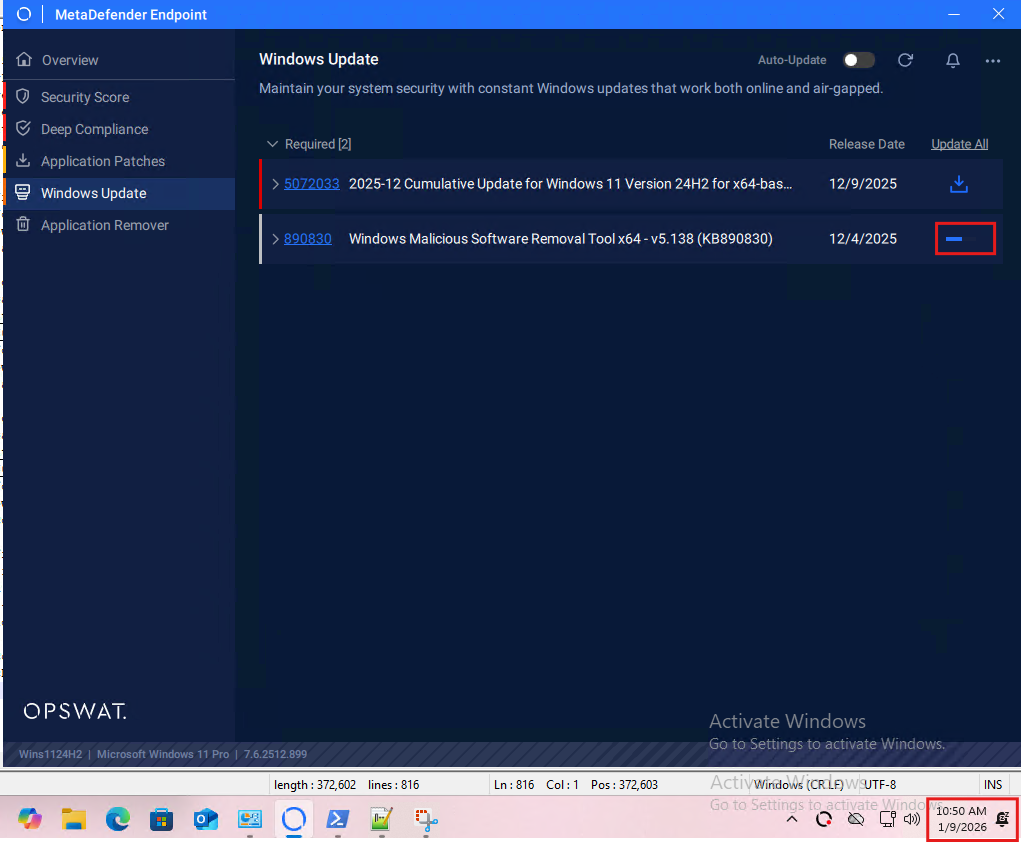
Check patch history/logs on the endpoint
If the Endpoint UI is enabled, check the progress bar to see if the patch is updating
Check the history section or notification to confirm the patch updated successfully
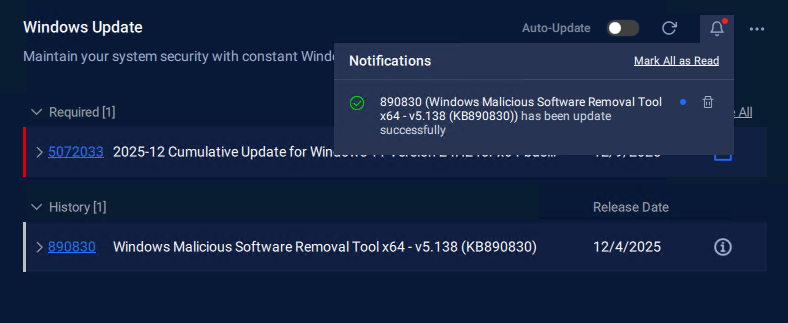
Review the Endpoint log to check patch update status:
C:\ProgramData\OPSWAT\Gears\logs\os-updates\service.log. Find the install log and output after installation. If successful, the log shows result code: 0 and saves to history[info] [01-09-26] (10:50:01) +07:00 (1092:9100) [OU_SVC]: Install missing patches from file: C:\ProgramData\OPSWAT\Gears\features\os-updates\patches\c046df9e-efdd-4234-aa03-4bb6c69c6c51\windows-kb890830-x64-v5.138_dc0e0b97d146a92303d881bf9e2912299cbbbac5.exe[info] [01-09-26] (10:51:52) +07:00 (1092:9100) [OU_SVC]: Input: {"input": {"force_close": 0, "method": 50301, "path": "C:\\ProgramData\\OPSWAT\\Gears\\features\\os-updates\\patches\\c046df9e-efdd-4234-aa03-4bb6c69c6c51\\windows-kb890830-x64-v5.138_dc0e0b97d146a92303d881bf9e2912299cbbbac5.exe", "signature": 1103}}[info] [01-09-26] (10:51:52) +07:00 (1092:9100) [OU_SVC]: Output: {"result": {"architecture": "64-bit", "blocking_processes": [], "code": 0, "language": "", "log_paths": ["C:\\WINDOWS\\Temp\\CBS_1767930711.log", "C:\\WINDOWS\\Temp\\dism_1767930712.log"], "method": 50301, "require_close_first": 0, "require_restart": 0, "require_uninstall_first": 0, "signature": 1103, "timestamp": "1767930601", "timing": 111625, "version": "10.0.26100"}}[info] [01-09-26] (10:51:52) +07:00 (1092:9100) [OU_SVC]: Timing: 111s[info] [01-09-26] (10:51:52) +07:00 (1092:9100) [OU_SVC]: History: {"c046df9e-efdd-4234-aa03-4bb6c69c6c51": {"category": "update_rollup", "cves": [], "date": "1764781200", "description": "After the download, this tool runs one time to check your computer for infection by specific, prevalent malicious software (including Blaster, Sasser, and Mydoom) and helps remove any infection that is found. If an infection is found, the tool will display a status report the next time that you start your computer. A new version of the tool will be offered every month. If you want to manually run the tool on your computer, you can download a copy from the Microsoft Download Center, or you can run an online version from microsoft.com. This tool is not a replacement for an antivirus product. To help protect your computer, you should use an antivirus product.", "duration": 112, "filename": "windows-kb890830-x64-v5.138_dc0e0b97d146a92303d881bf9e2912299cbbbac5.exe", "highest_severity": "", "id": "c046df9e-efdd-4234-aa03-4bb6c69c6c51", "is_allow_patch": 1, "is_available": 1, "kb_id": "890830", "optional": false, "password": null, "percentProgress": 0, "product": "Windows Update Rollups", "progress": 0, "reboot_required": false, "section": 3, "severity": "unknown", "size": null, "state": "installed", "timestamp": "1767930601", "title": "Windows Malicious Software Removal Tool x64 - v5.138 (KB890830)", "total_cves": 0, "vendor": "Microsoft", "version": ""}}[info] [01-09-26] (10:51:52) +07:00 (1092:9100) [OU_SVC]: Saved data to the cache file patches_history.json: {"c046df9e-efdd-4234-aa03-4bb6c69c6c51": {"category": "update_rollup", "cves": [], "date": "1764781200", "description": "After the download, this tool runs one time to check your computer for infection by specific, prevalent malicious software (including Blaster, Sasser, and Mydoom) and helps remove any infection that is found. If an infection is found, the tool will display a status report the next time that you start your computer. A new version of the tool will be offered every month. If you want to manually run the tool on your computer, you can download a copy from the Microsoft Download Center, or you can run an online version from microsoft.com. This tool is not a replacement for an antivirus product. To help protect your computer, you should use an antivirus product.", "duration": 112, "filename": "windows-kb890830-x64-v5.138_dc0e0b97d146a92303d881bf9e2912299cbbbac5.exe", "highest_severity": "", "id": "c046df9e-efdd-4234-aa03-4bb6c69c6c51", "is_allow_patch": 1, "is_available": 1, "kb_id": "890830", "optional": false, "password": null, "percentProgress": 0, "product": "Windows Update Rollups", "progress": 0, "reboot_required": false, "section": 3, "severity": "unknown", "size": null, "state": "installed", "timestamp": "1767930601", "title": "Windows Malicious Software Removal Tool x64 - v5.138 (KB890830)", "total_cves": 0, "vendor": "Microsoft", "version": ""}}
Endpoint is not communicating with Central Management
Investigation Steps
Check network connectivity, including firewall and VPN. Verify connection status on Inventory > Devices
Review the endpoint service status to ensure the Endpoint Service runs on the Windows Services Manager
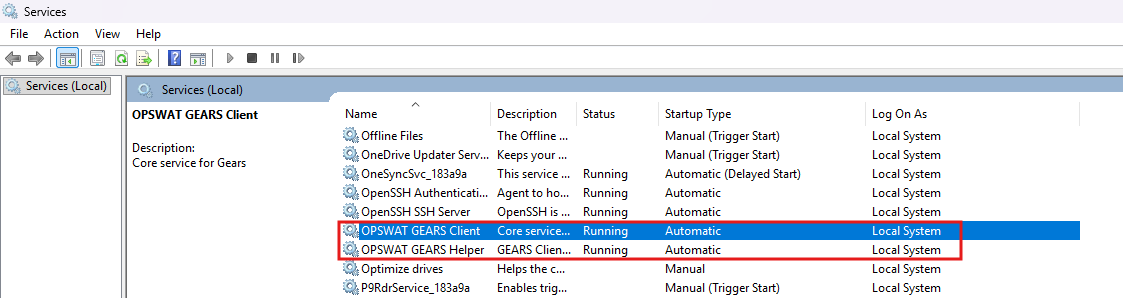
Check logs for communication errors: Open
C:\ProgramData\OPSWAT\Gears\logs\GEARS-Agent.logand look for health check messages to the server like thisIndicates Endpoint is connecting to the server
[info] [01-02-26] (12:39:36) GMT+07 (17192:24808) [ImHere]: .Indicates Endpoint cannot reach the server
[info] [01-02-26] (12:39:36) GMT+07 (17192:24808) [ImHere]: ,
Restoration Actions
Restart the Endpoint service if it has stopped
Ping the Central Management server to ensure the endpoint can communicate with it
escalate to network or infrastructure team if needed
Check if the Endpoint license is activated and the maximum number of managed devices has not been exceeded