
This article applies to the current MetaDefender IT-OT Access Console and API, and all MetaDefender Endpoint releases deployed on Windows, macOS and Linux systems.
Users running MetaDefender Endpoint on one or more Windows, macOS or Linux devices may occasionally see MetaDefender IT-OT Access device compliance warnings/flags related to their various associated Firewall products, although this depends entirely on policy configuration.
These warnings/flags are triggered by device issues and will appear under MetaDefender IT-OT Access Console>Inventory>Devices>Relevant Device>Detailed Device Information>Deep Compliance>Firewall.
MetaDefender IT-OT Access Compliance Warning: Firewall Is Disabled
Turn on the firewall of your preferred firewall product, following the relevant vendor guidelines.
Popular guidelines can be found:
Open MetaDefender Endpoint.
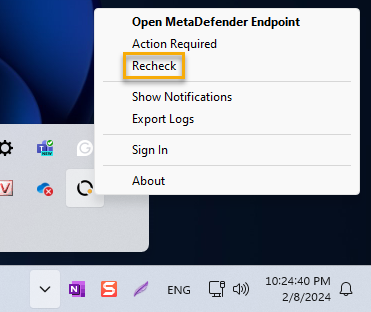
Once the app is running, click/right-click on the Client tray Icon and, from the pop-up menu, click Recheck.
This will trigger the MetaDefender Endpoint to scan all device compliance data and report to the MetaDefender IT-OT Access servers again.
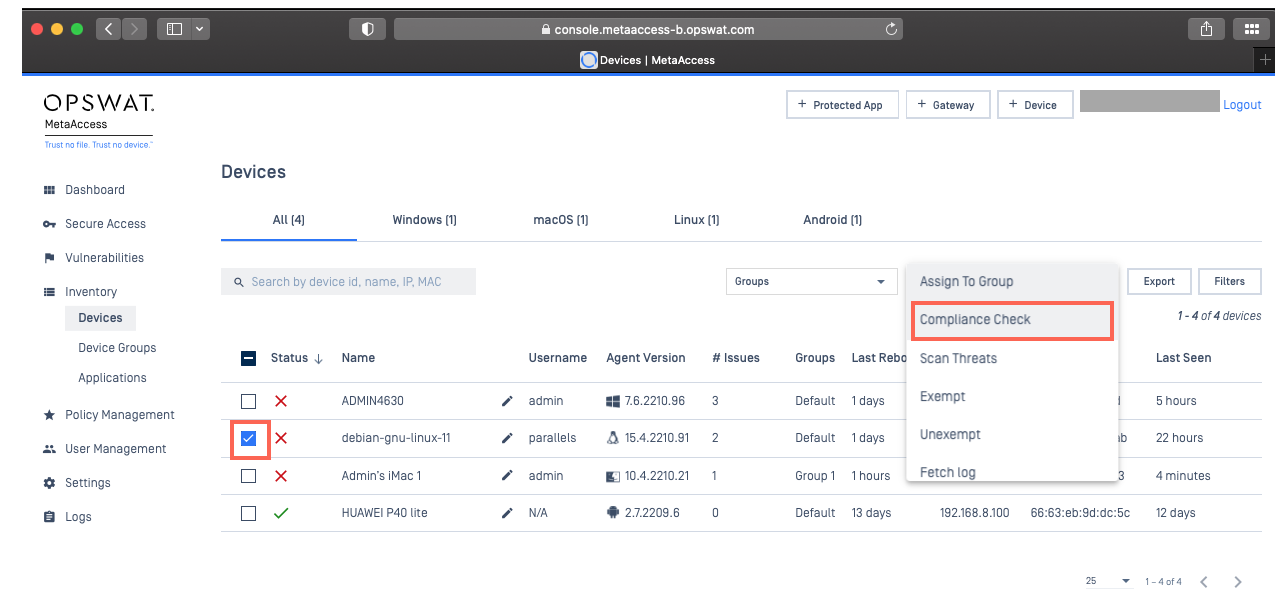
To complete Step 3 on Linux devices, please navigate to MetaDefender IT-OT Access Console>Inventory>Devices, select the box alongside the device for which you’d like to run the action and then, from the Actions drop-down menu in the top right-hand corner of the screen, select Compliance Check, as illustrated below.
Check under MetaDefender IT-OT Access Console>Inventory>Devices>Relevant Device>Detailed Device Information>Deep Compliance>Firewall again.
If you have switched on your firewall but the problem persists, please follow the instructions below to contact OPSWAT Support, providing screenshots to show your Firewall’s enabled status, as well as MetaDefender Endpoint version details for the device/s reporting the error.
If you have followed the instructions above, and or the relevant linked guidelines, but Continue To Experience Firewall Issues On Your MetaDefender Endpoint / MetaDefender IT-OT Access Devices, please open a Support Case with the OPSWAT team via phone, online chat or form, or feel free to ask the community on our OPSWAT Expert Forum.