
This page explains how the throughput of MetaDefender® Email Gateway Security changes as the number of protected users grows, why processing slows down under heavy load, and which deployment and configuration choices keep performance predictable at scale.
The figures on this page are planning guidelines, not performance guarantees. Actual throughput depends on your email mix, the MetaDefender Core™ configuration and hardware behind Email Gateway Security, and your database deployment. OPSWAT recommends validating any sizing decision with a benchmark on your own traffic.
Baseline traffic assumptions
By default, an Email Gateway Security license covers up to 4,000 protected users (see User based licensing). The table below shows what that means in email volume, using commonly cited industry planning figures.
Assumption | Planning value | Source |
|---|---|---|
Emails sent and received per business user per day | 120–130 | Radicati Group, Email Statistics Reports |
Average email size (attachments amortized in) | ~75 KB | Microsoft Exchange sizing guidance |
Share of emails carrying at least one attachment | ~20–25% | Industry planning figure |
Attachments per attachment-bearing email | ~1.5–2 | Industry planning figure |
Peak-hour traffic vs. 24-hour average | 2–4× | Email traffic is concentrated in business hours, with mid-morning peaks |
For a fully utilized 4,000-user license this yields:
Derived load figure | Value |
|---|---|
Emails per day | ~520,000 |
Average rate over 24 hours | ~21,700/hour (~6/second) |
Sustained business-hour rate | ~40,000–50,000/hour (~11–14/second) |
Peak-hour rate | ~65,000–87,000/hour (~18–24/second) |
Email data volume per day | ~39 GB |
One email is more than one scan object. Depending on policy, Email Gateway Security submits the header, the body parts, and each attachment to MetaDefender Core separately (or the whole email as a single object). With the attachment ratios above, plan for roughly 2.5–3.5 scan objects per email before caching — at peak, that is on the order of 50–80 object scans per second arriving at the MetaDefender Core layer.
How an email moves through the pipeline
Understanding where time is spent requires a short look at the processing pipeline. Every email passes through six stages:
SMTP (Simple Mail Transfer Protocol) reception. The built-in SMTP service (inserted between the email gateway and the mail server) accepts the message and performs recipient verification against the license and configuration
Queueing. The full message is persisted to the Email Gateway Security database and enters the processing queue in
PendingstatusDispatch. A dispatcher moves queued emails into
Processingstatus, up to a configurable concurrency ceiling (processing_threshold, default 75 concurrent emails per instance — see Registry configuration)Scanning. For each email part, Email Gateway Security first performs a hash lookup (configured per policy rule) — parts already known from a previous scan are not sent again. Unknown parts are submitted to MetaDefender Core, where they queue for the configured scan pipeline (multiscanning, Deep CDR™, Proactive DLP™, sandbox, and so on, depending on workflow)
Verdict and action. Based on the scan results and the matching policy rule, the email is delivered, modified (for example, sanitized attachments), quarantined, or blocked
Finalization. History, event log, and statistics records are written to the database, and temporary working data is cleaned up
Three shared resources carry this pipeline, and each one can become the limiting factor:
Resource | What it does per email | Typical limiting factor |
|---|---|---|
MetaDefender Core instance(s) | Scans every non-cached object | Scan throughput (engine count, CPU, Deep CDR workload) |
PostgreSQL database | Stores message content, queue state, status transitions, history, statistics | Write throughput, connection count, shared usage with MetaDefender Core |
Email Gateway Security host | Parsing, policy evaluation, SMTP delivery, orchestration | CPU and disk, concurrency ceiling |
Which resource saturates first depends on the configuration. A benchmark-class MetaDefender Core instance sustains hundreds of thousands of scanned objects per hour with standard multiscanning workflows — at that rate, the gateway's own concurrency ceiling and the database become the relevant limits. The picture inverts when the workflow includes the embedded Adaptive Sandbox (roughly a 10× throughput reduction at the scanning layer), when MetaDefender Core runs on small hardware, or when the two products share one PostgreSQL instance under load.
How throughput changes as the user count grows
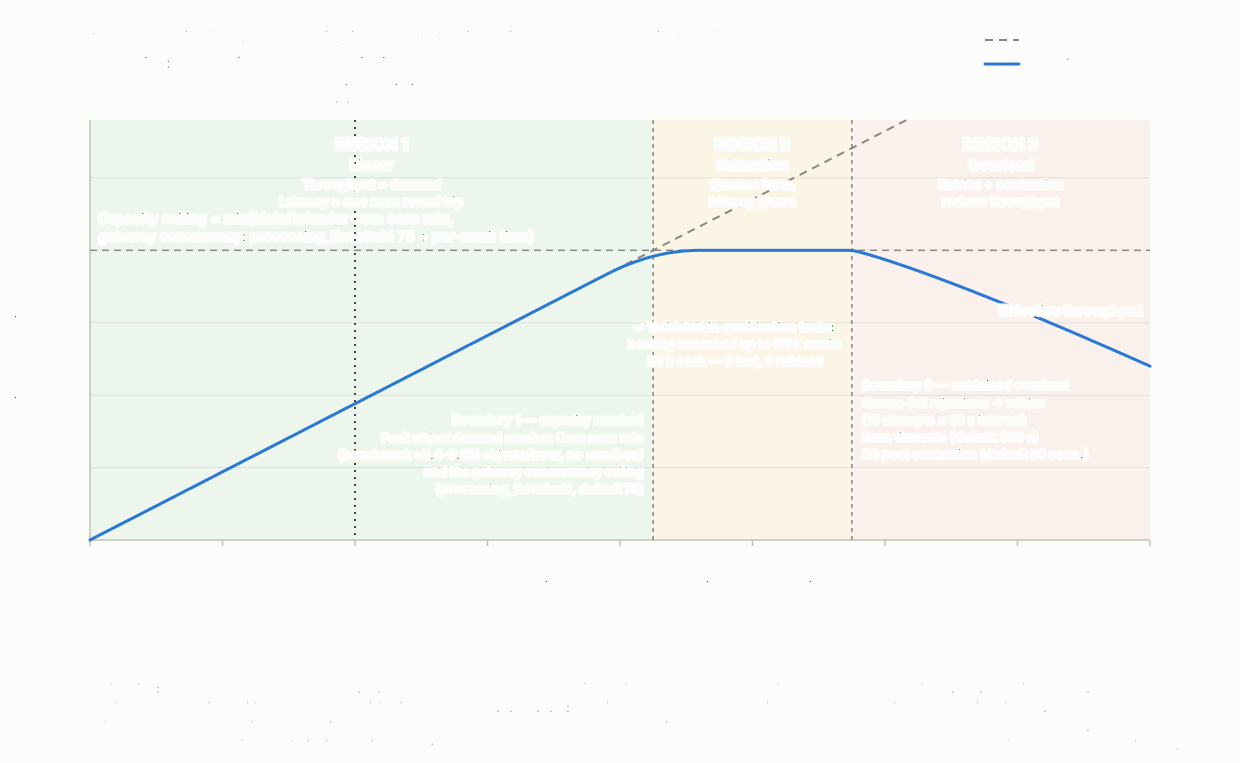
Every protected user adds a fixed slice of demand — roughly 130 emails per day, arriving mostly in business hours as about 2.5–3.5 scan objects per email. Offered load therefore grows linearly with the number of users. Delivered throughput, however, does not: like any queue-based system, Email Gateway Security moves through three distinct regions as the user count grows past what the scanning layer behind it can absorb.
Region 1 — Linear operation
While the peak scan demand of the user base stays below the scan capacity of the MetaDefender Core layer, throughput equals demand: every additional user adds their emails to the delivered volume, one for one. Emails are dispatched almost immediately, the Pending queue stays near zero, and end-to-end latency is dominated by a single scan round trip (typically seconds).
Region 2 — Saturation
Boundary 1 is crossed when the peak object rate of the user base reaches the capacity of the slowest stage — the scan rate of the MetaDefender Core layer (determined by its engine package and hardware, see the benchmark reports) or the gateway's concurrency ceiling (processing_threshold, default 75 concurrent emails). From this user count onward, queues form — first in the MetaDefender Core scan queue (bounded by max_queue_per_agent, default 500 objects), then in the Email Gateway Security Pending queue. Throughput levels off at the capacity of the slowest stage and stops following the user count. Latency now grows with queue depth rather than scan time: an email may be scanned in 10 seconds but wait minutes in the queue first. This is standard queueing behavior — as utilization approaches 100%, waiting time grows steeply and small traffic bursts cause disproportionately long delays.
Mail flow remains safe in this region: messages are persisted on arrival and processed in priority order, so a temporary peak resolves itself once traffic falls back below capacity. What suffers is delivery delay, not delivery. This is not just a design intent — release qualification load tests drive the system deep into this region for hours to days and consistently show zero lost, refused, or failed emails (see the measured results below).
Region 3 — Overload
Boundary 2 is crossed when the added users keep the scan queue persistently full. Queue-full rejections now trigger retry cycles per the policy rule's error handling (default: 10 attempts at 30-second intervals), scans start hitting their timeout (default 300 seconds), and database contention rises — second-order effects that reduce effective throughput below the Region 2 plateau. This is the region where adding users genuinely decreases performance, for the reasons detailed in the next section.
Region | Trigger (user count) | Queue depth | Latency | Effective throughput |
|---|---|---|---|---|
1 — Linear | Peak demand below scan capacity | Near zero | One scan round trip | Grows linearly with users |
2 — Saturation | Peak demand reaches scan capacity (Boundary 1) | Growing | Queue wait dominates | Constant (= capacity) |
3 — Overload | Scan queue persistently full (Boundary 2) | Large, persistent | Minutes to hours | Declining as users grow |
Worked example — where the boundaries fall
One user contributes ~49 scan objects/hour at peak (130 emails/day × 3 peak factor ÷ 24 hours × ~3 objects per email). The official MetaDefender Core 5.20.0 benchmark reports (32 vCPU server, ~1.5 MB average file size) give the scan-side capacity:
Benchmark configuration | Throughput (objects/hour) | Users supported at peak |
|---|---|---|
Single technology (e.g. file-based vulnerability assessment) | Up to ~2,000,000 | Not a realistic standalone workflow — upper bound |
Metascan 8 + Deep CDR + Proactive DLP (Windows) | ~542,000 | ~11,000 |
Metascan 5/10 + Deep CDR + Proactive DLP + Vulnerability (Linux) | ~360,000–406,000 | ~7,300–8,300 |
Any package + embedded Adaptive Sandbox | ~30,000–53,000 | ~600–1,100 |
On the gateway side, the concurrency ceiling (processing_threshold, default 75 concurrent emails) combined with a per-email pipeline time of a few seconds puts a single Email Gateway Security instance in the same range — on the order of 8,000–10,000 users at peak.
The practical conclusions: a single Email Gateway Security instance with one benchmark-class MetaDefender Core instance and no sandbox in the workflow handles roughly 8,000–10,000 users, so a fully utilized default license of 4,000 users runs in Region 1 with about 2× headroom. Hash-lookup caching adds further margin. The boundaries move left — and horizontal MetaDefender Core scaling becomes the primary lever — when the workflow includes the embedded Adaptive Sandbox (÷10 scan capacity: ~600–1,100 users per instance), when MetaDefender Core hardware is smaller than the benchmark class, or when the traffic mix is attachment-heavy.
Measured behavior under sustained overload — release qualification tests
Every Email Gateway Security release is qualified with long-duration load tests in which the scanning layer is deliberately constrained (scan queue capped at 20 objects, parallel scan count 5, 8 antivirus engines + Deep CDR + Proactive DLP on all file types) so that offered load exceeds scan capacity by design. These runs validate exactly the Region 2 and Region 3 behavior described above — what happens when demand outruns capacity for hours or days:
Qualification run | Setup (16 CPU cores, 32 GB RAM) | Load profile | Outcome |
|---|---|---|---|
Version 6.4.0, 8-hour run | Two-instance high-availability pair + MetaDefender Core 5.19.0 | 453,959 emails sent (~57,000/hour — roughly 2× the configured scan capacity) | ~31,000 emails/hour processed at plateau; backlog peaked at 33,917 emails; 0 failed, 0 refused, 0 sending errors |
Version 6.4.1, 8-hour run | Two-instance high-availability pair + MetaDefender Core 5.20.0 | 93,947 emails sent (~12,000/hour) | All 93,947 emails processed; backlog peaked at 12,100; 0 failed, 0 refused, 0 sending errors |
Version 6.4.2, 88-hour soak | Single instance + MetaDefender Core 5.21.0 | 651,435 emails sent well above the constrained scan capacity | All 651,435 emails processed by end of run; backlog peaked at 517,334 emails and drained fully; 0 failed, 0 refused, 0 sending errors |
Two conclusions matter for sizing. First, the throughput plateau behaves exactly as the region model predicts: when offered load ran at ~2× capacity (version 6.4.0 run), delivered throughput held at the capacity ceiling while the queue absorbed the difference. Second — and most relevant for operational confidence — even with more than half a million emails in the backlog, no email was lost, refused, or failed; the queue drained completely once load subsided, with stable memory, CPU, and disk usage throughout. Deep in Region 2 and 3, the cost of overload is delivery delay, never delivery.
Note that these qualification runs measure overload behavior, not maximum throughput — the scan queue and parallel count are set far below their defaults (500 and 20) to force saturation. Production capacity with default settings and a benchmark-class MetaDefender Core is bounded by the figures in the previous section.
Why throughput decreases as users keep growing
Retry amplification at the MetaDefender Core layer
MetaDefender Core protects itself with a bounded scan queue (max_queue_per_agent, default 500 objects). When the queue is full, new submissions are rejected until space becomes available. Email Gateway Security handles this according to the policy rule (default: Retry): the email is rescheduled and submitted again later, up to 10 attempts at a fixed interval (default 30 seconds).
Under moderate bursts this is exactly the right behavior. Under sustained overload, however, every rejected email is re-queued, re-dispatched, and re-submitted — consuming dispatcher capacity, database writes, and processing slots without producing a finished email. The same applies to scan timeouts (default 300 seconds per scan): a MetaDefender Core instance that is slow because it is overloaded causes timeouts, and each timeout triggers a retry that adds further load. This feedback loop is the single largest contributor to the throughput decline in Region 3.
Concurrency ceiling and long scan times
Email Gateway Security limits concurrent in-flight emails per instance (processing_threshold, default 75) to protect itself and MetaDefender Core. Each in-flight email holds its slot for the full duration of its scans. When scans are fast, 75 slots recycle quickly and support a high throughput; when MetaDefender Core slows down under load, the same 75 slots recycle slowly, and throughput drops in direct proportion to the scan latency increase. In other words, any slowdown at the scanning layer translates one-to-one into a gateway throughput reduction, even though the gateway itself is not busy.
Database contention — especially with a shared PostgreSQL instance
Every email generates a significant database workload: the full message content is stored on arrival and read back for processing, and each status transition, event log entry, scan result, and statistics counter is a database write. At 20+ emails per second this is a sustained, write-heavy load with tens of gigabytes of daily churn.
PostgreSQL throughput does not scale linearly with concurrent demand. Past an optimal level of concurrency, additional active connections reduce total throughput due to lock contention, context switching, and per-connection memory pressure — a well-documented characteristic of PostgreSQL's architecture. Write-heavy workloads additionally contend on the shared WAL (write-ahead log): every transaction commit requires a WAL flush, and checkpoint activity causes periodic I/O spikes. On stock PostgreSQL defaults this can become a feedback loop: the default checkpoint budget (max_wal_size = 1 GB) is far too small for gateway-scale write volumes, forcing checkpoints every 30–60 seconds, and each premature checkpoint multiplies the write cost per email through full-page-write amplification (roughly 4× observed in the field). Background maintenance (autovacuum) must also keep up with the dead rows produced by frequent status updates; when it falls behind, tables and indexes bloat and every subsequent operation becomes slower — a compounding effect that makes the system slower the longer the overload lasts.
This failure mode deserves emphasis because it does not wait for the theoretical boundaries: field experience shows that an untuned database moves Boundary 1 far to the left. In one production deployment, a shared, default-configured PostgreSQL server hosting both product databases (grown to over 1 TB under a 12-month retention policy) saturated its disk subsystem at only ~5,700 emails/hour — a load the scanning layer handled easily — stalling mail intake during business hours until the database was tuned. No email was lost; delivery resumed and the queue drained once the mitigations were applied. The lesson: at high volume, the database is frequently the first bottleneck in practice, ahead of scan capacity.
Sharing one PostgreSQL instance between Email Gateway Security and MetaDefender Core is convenient and fully supported, but under load the two products compete for the same buffer cache, the same WAL bandwidth, the same I/O budget, and the same autovacuum workers. Scan-result writes from MetaDefender Core land in the same instance that Email Gateway Security needs for dispatching — so database pressure from one product directly slows the other. This coupling is negligible at low volume and increasingly expensive as traffic grows.
Larger emails cost more at every stage
Load is not only message count. Attachment-heavy traffic increases scan time per object at MetaDefender Core (particularly with Deep CDR and sandbox analysis), increases database I/O (message content is stored and retrieved through the database), and increases disk activity in the working storage. A traffic mix shift toward large attachments reduces throughput even at a constant message rate.
History and statistics growth
Email Gateway Security retains processing history and statistics (default: 28 days). The history tables are indexed for search, and index maintenance cost grows with table size. A high-volume deployment therefore pays a slowly increasing per-email write cost until retention cleanup reaches equilibrium — one more reason why a system that was fast in week one may be measurably slower in week four at identical traffic.
Symptoms to watch for
Symptom | What it indicates |
|---|---|
Growing number of emails in | Arrival rate exceeds processing capacity (Region 2) |
| Concurrency ceiling reached; scan latency is limiting throughput |
Scan failures with a "busy" result and retry cycles | MetaDefender Core queue is full (Region 3 risk) |
Scan timeouts increasing | MetaDefender Core overloaded or undersized for the workload |
Rising end-to-end delivery latency at constant throughput | Saturation; capacity expansion advisable |
Database connection wait or acquisition failures | Database connection pool or PostgreSQL instance at its limit |
Managing performance at scale
The measures below are ordered by typical impact. Database tuning comes first deliberately: sizing the scanning layer is usually part of deployment planning, but the database is where production deployments most often degrade first — silently and chronically — well before the scanning layer reaches its limits.
1. Tune and size the PostgreSQL database
Stock PostgreSQL defaults are sized for small databases and fail at gateway-scale write volumes. For any deployment beyond a few hundred users, apply the following (aligned with the OPSWAT guidance for high-volume deployments):
Checkpoint configuration — this is the single highest-impact setting group for write-heavy load:
max_wal_size= 32–64 GB,min_wal_size= 4 GB,checkpoint_timeout= 15–30 minutes,wal_compression=zstd. This removes the checkpoint feedback loop and its ~4× write amplificationMemory sizing —
shared_buffers≈ 25% of RAM,effective_cache_size≈ 70% of RAM,work_mem= 32–64 MB,maintenance_work_mem= 1–2 GBAutovacuum — on the large, frequently updated tables (email history, filestore), set a per-table
autovacuum_vacuum_scale_factor≈ 0.01, allow more autovacuum workers, and raise the cost limit so dead-tuple bloat cannot accumulate faster than it is reclaimedStorage layout — fast local SSD/NVMe; place
pg_walon a separate physical disk from the data filesOperational guard rails — set
statement_timeout,lock_timeout, andidle_in_transaction_session_timeoutper database; sizetemp_file_limitgenerously (and verify the unit — MB, not kB); enablelog_temp_files,log_lock_waits, andlog_autovacuum_min_duration = 0; reviewpg_stat_statementsperiodicallyRetention sized to storage — keep email history and quarantine retention aligned with the available disk and I/O budget; every month of retained history adds to index maintenance cost and vacuum workload
Supported version pairing — run a PostgreSQL major version that is supported for your Email Gateway Security release
For further details see Tuning high-volume PostgreSQL deployments.
2. Scale the MetaDefender Core layer horizontally
When scanning is the bottleneck — sandbox-enabled workflows, smaller hardware, attachment-heavy traffic, or user counts beyond what one instance covers — adding MetaDefender Core instances is the most effective capacity measure. Email Gateway Security supports multiple MetaDefender Core servers in one server profile with failover, round robin, and random robin distribution (round robin and random robin require the Core High Availability license option). Alternatively, place MetaDefender Core instances behind an external load balancer (see the settings page for load-balancer-aware Core communication).
Size each instance according to the official recommendations and benchmark reports — as a rule of thumb, more CPU cores support a higher engine count and parallel scan capacity, and Deep CDR, Proactive DLP, or sandbox workloads require additional headroom (at least 8 GB RAM and 4 CPU cores extra). Verify capacity against your own traffic profile using the derived load figures above: peak object rate ÷ per-instance scan throughput = required instance count, plus headroom for bursts and maintenance.
On the MetaDefender Core side, the performance tuning guide covers the two most relevant settings: the parallel scan count (parallelcount, default 20, maximum recommended 50) and the scan queue size (default 500).
3. Separate the databases
For any deployment approaching sustained business-hour volumes, run Email Gateway Security and MetaDefender Core on separate PostgreSQL instances (or at minimum, separate servers for the database and the applications). This removes the direct coupling described above: scan-result write bursts no longer delay email dispatching, and each product's database can be tuned and scaled for its own workload. A dedicated PostgreSQL instance — or a managed service such as Amazon RDS/Aurora — also keeps the tuning in section 1 independent per product. Keep total active connections moderate: PostgreSQL performs best with a bounded connection count, and raising connection limits far beyond CPU core counts reduces throughput rather than increasing it.
4. Provide backpressure at the edge
Enable the built-in SMTP throttling policies (connection, sender, recipient, and directory harvest limits) so that extreme bursts are answered with a standards-compliant temporary failure (4xx). Upstream mail servers queue and retry automatically — this converts an uncontrolled internal backlog into a controlled, protocol-level flow control mechanism and keeps the gateway inside its efficient operating region.
5. Reduce work per email
Keep hash lookup enabled (default): repeated content — signatures, logos, mass-mail attachments — is resolved from cache instead of being rescanned
Scope scanning in policy rules to what the rule actually needs; for example, distinct workflows for headers, bodies, and attachments, or lighter workflows for trusted internal traffic
Review scan timeout and retry settings together with MetaDefender Core capacity so that retries remain a burst-absorption mechanism rather than a permanent load amplifier
6. Scale Email Gateway Security itself
When a single instance's concurrency ceiling becomes the limit (rather than MetaDefender Core or the database) — typically beyond roughly 8,000–10,000 users — deploy additional Email Gateway Security instances against an external PostgreSQL database (PostgreSQL 14.11 or later, see prerequisites) and distribute inbound SMTP across them — see scalable deployment operation and the related registry configuration. The per-instance concurrency ceiling (processing_threshold) and database connection settings can also be tuned — but raising concurrency without adding scan and database capacity moves the bottleneck rather than removing it.
7. Monitor the leading indicators
Track the Pending queue depth and end-to-end processing latency (via the Dashboard and Email History), MetaDefender Core queue utilization and scan duration, and PostgreSQL health (connection usage, WAL throughput, autovacuum lag). Queue depth and latency rise before throughput falls — they are the early warning that capacity expansion is due.
Summary
Email Gateway Security throughput follows the classic capacity curve of a queue-based scanning pipeline as the user count grows: linear while the MetaDefender Core layer keeps up with the users' peak demand, flat at saturation, and declining under sustained overload as retries, timeouts, and database contention consume capacity without completing emails. The default limits (75 concurrent emails per instance, bounded scan queues, bounded retry budgets) are deliberate safety valves that keep the system stable and recoverable under bursts.
For a fully loaded 4,000-user deployment with standard multiscanning workflows, a single Email Gateway Security instance with one benchmark-class MetaDefender Core instance operates in the linear region with roughly 2× headroom. Plan the scanning layer for the peak object rate (not the daily average) — in particular, re-size it when the workflow includes the embedded Adaptive Sandbox, which reduces scan capacity about tenfold. Tune the PostgreSQL server away from stock defaults before anything else — field experience shows an untuned database stalls throughput well before the scanning layer reaches its limits — separate the Email Gateway Security and MetaDefender Core databases at high volume, enable edge throttling, and monitor queue depth as the primary capacity signal. Scaled this way, the system stays in its linear region, where throughput tracks demand and delivery latency remains a matter of seconds.
References
Radicati Group, Email Statistics Reports — per-user email volume planning figures
Microsoft Exchange Team, Sizing Exchange Deployments — 75 KB average message size planning baseline
OPSWAT documentation, MetaDefender Core: recommended system configuration, performance and load estimation, benchmark reports (Windows, Linux), performance tuning guide, using an external load balancer, and Optimizing PostgreSQL for High-Volume Deployments
OPSWAT documentation, Email Gateway Security: policy configuration, server profiles, registry configuration, SMTP server connection control, scalable deployment operation, user based licensing, and deployment prerequisites
PostgreSQL documentation and wiki: Number of Database Connections, Tuning Your PostgreSQL Server, WAL configuration, and asynchronous commit