
In Email Gateway Security, the order of security rules is crucial because they are enforced sequentially from top to bottom. Properly arranging rules ensures that specific cases are addressed first, while broader rules apply as a final safeguard. Follow the steps below to adjust the order of your security rules.
Steps to Move Security Rules
Locate the Rule List
Navigate to the security rules section in the Email Gateway Security dashboard.
Hover Over the Rule
Find the rule you want to move.
Move your cursor over the icon on the left side of the rule until a double-arrow (↕) icon appears.
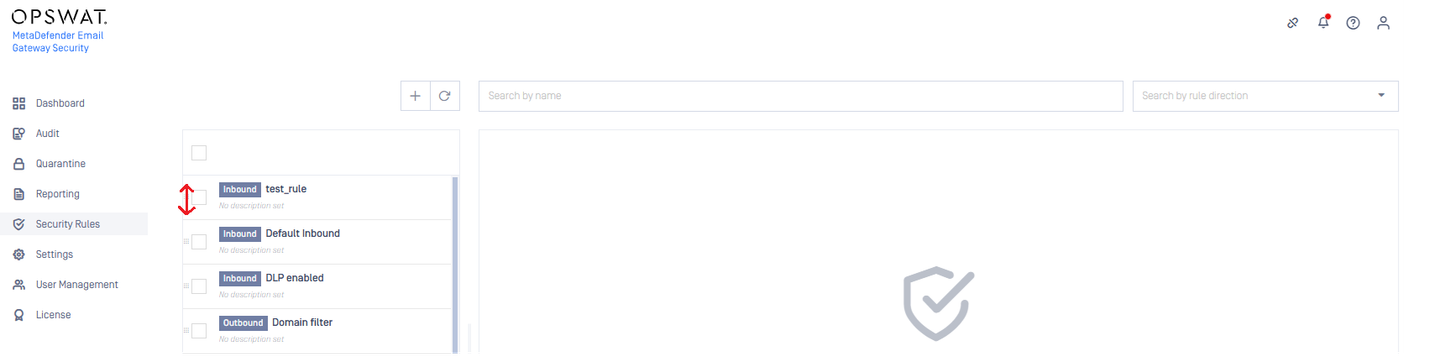
Drag and Drop
Click and hold the rule.
Drag it up or down to the desired position.
Release the mouse button to place the rule in its new order.
Best Practices for Rule Arrangement
Prioritize specific rules: Place rules that address particular threats or conditions at the top.
General rules last: Broad filtering rules should be positioned lower in the list to catch all remaining emails that weren’t filtered by earlier rules.
Review rule order regularly: Ensure rules are in optimal order based on evolving security needs.
By following these steps, you can efficiently manage security rule execution and optimize your email security settings.
If Further Assistance is required, please proceed to create a support case or chat with our support engineer.