
Version | 5.8.0 |
|---|---|
Release date | 20 December 2023 |
Scope | Focused feature enhancement, security enhancement and other product stability bug fixes. |
Making sure to check out the Known Limitations
New Features, Improvements and Enhancements
Details | |
|---|---|
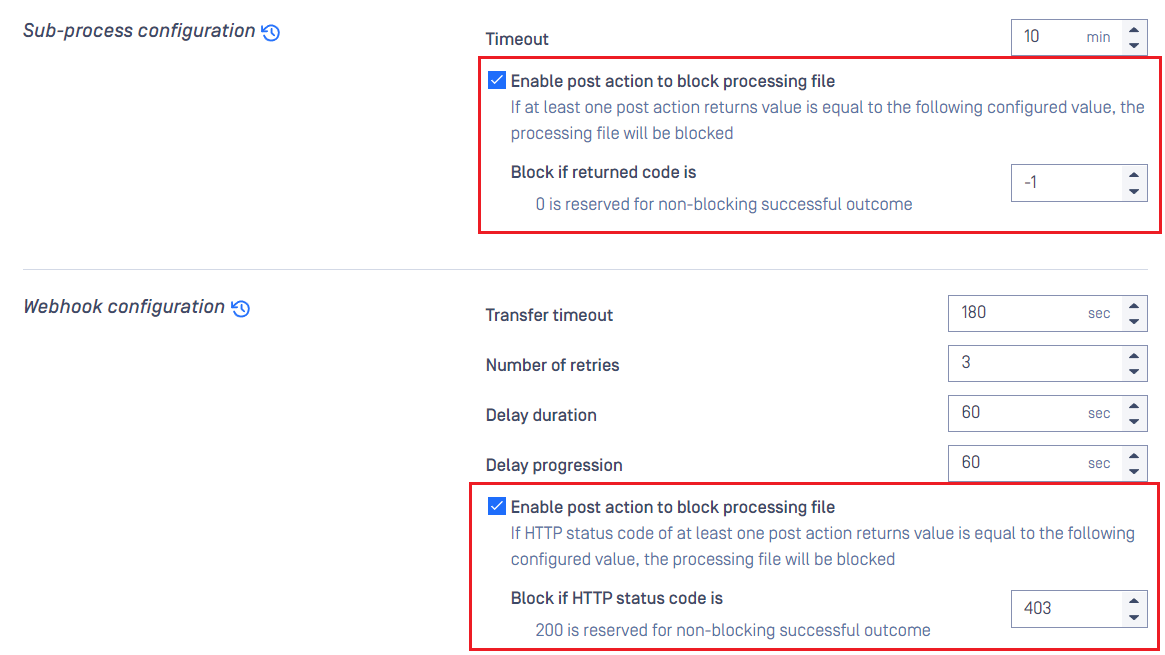
Allow post action to override final processing verdict | The new setting under "Post Action" section in MetaDefender Core workflow rule (disabled by default) will let authorized users configure the product to scan for the pre-defined final output code returned by your custom post action script (or custom post action webhook server) to determine if the final processing verdict should be overriden as "blocked" by that or not.
This new setting create an opportunity for MetaDefender Core customers to customize even better their security policy with their own action's logic. |
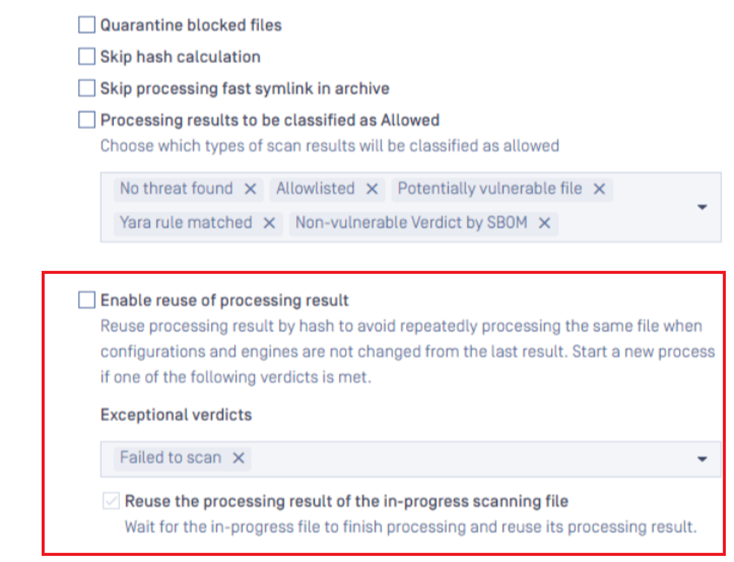
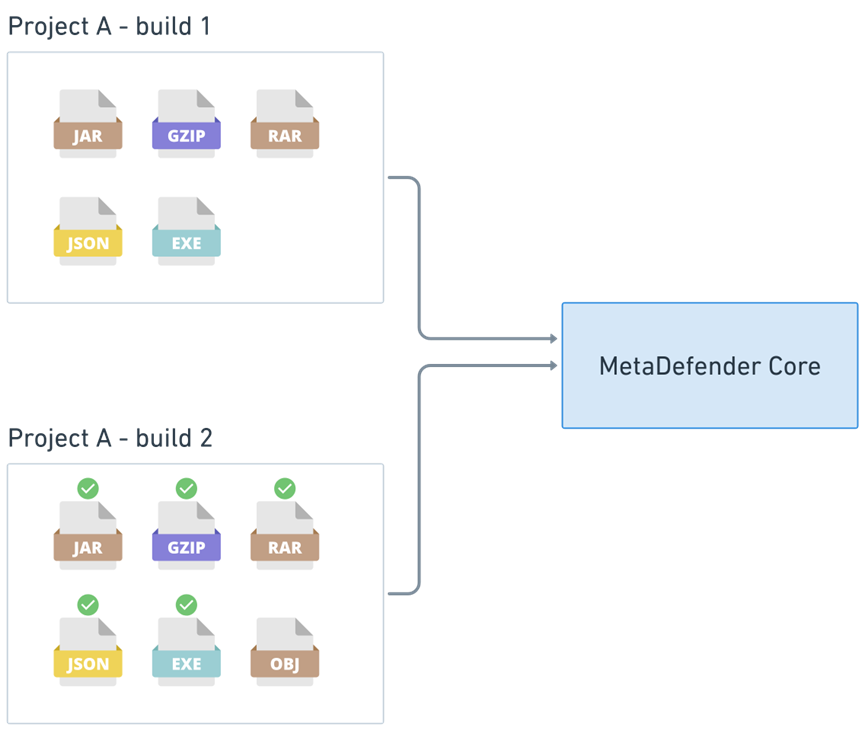
Reuse processing result by hash | The new setting under "General" section in MetaDefender Core workflow rule (disabled by default) will let authorized users configure the product to automatically reuse eligible processed results with the same hash for all other in-progress submitted requests.
A great approach to tremendously boost up the entire processing throughput for certain use-cases such as Email Security, DevSecOps, Cross Domain etc. to avoid repeatedly processing same files within a short time period.
Learn more at Reuse scan results for the same hash |
Support Red Hat Enterprise 9 | Enrich supported OS porfolio in MetaDefender Core with new support for Red Hat Enterprise 9. List of all current supported Linux-based OS: [Linux Supported Operating Systems,linux-supported-operating-systems] Note: For Deep CDR engine, it is required to install all neccessary libraries mentioned in .NET 5 dependencies on RHEL 9 |
Support PST archive file sanitization | When enabled, MetaDefender Core will remove infected and encryted child files inside original PST file, and create a sanitized version of PST without them. |
Security enhancements |
|
Usability enhancements / changes |
For example, you can specify the information for client endpoint's host name and current logged-on user by writing those information in your scan request's header
|
Performance improvements |
|
Logging improvements |
|
UI updates |
|
Bug Fixes
Details | |
|---|---|
Fixes on product stability issues |
|
Other minor bug fixes | Some UI cosmetics and minor bugs are addressed. |
Known Limitations
Details | |
|---|---|
Button "Revert to Default" in Workflow Rule might not work well | When modifying settings in Workflow Rule, sometimes button "Revert to Default" disappears and cannot work properly. This behavior might be encountered in version 5.5.0. This issue is addressed and resolved in version 5.6.0. |
Engine Update feature sometimes does not work properly in particular environment | We have observed that the Engine Update feature may not work properly in an environment that is protected by a [Palo Alto firewall](Palo Alto firewall). In log file, you might find this message "SslHandshakeFailedError". In case that upgrading to the latest version of MetaDefender Core does not help, please consider setting up MetaDefender Update Downloader product. This product is responsible for downloading engines, and MetaDefender Core will pick and update its engines from there. |
UI inconvenience on small resolution screen | MetaDefender Core 5.5.0 introduces a lot of changes for supporting UI accessibility. Unfortunately, this leads to an inconvenience issue when displaying Workflow Rule on small/zoomed-in resolution screen. Some tabs at the bottom of the list will not be displayed properly. Workaround: zooming out a little bit on the browser. This issue is addressed and resolved in version 5.5.1. |
Performance degradation against big archive files | This issue is addressed and resolved in MD Core v5.5.0 and Archive v6.2.1.
|
Stability issue when encountering malformed data created by FileType engine | FileType version 6.0.2 sometimes created malformed data. After being written into PostgreSQL database, those malformed data cause negative impacts to MetaDefender Core v5.4.0 or older:
If you encounter similar symptoms, please find the following troubleshooting to resolve the issue: Rectify malformed FileType data in PostgreSQL database This issue is addressed and resolved in version 5.4.1. |
Stability issues on Red Hat / CentOS with its kernel version 372.13 | MetaDefender Core 5.2.1 or above might not be able to work properly with Red Hat /Cent OS with its kernel 372.13. The vendor Red Hat seems to be fixing the issues with the kernel. Please try upgrading to kernel version 372.26. |
PostgreSQL and MetaDefender Core services cannot initialize in specific containerized environment | In containerized environment, MetaDefender Core 5.2.0 or newer cannot work properly when:
Workarounds:
|
MetaDefender Core's NGINX web server will not start if using weak cipher suites for HTTPS | On MetaDefender Core 5.2.0 or newer, OpenSSL 1.x is replaced by OpenSSL 3.x within the product and other dependencies (PostgreSQL, NGINX) as a security improvement, and prevent known vulnerabilities found on OpenSSL 1.x NGINX's OpenSSL 3.x on MetaDefender Core has the enforcement in place to reject all weak cipher suites. It only accepts "HIGH" encryption cipher suites https://www.openssl.org/docs/man1.1.1/man1/ciphers.html (MD5 and SHA1 hashing based will not be accepted as well). As a result, if you already configured MetaDefender Core for HTTPS connection, but using a weak SSL cipher with your certificate, then MetaDefender Core will not be able to start due to NGINX's OpenSSL 3.x enforcement. For prevention and remediation before upgrading MetaDefender Core, learn more at HTTPS Failure on MetaDefender Core 5.2.0 (or newer) |