
These results should be viewed as guidelines and not performance guarantees, since there are many variables that affect performance (file set, network configurations, hardware characteristics, etc.). If throughput is important to your implementation, OPSWAT recommends site-specific benchmarking before implementing a production solution.
Environment
Using AWS environment with the specification below:
MetaDefender Core
OS | AWS instance type | vCPU | Memory (GB) | Network bandwidth (Gbps) | Disk type | Benchmark | |
|---|---|---|---|---|---|---|---|
MetaDefender Core #1 | Ubuntu 24.04 | c5.4xlarge | 16 | 32 | Up to 10 | SSD | |
MetaDefender Core #2 | Ubuntu 24.04 | c5.4xlarge | 16 | 32 | Up to 10 | SSD |
RDS
OS | AWS instance type | vCPU | Memory (GB) | Network bandwidth (Gbps) | Disk type |
|---|---|---|---|---|---|
Windows Server 2022 | db.m7i.4xlarge | 16 | 64 | Up to 10 | SSD |
Deployment Model
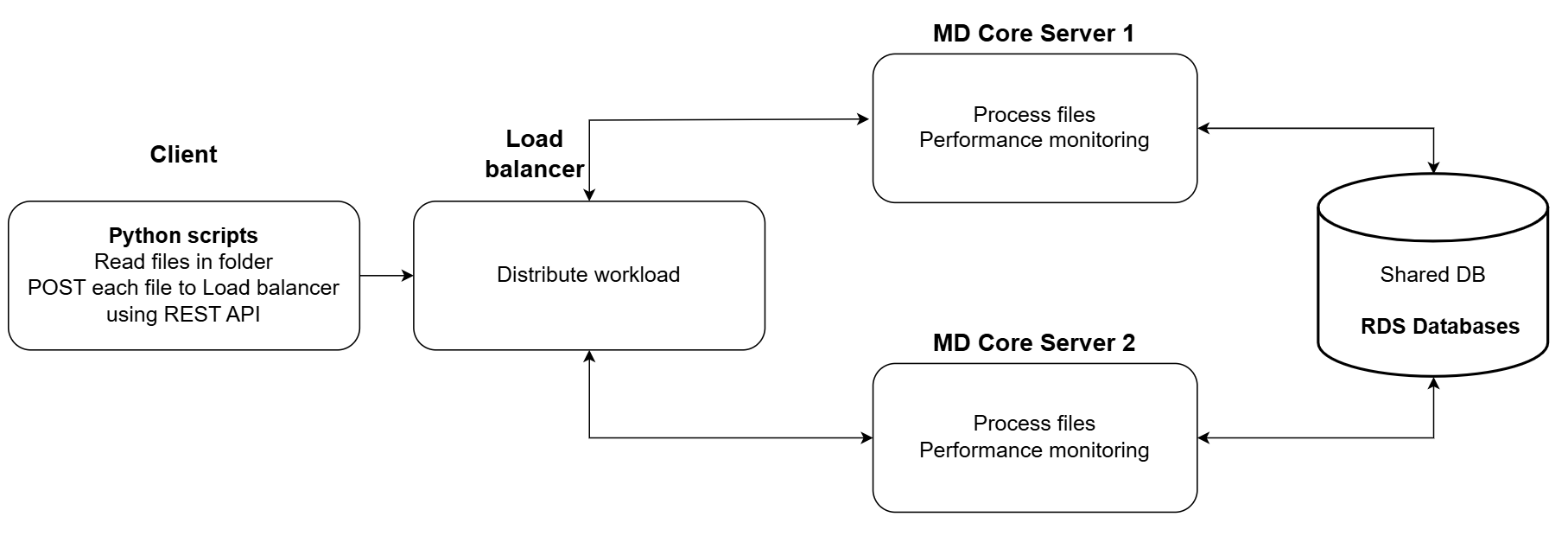
Using a AWS Load Balancer to distribute files sent from the client tool to two (2) different MetaDefender Core servers applying Round Robin algorithm. With this algorithm, each MetaDefender Core server is supposed to receive same number of requests.
Client tool
A simple tool written in Python to collect files in a designated folder and submit requests to Load Balancer mentioned above.
OS | AWS instance type | vCPU | Memory (GB) | Network bandwidth (Gbps) | Disk type |
|---|---|---|---|---|---|
CentOS 7 | c5.4xlarge | 16 | 32 | Up to 10 | SSD |
Dataset
Detailed information of dataset below will be used for testing:
File category | File type | Number of files | Total size (MB) | Average file size (MB) |
|---|---|---|---|---|
Adobe | 370 | 385 MB | 1.0 MB | |
Executable | EXE | 45 | 309.5 MB | 6.9 MB |
MSI | 15 | 45.75 MB | 3.1 MB | |
Image | BMP | 80 | 515 MB | 6.4 MB |
JPG | 420 | 237.5 MB | 0.6 MB | |
PNG | 345 | 169 MB | 0.5 MB | |
Media | MP3 | 135 | 865 MB | 6.4 MB |
MP4 | 50 | 500 MB | 10.0 MB | |
Office | DOCX | 235 | 190 MB | 0.8 MB |
DOC | 225 | 486 MB | 2.2 MB | |
PPTX | 365 | 860 MB | 2.4 MB | |
PPT | 355 | 1950 MB | 5.5 MB | |
XLSX | 340 | 283.5 MB | 0.8 MB | |
XLS | 335 | 284.5 MB | 0.8 MB | |
Text | CSV | 100 | 236 MB | 2.4 MB |
HTML | 1075 | 76 MB | 0.1 MB | |
TXT | 500 | 210 MB | 0.4 MB | |
Archive | ZIP | Compressed files: 10 Extracted files: 270 | Compressed size: 125.5 MB Extracted size: 156.5 MB | Avg compressed size: 12.6 MB Avg extracted size: 0.6 MB |
Summary (compressed) | 5000 | 7728.5 MB | 1.55 MB average file size | |
Summary (extracted) | 5260 | 7759.5 MB | 1.48 MB average file size |
Product Information
Product versions:
MetaDefender Core version 5.18.0
Engines:
Metascan 5: Ahnlab, Bitdefender, ClamAV, ESET, K7
Metascan 10: Metascan 5 + Avira, Varist, IKARUS, Quick Heal, TACHYON
Metascan MAX: Metascan 10 + Lionic, CMC, CrowdStrike Falcon ML, Aurora, Trellix, NANOV, RocketCyber, Sophos, Webroot SMD, Xvirus Anti-Malware
Deep CDR: 7.8.0
Proactive DLP: 3.2.0
Archive: 7.8.0
File type analysis: 7.8.0
File-based vulnerability assessment: 4.57-236
Adaptive Sandbox: 3.0.0
MetaDefender Core settings
General settings
Turn off data retention
Turn off engine update
Max file size: 99999999
Archive extraction settings
Max recursion level: 99999999
Max number of extracted files: 99999999
Max total size of extracted files: 99999999
Timeout: 10 minutes
Handle archive extraction task as Failed: true
Extracted partially: true
Metascan AV settings
Scan timeout: 10 minutes
Per engine scan timeout: 1 minutes
Adaptive Sandbox
Max file size: 18446744073709 MB (max)
Timeout: 86400 (max)
Performance test results
MetaDefender Core with single engine (technology)
Summary metrics:
System resource utilization:
MetaDefender Core with common engine packages
Summary metrics:
System resource utilization:
Recommendations
Controlling total processing time of each MD Core server:
In this deployment model, we should organize and send files in the way that it best utilizes the load of each MD Core server. It is not a good practice if one Core server is free while the other one is busy. By optimizing the distribution of files, we can ensure that each Core server is utilized efficiently, thereby improving overall system performance. Furthermore, this approach can help prevent bottlenecks and minimize the chances of system overload.
Adding proper number of MD Core servers to the cluster:
Adding more Core servers to this model will increase more load on the shared database. When adding a new MD Core server, users should monitor performance of database server such as memory/CPU consumption, disk usage, network bandwidth, request response time and so on… to see if it still can handle the load. This is important in order to maintain optimal performance and ensure that the database server can continue to efficiently serve the needs of the system.
Optimizing database server for better performance:
Continuing to add more Core servers to this model may result in increased strain on the shared database. As such, it is crucial to ensure that the database is optimized to handle the additional load effectively. Users can consider adjusting default database settings of PostgresSQL to optimize for more data load if needed. Here is where we can adjust PostgresSQL database settings: <PostgreSQL install location\version>\data\postgresql.conf.
Besides that, MD Core also supports a parameter (db_connection) for users to specify max connections that MD Core can handle, take a look at this guideline: MetaDefender Configuration.