
The custom detection feature is an advanced feature that allows users to define their own rules for identifying specific patterns within files. This capability enables users to support their own file types for detection quickly, without needing to wait for official support from the FileType engine.
Enable custom detection
This feature is disabled by default. To enable this feature:
At Inventory > Modules > Utilities > FileType, Tick Enable custom detection
At Inventory > Modules > Utilities > FileType, section Enable custom detection, specify paths to rule files and/or rule directories that contain JSON rule files.
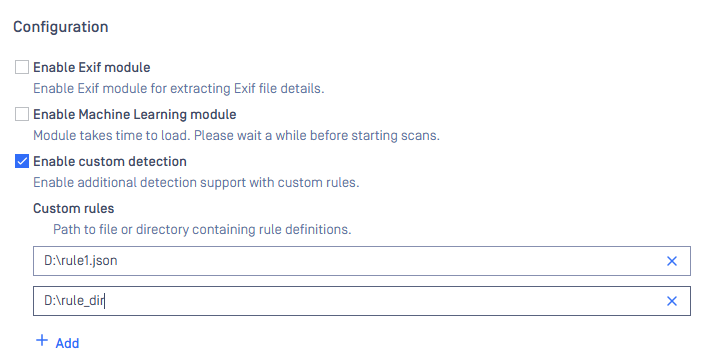
When there are updates on the rule files or the rule directories, the engine needs to be restarted in order for the rules to take effective.
When new items of the configuration are added, the rules are loaded automatically along with the changes insides the existing files or directories if available.
JSON custom rules
Rule definitions
Info of file types detected with custom rules and the rules are defined in JSON format with fields described as in the table below. The rule file must have .json extension.
File type Info
Field | Mandatory | Meaning |
|---|---|---|
rule_type | Required | Can be either xml-based or zip-based or binary. |
file_type | Required | File type description to be used to output. |
file_type_id | Required | File type ID. |
mime_type | Optional | Mime type to be used to output. Default value: application/octet-stream. |
encrypted | Optional | Encrypt property to be used to output. Default value: false. |
group | Optional | Group ID to be used to output. Default value: O. See the list of group IDs below. |
extensions | Optional | Extension(s) for the file format. This value will be used to check mismatching. Default value: empty. |
Binary detection rules
Field | Mandatory | Meaning |
|---|---|---|
min_score | Optional | Minimum confidence score for this file type. Default value: 0.0. |
priority | Optional | Priority of the rule. Default value: 1. |
variables | Optional | Input variables array. Default value: empty. |
[variable].name | Required | Name of the variable. |
[variable].type | Optional | Type of the variable. Currently, only "built-in" variables are supported. |
[variable].data_type | Optional | Data type of the variable. This can be i8, i16, i32, i64, u8, u16, u32, u64, float, double or a string. |
[variable].length | Optional | Length of the variable. Applicable for string-type variable. Default value: 0. |
[variable].endianness | Optional | Endianness of the variable. This can be host, little_endian, big_endian. Default value: little_endian. |
[variable].offset | Optional | (Similar to offset described in Binary detection rule). |
rules | Required | An array contains binary detection rules. |
Binary detection rule | ||
[rule].score | Optional | Score of the rule. Default value: 0.0. |
[rule].description | Optional | The description of the rule. Default value: empty. |
[rule].match | Required | Object contains the detection match. |
offset | Optional | Offset to check for the match. Can be either integer or object. Applicable for type exact, search, regex, and oneof. |
base | Optional | (For object-type offset) Base for the offset, can be one of the following values:
|
variable | Optional | (For object-type offset) Variable for the offset. Required for variable-type base. |
relative_offset | Optional | (For object-type offset) Relative value for the offset. Default value: 0. |
type | Required | Can only be one of the following values: exact, compare, search, regex, oneof. |
For exact-type match | ||
offset | Optional | (mentioned above) |
For compare-type match | ||
operator | Required | Can only be one of the following values: equal, greater, greater_or_equal, less_than, less_than_or_equal. |
value | Required | The value to compare. This can be integer, string, or object. |
variable | Optional | The input variable for the value. It's required for object-type value. |
For search-type match | ||
offset | Optional | (mentioned above) |
search_range | Optional | Searching range. 0 is for searching the whole file. Default value 0. |
occurrences | Optional | Number of occurrences for the match. Default value 1. This can be either integer or object. |
min | Optional | (For object-type occurrences) Minimum number of occurrences required for the match. Default value 0. |
max | Optional | (For object-type occurrences) Maximum number of occurrences required for the match. Default value 0. |
algorithm | Optional | Searching strategy. Can be either linear or KMP. Default value: linear. |
For regex-type match | ||
offset | Optional | (mentioned above) |
range | Optional | Searching range. 0 is for searching the whole file. Default value 0. |
For oneof-type match | ||
offset | Optional | (mentioned above) |
[rule].pattern | Required | Object contains the detection pattern to be matched. |
type | Required | Can only be one of the following values: hex, text, encoded, variable. |
For hex-type pattern | ||
data | Required | Hex data. This can be a hex value or an array of hex values. |
mask | Optional | Mask bytes. |
For variable-type pattern | ||
name | Required | Name of variable. |
For text-type pattern | ||
data | Required | The text data. |
For encoded-type pattern | Not supported for now. |
Zip-based detection rules
Field | Mandatory | Meaning |
|---|---|---|
entry_rules | Required | An array contains all rules for entry checking. |
[entry_rule].pattern | Required | Name pattern of the entry. |
[entry_rule].type | Required | Can only be exact for now. |
[entry_rule].score | Optional | Score for the entry. Default value: 0.0. |
[entry_rule].data | Optional | Rule to detect binary data of the entry (refer to section Binary detection rules). |
Xml-based detection rules
Field | Mandatory | Meaning |
|---|---|---|
root_node | Required | Object contains root node information. |
name | Required | Name of the root node. |
score | Optional | Root node contribution score. Default value: 0.0. |
attributes | Optional | An array contains attributes. |
[attribute].name | Required | Attribute name. |
[attribute].value | Required | Attribute value. |
attributes_contribution | Optional | Attributes contribution score. Default value: 0.5. |
tree_nodes | Optional | An array contains tree nodes information. |
score | Optional | Tree nodes contribution score. Default value: 0.0. |
nodes | Optional | An array contains tree nodes. |
[node].name | Required | Node name. |
[node].level | Required | Node level. |
[node].parent | Required | Node parent. |
Group ID and name
Group | Group | Group |
|---|---|---|
A: Archive Files | G: Image Files | T: Text Files |
AP: Application Files | I: Disk Image Files | Z: Email Files |
D: Office Documents | M: Media Files | O: Other |
D_ENC: Encrypted Documents | OPENSSL_ENC: OpenSSL Encrypted Files | |
E: Executable Files | P: Adobe Files |
Example rules
Below are some JSON example rules.
XML custom rules (deprecated)
Rule definitions
Info of file types detected with custom rules and the rules are defined in XML format with fields described as in the table below. The rule file must have .xml extension.
Field | Mandatory | Meaning |
|---|---|---|
File type info | ||
description | Required | File type description to be used to output. |
id | Required | File type ID. |
mime | Optional | Mime type to be used to output. Default value: application/octet-stream. |
group | Optional | Group ID to be used to output. Default value: O. See the list of group IDs below. |
extension | Optional | Extension(s) for the file format. This value will be used to check mismatching. Default value: empty. |
score | Optional | Confidence score for the custom file type. Value range [0, 1]. Default value: 0.25. |
Patterns for detection | ||
FrontBlock | Required | Define patterns at specific offsets |
FrontBlock.Pattern | Required | Define offset (stored in Pos) and hex pattern to be compared (stored in Bytes). |
GlobalStrings | Optional | Define patterns at random offsets. |
GlobalStrings.String | Optional | Define string pattern to be matched. |
Group ID and name
Group | Group | Group |
|---|---|---|
A: Archive Files | G: Image Files | T: Text Files |
AP: Application Files | I: Disk Image Files | Z: Email Files |
D: Office Documents | M: Media Files | O: Other |
D_ENC: Encrypted Documents | OPENSSL_ENC: OpenSSL Encrypted Files | |
E: Executable Files | P: Adobe Files |
The current use case is to turn a unknown (DATA) or not surely (non-DATA with score < 1.0) (detected by native rules of the engine) file type into a user-custom one with higher score.
There can be cases in which a file matches both a custom and a built-in rule. In order to prioritize the detection result from the custom rule, the custom rule should be defined with a high confidence score, e.g., 1.1.
The detection "score" can be found in the JSON scan result: filetype_info.file_info.likely_type_ids.score
Example rules
Below are some XML example rules.