
How to enable debug logging for MetaDefender Core?
This article applies to all MetaDefender Core V4 and V5 releases deployed on Windows and Linux systems.
To assist the OPSWAT Support team in diagnosing issues more effectively, we may require debug logs from your MetaDefender Core for a detailed analysis.
Enabling debug logging level on MetaDefender Core should only be used when absolutely necessary, and advised by OPSWAT team.
To enable debug logging for MetaDefender Core, please follow the appropriate guide based on your operating system:
Windows
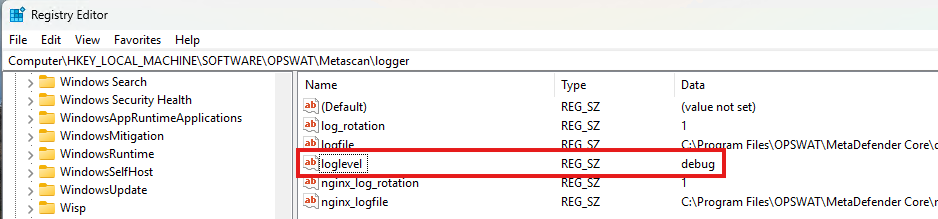
Open Registry Editor.
Navigate to
HKEY_LOCAL_MACHINE\SOFTWARE\OPSWAT\Metascan\logger.Change the value of
logleveltodebug.Restart your MetaDefender Core service.
Linux
Open the file at
/etc/ometascan/ometascan.confwith your preferred text editor.In the [logger] section, change the value of
logleveltodebug.
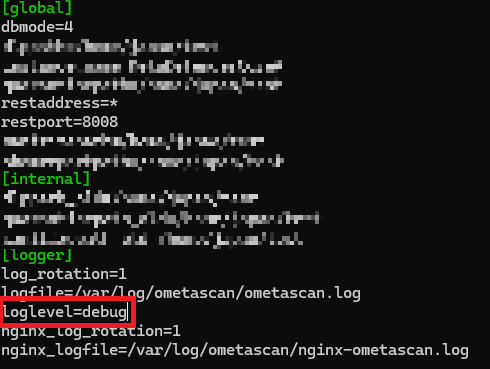
Restart your MetaDefender Core service.
After finishing with debug logging mode, the loglevel should be set back to info. Failed to do so, the size of your log files could increase significantly.
Generating a Support Package
After you have enabled the debug logging mode, try to reproduce the issue that you are currently have. Next, please run generate the Support Package and send to the Support team so we can effectively investigate your issue.
For detailed guide on Generating Support Package, please follow this URL:
If Further Assistance is required, please proceed to log a support case or chat with our support engineer.