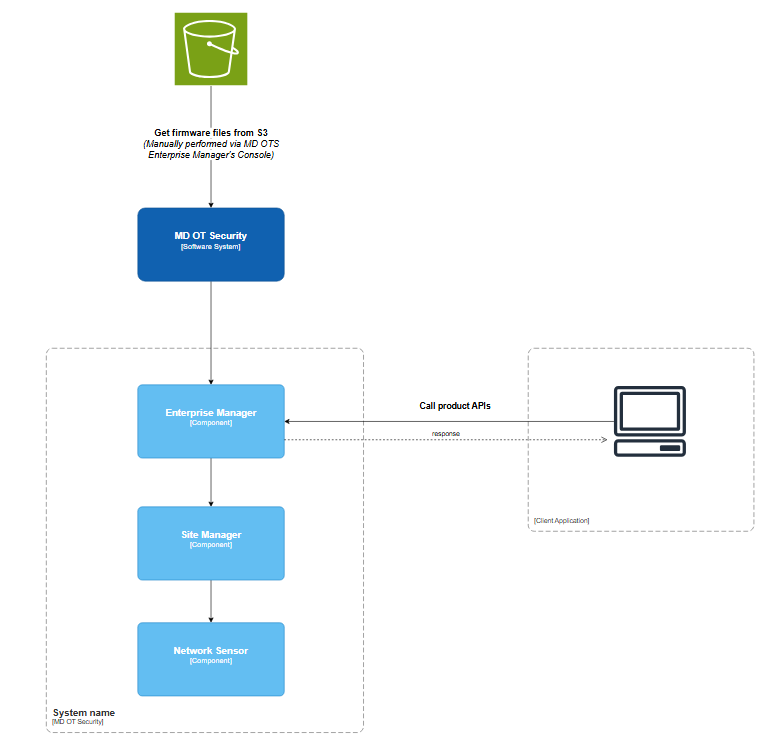
API Client v1

Overall

Workflow overview
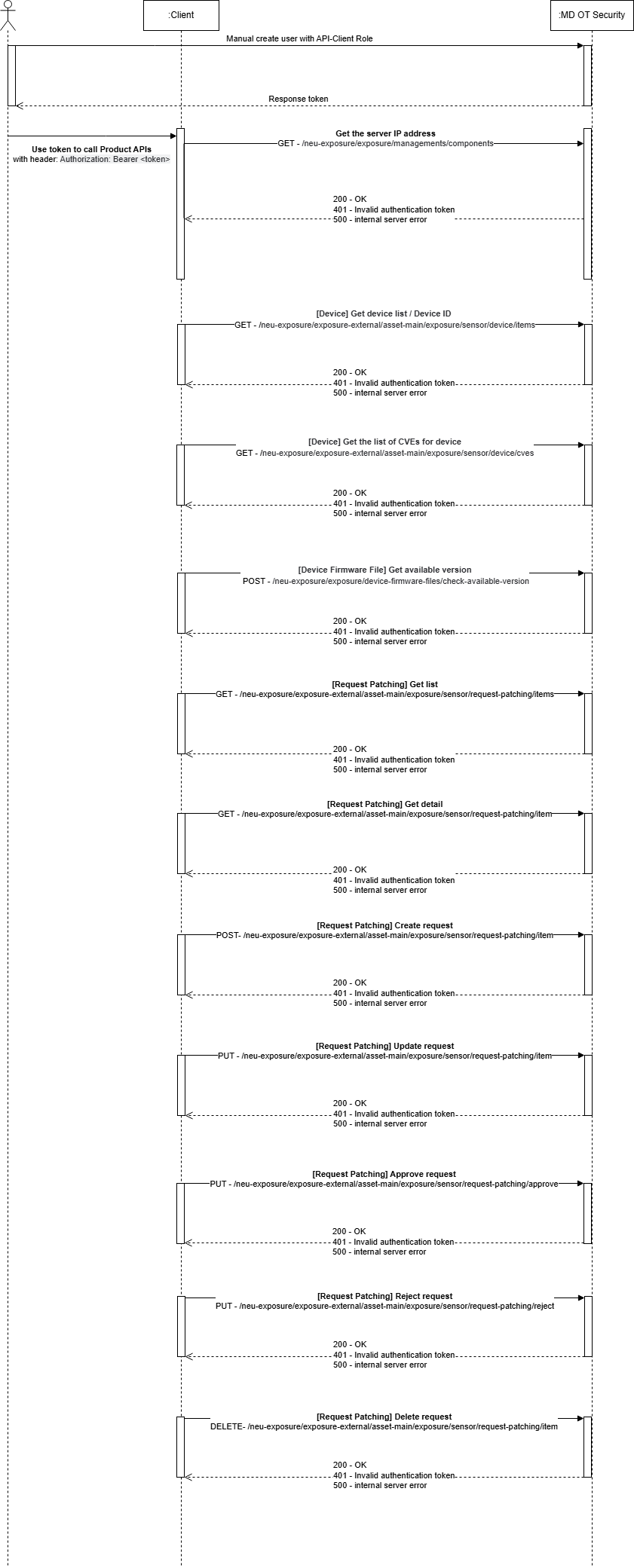
MetaDefender OT Security Configuration

Create a MetaDefender OT Security User

MetaDefender OT Security will utilize multiple APIs to communicate with its products. Access to the API is validated via a combination of credentials (Token). This user requires a minimum access level; do not use a Super Administrator account.

Create a user from Enterprise -> User ManagementUserCreate User → {Create a user, ensure that you use the Role of API-Client }
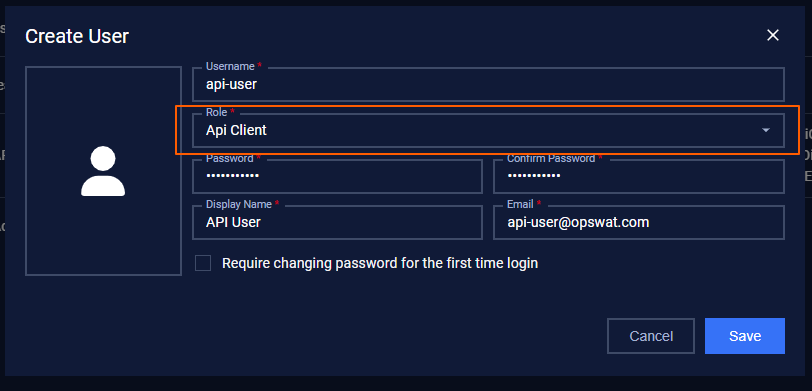
Clicking on the Save button → Create user successfully → Copy this API-Client Token to be used for authentication

API

  1. [Device] Get the server IP address
Title[Device] Get the server IP address
URL Pathhttps://{IP of Enterprise Manager}:3003/neu-exposure/exposure/v1/managements/components
MethodGET
Authentication methodBearer Token
Request headers
  • Bearer Token: retrieved after creating API-Client user (mandatory)
  • This API requires Bearer Token Authentication. You must include a valid Bearer token in the Authorization header.
  • Format: Authorization: Bearer <token>
Response
  • Response, 200 OK
JSON
Copy
  • Response, 401 - Unauthorized
Javascript
Copy

2. [Device] Get device list

Title[Device] Get device list
URL Pathhttps://{IP_Enterprise}:3003/neu-exposure/exposure-external/asset-main/exposure/v1/sensor/device/items
MethodGET
Authentication methodBearer Token
Request headers
  • Bearer Token: retrieved after creating API-Client user (mandatory)
  • This API requires Bearer Token Authentication. You must include a valid Bearer token in the Authorization header.
  • Format: Authorization: Bearer <token>
Params
  • siteIp:

    • Type: string
    • Description: The IP address of the site to fetch device data for.
    • Example: "10.40.172.144"
  • sensorIp:

    • Type: string
    • Description: The IP address of the sensor associated with the site.
    • Example: "10.40.172.172"
  • data:

    • Type: Object

    • Description: Pagination Info

      • “limit”: Number of records
      • page”: The value should ALWAYS be 1.
      • "sortBy": "discovTime"
      • "sortType": "desc"
    • Example:{"limit":20,"page":1,"sortBy":"discovTime","sortType":"desc"}

ResponseResponse, 200 OK Ex:
JSON
Copy

3. [Device] Get a device list by site id

Title[Device] Get device list by site id
URL Pathhttps://{IP_Enterprise}:3003/neu-exposure/exposure/v1/devices/items?siteId=[2]&data={"isAll":false}
MethodGET
Authentication methodBearer Token
Request headers
  • Bearer Token: retrieved after creating API-Client user (mandatory)
  • This API requires Bearer Token Authentication. You must include a valid Bearer token in the Authorization header.
  • Format: Authorization: Bearer <token>
Params
  • siteId:

    • Type: number[]
    • Description: The IP address of the site to fetch device data for.
    • Example: [1,2]
  • data:

    • Type: Object

    • Description: Pagination Info

      • “limit”: Number of records
      • page”: The value should ALWAYS be 1.
      • "sortBy": "discovTime"
      • "sortType": "desc"
    • Example:

{"limit":20,"page":1,"sortBy":"discovTime","sortType":"desc"}

ResponseResponse, 200 OK Ex:
JSON
Copy

4. [Device] Get a device alert list

Title[Device] Get a device alert list
URL Pathhttps://{IP_Enterprise}:3003/neu-exposure/exposure-external/alert-main/exposure/v1/sensor/device-alert/items?
MethodGET
Authentication methodBearer Token
Request headers
  • Bearer Token: retrieved after creating API-Client user (mandatory)
  • This API requires Bearer Token Authentication. You must include a valid Bearer token in the Authorization header.
  • Format: Authorization: Bearer <token>
Params
  • siteIp:

    • Type: string
    • Description: The IP address of the site to fetch conn alert list data for.
    • Example: "10.40.172.144"
  • sensorIp:

    • Type: string
    • Description: The IP address of the sensor associated with the site.
    • Example: "10.40.172.172"
  • data:

    • Type: Object

    • Description: Pagination Info

      • “limit”: {Number of records}
      • page”: The value should ALWAYS be 1.
      • "sortBy":"alertStarted"
      • "sortType": "desc"
    • Example:{"limit":200,"page":1,"sortBy":"alertStarted","sortType":"desc"}

ResponseResponse, 200 OK Ex:
JSON
Copy

5. [Device] Get the connection alert list

Title[Device] Get the connection alert list
URL Pathhttps://{IP_Enterprise}:3003/neu-exposure/exposure-external/alert-main/exposure/v1/sensor/conn-alert/items
MethodGET
Authentication methodBearer Token
Request headers
  • Bearer Token: retrieved after creating API-Client user (mandatory)
  • This API requires Bearer Token Authentication. You must include a valid Bearer token in the Authorization header.
  • Format: Authorization: Bearer <token>
Params
  • siteIp:

    • Type: string
    • Description: The IP address of the site to fetch conn alert list data for.
    • Example: "10.40.172.144"
  • sensorIp:

    • Type: string
    • Description: The IP address of the sensor associated with the site.
    • Example: "10.40.172.172"
  • data:

    • Type: Object

    • Description: Pagination Info

      • “limit”: {Number of records}
      • page”: The value should ALWAYS be 1.
      • "sortBy":"alertStarted"
      • "sortType": "desc"
    • Example:{"limit":200,"page":1,"sortBy":"alertStarted","sortType":"desc"}

ResponseResponse, 200 OK Ex:
Javascript
Copy

6. [Device] Get the Suricata alert list

Title[Device] Get the Suricata alert list
URL Pathhttps://{IP_Enterprise}:3003/neu-exposure/exposure-external/alert-main/exposure/v1/sensor/suricata-alert/items
MethodGET
Authentication methodBearer Token
Request headers
  • Bearer Token: retrieved after creating API-Client user (mandatory)
  • This API requires Bearer Token Authentication. You must include a valid Bearer token in the Authorization header.
  • Format: Authorization: Bearer <token>
Params
  • siteIp:

    • Type: string
    • Description: The IP address of the site to fetch conn alert list data for.
    • Example: "10.40.172.144"
  • sensorIp:

    • Type: string
    • Description: The IP address of the sensor associated with the site.
    • Example: "10.40.172.172"
  • data:

    • Type: Object

    • Description: Pagination Info

      • “limit”: {Number of records}
      • page”: The value should ALWAYS be 1.
      • "sortBy":"alertStarted"
      • "sortType": "desc"
    • Example:{"limit":200,"page":1,"sortBy":"alertStarted","sortType":"desc"}

ResponseResponse, 200 OK Ex:
Javascript
Copy

7. [Device] Get CVE list

Title[Device] Get the list of CVEs for the device
URL Pathhttps://{IP of Enterprise Manager}:3003/neu-exposure/exposure-external/asset-report/exposure/v1/sensor/device-cves/items
MethodGET
Authentication methodBearer Token
Request headers
  • Bearer Token: retrieved after creating API-Client user (mandatory)
  • This API requires Bearer Token Authentication. You must include a valid Bearer token in the Authorization header.
  • Format: Authorization: Bearer <token>
Params
  • siteIp:

    • Type: string
    • Description: The IP address of the site to fetch conn alert list data for.
    • Example: "10.40.172.144"
  • sensorIp:

    • Type: string
    • Description: The IP address of the sensor associated with the site.
    • Example: "10.40.172.172"
  • data:

    • Type: Object

    • Description: Pagination Info

      • “limit”: {Number of records}
      • page”: The value should ALWAYS be 1.
      • "sortBy":"alertStarted"
      • "sortType": "desc"
    • Example:{"limit":250,"page":1,"sortBy":"name","sortType":"desc"}

ResponseResponse, 200 OK Ex:
Javascript
Copy

8. [Device] Get the list of CVEs for the device by site id

Title[Device] Get the list of CVEs for the device by site id
URL Pathhttps://{IP of Enterprise Manager}:3003/neu-exposure/exposure/v1/devices/items?siteId=[2]&data={"isAll":false}
MethodGET
Authentication methodBearer Token
Request headers
  • Bearer Token: retrieved after creating API-Client user (mandatory)
  • This API requires Bearer Token Authentication. You must include a valid Bearer token in the Authorization header.
  • Format: Authorization: Bearer <token>
Params
  • siteIp:

    • Type: string
    • Description: The IP address of the site to fetch conn alert list data for.
    • Example: "10.40.172.144"
  • data:

    • Type: Object

    • Description: Pagination Info

      • “limit”: {Number of records}
      • page”: The value should ALWAYS be 1.
      • "sortBy":"alertStarted"
      • "sortType": "desc"
    • Example:{"limit":20,"page":1,"sortBy":"discovTime","sortType":"desc"}

ResponseResponse, 200 OK Ex:
Javascript
Copy
  • Response, 401 - Unauthorized
Javascript
Copy
Javascript
Copy

9. [Components] Get component info

Title[Components] Get the list of Site and Sensor infor
URL Pathhttps://{IP of Enterprise Manager}:3003/neu-exposure/exposure/v1/managements/components
MethodGET
Authentication methodBearer Token
Request headers
  • Bearer Token: retrieved after creating API-Client user (mandatory)
  • This API requires Bearer Token Authentication. You must include a valid Bearer token in the Authorization header.
  • Format: Authorization: Bearer <token>
Params
ResponseResponse, 200 OK Ex:
Javascript
Copy
  • Response, 401 - Unauthorized
Javascript
Copy
Javascript
Copy

10. [Components] Get sites address

Title[Device] Get sites address
URL Pathhttps://{IP of Enterprise Manager}:3003/neu-exposure/exposure/v1/managements/sites
MethodGET
Authentication methodBearer Token
Request headers
  • Bearer Token: retrieved after creating API-Client user (mandatory)
  • This API requires Bearer Token Authentication. You must include a valid Bearer token in the Authorization header.
  • Format: Authorization: Bearer <token>
Params
ResponseResponse, 200 OK Ex:
Javascript
Copy
  • Response, 401 - Unauthorized
Javascript
Copy
Javascript
Copy

API Patching PLC Device

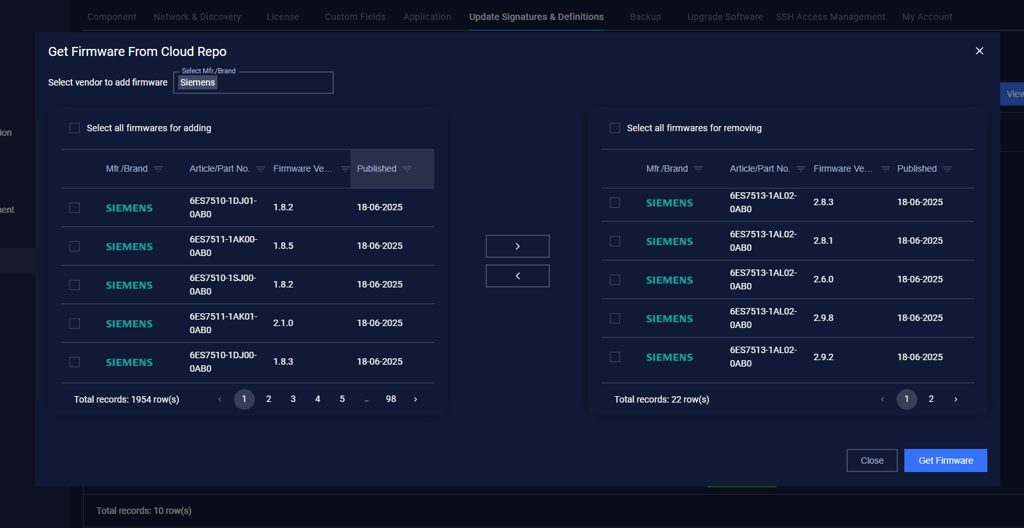
Enterprise Manager - Update PLC Firmware by getting from the Cloud Repo or uploading Manualy

Navigate to the Enterprise Manager → Settings → Update Signatures & Definitions → PLC Firmware
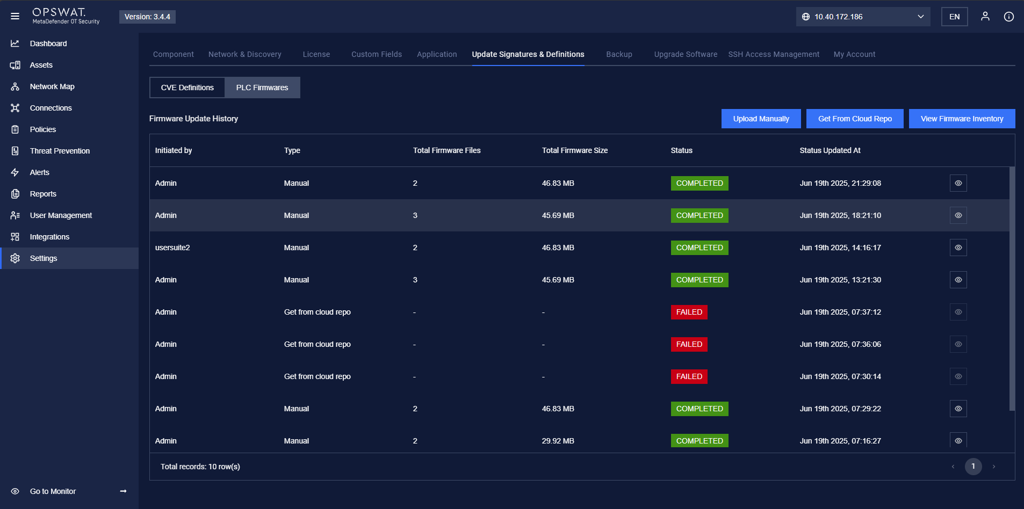
Get from Cloud Repo: we can filter by a specific Article/Part No.
1.[Device Firmware File] Get available version

Title[Device Firmware File] Get available version
URL Pathhttps://{IP of Enterprise Manager}:3003/neu-exposure/exposure/v1/device-firmware-files/check-available-version
MethodPOST
Authentication methodBearer Token
Request headers
  • Bearer Token: retrieved after creating API-Client user (mandatory)
  • This API requires Bearer Token Authentication. You must include a valid Bearer token in the Authorization header.
  • Format: Authorization: Bearer <token>

Request body:

  • Raw format:
Javascript
Copy

Response:

  • Response, 200 OK
Javascript
Copy
  • Response, 401 - Unauthorized
Javascript
Copy

2. [Device] Get the device ID for patching

Title[Device] Get the device ID for patching
URL Pathhttps://{IP of Enterprise Manager}:3003/neu-exposure/exposure-external/asset-main/exposure/v1/sensor/device/items
MethodGET
Authentication methodBearer Token
Request headers
  • Bearer Token: retrieved after creating API-Client user (mandatory)
  • This API requires Bearer Token Authentication. You must include a valid Bearer token in the Authorization header.
  • Format: Authorization: Bearer <token>
Params

Get based on IPv4 or the MAC address of the Device

  • siteIp:

    • Type: string
    • Description: The IP address of the site to fetch device data for.
    • Example: "10.40.172.144"
  • sensorIp:

    • Type: string
    • Description: The IP address of the sensor associated with the site.
    • Example: "10.40.172.172"
  • data:

    • Type: Object

    • Description: Pagination Info

      • “limit”: Number of records
      • page”: The value should ALWAYS be 1.
      • "sortBy": "discovTime"
      • "sortType": "desc"
      • “properties“: {"ipv4":"", "mac":""}
    • Example:

    • {"limit":20,"page":1,"sortBy":"discovTime","sortType":"desc","properties":{"ipv4":"192.168.1.103","mac":"E0:DC:A0:C4:6A:42"}}

ResponseResponse, 200 OK Ex:
Javascript
Copy
  • Response, 401 - Unauthorized
Javascript
Copy
Javascript
Copy

3. [Device] Get the list of CVEs for device

Title[Device] Get the list of CVEs for the device
URL Pathhttps://{IP of Enterprise Manager}:3003/neu-exposure/exposure-external/asset-main/exposure/v1/sensor/device/cves
MethodGET
Authentication methodBearer Token
Request headers
  • Bearer Token: retrieved after creating API-Client user (mandatory)
  • This API requires Bearer Token Authentication. You must include a valid Bearer token in the Authorization header.
  • Format: Authorization: Bearer <token>
Params
  • siteIp:

    • Type: string
    • Description: The IP address of the site to fetch device data for.
    • Example: "10.40.172.144"
  • sensorIp:

    • Type: string
    • Description: The IP address of the sensor associated with the site.
    • Example: "10.40.172.172"
  • data:

    • Type: Object

    • Description: Pagination Info

      • “id”: the device ID
      • “status”: /unpatched/patched/potential or ““ to get all
    • Example:

    • {"id":1, "status": ""}

ResponseResponse, 200 OK Ex:
Javascript
Copy
  • Response, 401 - Unauthorized
Javascript
Copy
Javascript
Copy

4. [Request Patching] Get list

Title[Request Patching] Get list
URL Pathhttps://{IP of Enterprise Manager}:3003/neu-exposure/exposure-external/asset-main/exposure/v1/sensor/request-patching/items
MethodGET
Authentication methodBearer Token
Request headers
  • Bearer Token: retrieved after creating API-Client user (mandatory)
  • This API requires Bearer Token Authentication. You must include a valid Bearer token in the Authorization header.
  • Format: Authorization: Bearer <token>
Params
  • siteIp:

    • Type: string
    • Description: The IP address of the site to fetch device data for.
    • Example: "10.40.172.144"
  • sensorIp:

    • Type: string
    • Description: The IP address of the sensor associated with the site.
    • Example: "10.40.172.172"
ResponseResponse, 200 OK Ex:
Javascript
Copy
  • Response, 401 - Unauthorized
Javascript
Copy
Javascript
Copy

5. [Request Patching] Get detail

Title[Request Patching] Get detail
URL Pathhttps://{IP of Enterprise Manager}:3003/neu-exposure/exposure-external/asset-report/exposure/v1/sensor/device-cves/items
MethodGET
Authentication methodBearer Token
Request headers
  • Bearer Token: retrieved after creating API-Client user (mandatory)
  • This API requires Bearer Token Authentication. You must include a valid Bearer token in the Authorization header.
  • Format: Authorization: Bearer <token>
Params
  • siteIp:

    • Type: string
    • Description: The IP address of the site to fetch device data for.
    • Example: "10.40.172.144"
  • sensorIp:

    • Type: string
    • Description: The IP address of the sensor associated with the site.
    • Example: "10.40.172.172"
  • data:

    • Type: Object

    • Description:

      • “id”: the id of the request patching
    • Example:{"id": 3}

ResponseResponse, 200 OK Ex:
Javascript
Copy
  • Response, 401 - Unauthorized
Javascript
Copy
Javascript
Copy

6. [Request Patching] Create request

Title[Request Patching] Create request
URL Pathhttps://{IP of Enterprise Manager}:3003/neu-exposure/exposure-external/asset-main/exposure/v1/sensor/request-patching/item
MethodPOST
Authentication methodBearer Token
Request headers
  • Bearer Token: retrieved after creating API-Client user (mandatory)
  • This API requires Bearer Token Authentication. You must include a valid Bearer token in the Authorization header.
  • Format: Authorization: Bearer <token>
Params
  • siteIp:

    • Type: string
    • Description: The IP address of the site to fetch conn alert list data for.
    • Example: "10.40.172.144"
  • sensorIp:

    • Type: string
    • Description: The IP address of the sensor associated with the site.
    • Example: "10.40.172.172"

Request body

  • Raw format
Javascript
Copy

Response

  • Response, 200 OK
Javascript
Copy
  • Response, 401 - Unauthorized
Javascript
Copy
Javascript
Copy

7. [Request Patching] Update request

Title[Request Patching] Create request
URL Pathhttps://{IP of Enterprise Manager}:3003/neu-exposure/exposure-external/asset-main/exposure/v1/sensor/request-patching/item
MethodPUT
Authentication methodBearer Token
Request headers
  • Bearer Token: retrieved after creating API-Client user (mandatory)
  • This API requires Bearer Token Authentication. You must include a valid Bearer token in the Authorization header.
  • Format: Authorization: Bearer <token>
Params
  • siteIp:

    • Type: string
    • Description: The IP address of the site to fetch conn alert list data for.
    • Example: "10.40.172.144"
  • sensorIp:

    • Type: string
    • Description: The IP address of the sensor associated with the site.
    • Example: "10.40.172.172"

Request body

  • Raw format
Javascript
Copy

Response

  • Response, 200 OK
Javascript
Copy
  • Response, 401 - Unauthorized
Javascript
Copy
Javascript
Copy

8. [Request Patching] Approve request

Title[Request Patching] Approve request
URL Pathhttps://{IP of Enterprise Manager}:3003/neu-exposure/exposure-external/asset-main/exposure/v1/sensor/request-patching/approve
MethodPUT
Authentication methodBearer Token
Request headers
  • Bearer Token: retrieved after creating API-Client user (mandatory)
  • This API requires Bearer Token Authentication. You must include a valid Bearer token in the Authorization header.
  • Format: Authorization: Bearer <token>
Params
  • siteIp:

    • Type: string
    • Description: The IP address of the site to fetch device data for.
    • Example: "10.40.172.144"
  • sensorIp:

    • Type: string
    • Description: The IP address of the sensor associated with the site.
    • Example: "10.40.172.172"
  • data:

    • Type: Object

    • Description:

      • “id”: the id of the request patching
    • Example:

    • {"id": 6}

ResponseResponse, 200 OK Ex:
Javascript
Copy
  • Response, 401 - Unauthorized
Javascript
Copy
Javascript
Copy

9. [Request Patching] Reject request

Title[Request Patching] Reject request
URL Pathhttps://{IP of Enterprise Manager}:3003/neu-exposure/exposure-external/asset-main/exposure/v1/sensor/request-patching/reject
MethodPUT
Authentication methodBearer Token
Request headers
  • Bearer Token: retrieved after creating API-Client user (mandatory)
  • This API requires Bearer Token Authentication. You must include a valid Bearer token in the Authorization header.
  • Format: Authorization: Bearer <token>
Params
  • siteIp:

    • Type: string
    • Description: The IP address of the site to fetch device data for.
    • Example: "10.40.172.144"
  • sensorIp:

    • Type: string
    • Description: The IP address of the sensor associated with the site.
    • Example: "10.40.172.172"
  • data:

    • Type: Object

    • Description:

      • “id”: the id of the request patching
    • Example:

    • {"id": 5}

ResponseResponse, 200 OK Ex:
Javascript
Copy
  • Response, 401 - Unauthorized
Javascript
Copy
Javascript
Copy

10. [Request Patching] Delete request

Title[Request Patching] Delete request
URL Pathhttps://{IP of Enterprise Manager}:3003/neu-exposure/exposure-external/asset-main/exposure/v1/sensor/request-patching/item
MethodDELETE
Authentication methodBearer Token
Request headers
  • Bearer Token: retrieved after creating API-Client user (mandatory)
  • This API requires Bearer Token Authentication. You must include a valid Bearer token in the Authorization header.
  • Format: Authorization: Bearer <token>
Params
  • siteIp:

    • Type: string
    • Description: The IP address of the site to fetch device data for.
    • Example: "10.40.172.144"
  • sensorIp:

    • Type: string
    • Description: The IP address of the sensor associated with the site.
    • Example: "10.40.172.172"
  • data:

    • Type: Object

    • Description:

      • “id”: the id of the request patching
    • Example:

    • {"id": 5}

ResponseResponse, 200 OK Ex:
Javascript
Copy
  • Response, 401 - Unauthorized
Javascript
Copy
Javascript
Copy
Type to search, ESC to discard