This document provides the steps necessary to complete the download and configuration of the TACACS+ CentOS 7 VM.
The TACACS+ configuration already contains configuration for the most common use cases including AD/LDAP integration, privilege levels and per-command authorization. The configuration can be customized to meet the specific requirements of the environment.
Navigate to the URL below and initiate the download of the TACACS+ CentOS 7 OVA. Import the OVA into your existing ESXi infrastructure. The OVA was built on ESXi6.5 and VM Hardware Version 13.
https://nac-downloads.opswat.com/IE/tacacs/OPSWAT-TACACS+-VM.ova
The VM image requires 4Gig of dedicated memory with 40Gig thin provisioned storage partition and 2 vCPUs.
The default username and password are below:
user = root
password = P@55w0rD
It is highly recommended that you change the default password. To do this type passwd and hit enter. You will be prompted to type in the new password.
Configure networking:
# vi /etc/sysconfig/network-scripts/ifcfg-ens160
Change the following fields to the desired setting for your network
IPADDR=x.x.x.x
NETMASK=x.x.x.x
GATEWAY=x.x.x.x
DNS1=x.x.x.x
DNS2=x.x.x.x
# systemctl restart network.service
Configure the desired hostname for the server:
# hostnamectl set-hostname hostname.your.domain
Reboot for the hostname change to take effect.
# vi /usr/local/etc/tac_plus.cfg
#!/usr/local/sbin/tac_plus
id = spawnd {
listen = {
port = 49
}
spawn = {
instances min = 1
instances max = 10
}
background = yes
}
id = tac_plus {
access log = /var/log/tac_plus/access/%Y%m%d.log
accounting log = /var/log/tac_plus/acct/%Y%m%d.log
authentication log = /var/log/tac_plus/authentication/%Y%m%d.log
authorization log = /var/log/tac_plus/authorization/%Y%m%d.log
#debug = ALL
mavis module = external {
script out = {
# Require group membership:
if (undef($TACMEMBER) && $RESULT == ACK) set $RESULT = NAK
# Don.t cache passwords:
if ($RESULT == ACK) set $PASSWORD_ONESHOT = 1
}
setenv LDAP_SERVER_TYPE = "microsoft"
###################################################
# Comment/uncomment below to select LDAP or LDAPS #
###################################################
#setenv LDAP_HOSTS = "ldap:// x.x.x.x:389"
setenv LDAP_HOSTS = "ldaps:// x.x.x.x:636"
setenv LDAP_BASE = "dc=your,dc=domain,dc=here"
setenv LDAP_USER = "user@your.domain.here"
setenv LDAP_PASSWD = "your_ldap_password"
setenv REQUIRE_TACACS_GROUP_PREFIX = 1
exec = /usr/local/lib/mavis/mavis_tacplus_ldap.pl
}
login backend = mavis
user backend = mavis
pap backend = mavis
host = world {
address = ::/0
#################################################
# Adjust prompt below to preferred login banner #
#################################################
prompt = "\nUnauthorized Access Is Prohibited\n\n"
enable 15 = clear your_enable_secret
key = “your_tacacs_key”
}
#################################################################################
# The following can be used to assign a privilege level to users based on group #
# Note: AD groups need to be prefaced with “TACACS” when created on the AD #
# server, e.g. TACACSNetEngPriv in AD, NetEngPriv in tac_plus.cfg. #
#################################################################################
group = NetEngPriv {
enable = login
default service = permit
service = shell {
default command = permit
default attribute = permit
set priv-lvl = 15
}
}
group = NetAdminPriv {
default service = permit
service = shell {
default command = permit
default attribute = permit
set priv-lvl = 1
}
}
##################################################################################
# As an alternative to privilege levels, the following configuration can be used #
# to assign specific commands that a user is allowed to issue #
# Note: Privilege level defaults to 1 #
##################################################################################
group = NetAdminCmd {
default service = deny
service = shell {
default command = deny
default attribute = deny
cmd = ping { permit .* }
cmd = show { permit .* }
cmd = traceroute { permit .* }
cmd = terminal { permit [length].* }
cmd = exit
}
}
Once the desired changes have been made to the configuration, the tac_plus configuration will need to be verified and the service restarted in order for the changes to take effect.
################################################################################
# If changes have been made to this file, the tac_plus service must be #
# restarted in order for them to take effect #
# #
# Pre-flight check - /usr/local/sbin/tac_plus -P /usr/local/etc/tac_plus.cfg #
# Make sure there are no errors returned #
# #
# Restart the service #
# systemctl restart tac_plus.service #
# #
# Make sure that the service is running #
# systemctl status tac_plus.service –l #
################################################################################
[root@tacacs-vm ~]# /usr/local/sbin/tac_plus -P /usr/local/etc/tac_plus.cfg
[root@tacacs-vm ~]# systemctl restart tac_plus.service
[root@tacacs-vm ~]# systemctl status tac_plus.service –l
● tac_plus.service - TACACS+ Service
Loaded: loaded (/etc/systemd/system/tac_plus.service; enabled; vendor preset:
disabled)
Active: active (running) since Tue 2017-05-30 17:57:09 EDT; 12s ago
Main PID: 5709 (tac_plus)
CGroup: /system.slice/tac_plus.service
├─5709 tac_plus: 0 connections, accepting up to 600 more
├─5710 tac_plus: 0 connections
└─5711 perl /usr/local/lib/mavis/mavis_tacplus_ldap.pl
May 30 17:57:09 tacacs-vm.impulse.com systemd[1]: Started TACACS+ Service.
May 30 17:57:09 tacacs-vm.impulse.com systemd[1]: Starting TACACS+ Service...
May 30 17:57:09 tacacs-vm.impulse.com tac_plus[5709]: startup (version 201705210930)
May 30 17:57:09 tacacs-vm.impulse.com tac_plus[5709]: epoll event notification mechanism
is being used
May 30 17:57:09 tacacs-vm.impulse.com tac_plus[5709]: bind to [::]:49 succeeded
May 30 17:57:09 tacacs-vm.impulse.com tac_plus[5710]: - Version 201705210930 initialized
May 30 17:57:09 tacacs-vm.impulse.com tac_plus[5710]: epoll event notification mechanism
is being used
Unit \xe2\x80\x93l.service could not be found.
[root@tacacs-vm ~]#
Note – In the event the device is unable to connect to the TACACS+ server, the device will resort back to using the local access credentials after a default or specified time-out period.
conf t
!
aaa new-model
!
aaa authentication login default local group tacacs+
aaa authentication login telnet group tacacs+ local
aaa authentication login console group tacacs+ local
aaa authentication enable default group tacacs+ enable
aaa authorization exec default group tacacs+ local
aaa authorization commands 0 default group tacacs+ local
aaa authorization commands 1 default group tacacs+ local
aaa authorization commands 15 default group tacacs+ local
aaa accounting update newinfo
aaa accounting exec default start-stop group tacacs+
aaa accounting commands 0 default start-stop group tacacs+
aaa accounting commands 1 default start-stop group tacacs+
aaa accounting commands 15 default start-stop group tacacs+
!
tacacs-server host x.x.x.x
tacacs-server key your_tacacs_key
tacacs-server administration
!
end
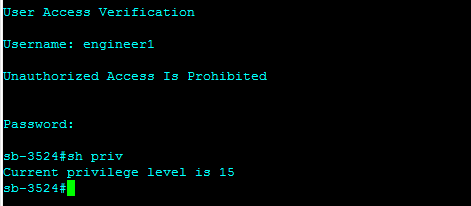
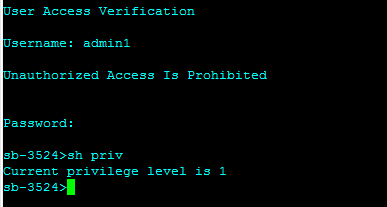
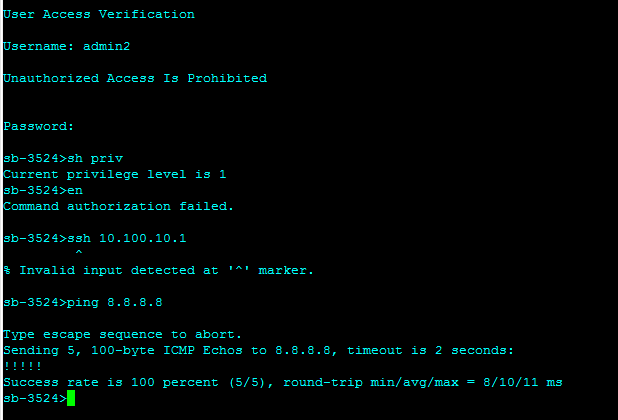
In order to validate the result on the switch, log in as a user in one of the TACACS+ AD groups and issue the show privileges command for privilege level concept or “?” for per command authorization.
Access log:
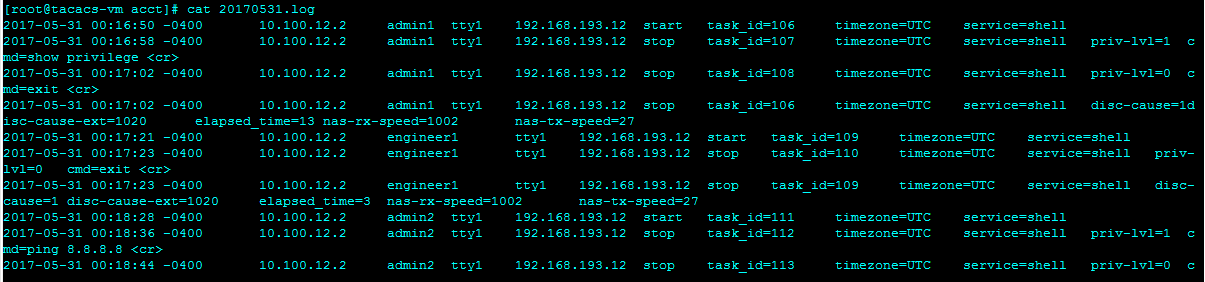
Accounting log:
Authentication log:
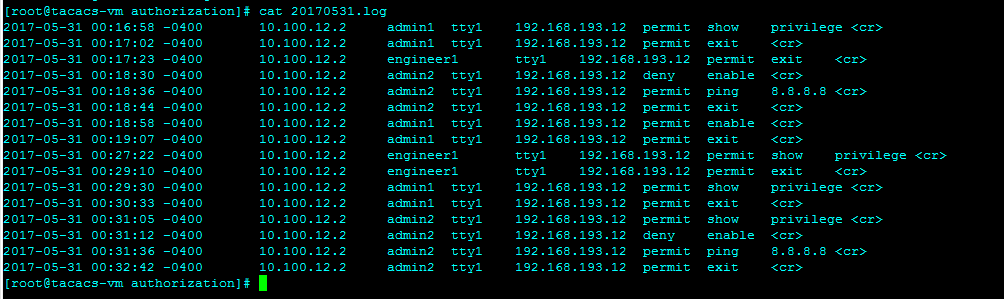
Authorization log: