
To achieve the maximum possible throughput on a single server, make sure to deploy MetaDefender Sandbox (previously known as OPSWAT Filescan Sandbox) on a powerful instance:
32 vCPUs (preferably 64 vCPUs)
128 GB RAM (preferably 256 GB)
500 GB SSD (preferably 1 TB)
The overall throughput of such a server may eclipse the default maximum limit of 25000 scans/day, and it primarily depends on the sample set. The processing time for individual samples can range from 5 seconds to 2 minutes (depending on the complexity of the sample).
The following special settings can be used to optimize the throughput when the main objective is quickly obtaining an accurate verdict for a sample, but deeper analysis is not required.
It is important to set any custom option values in the transform.cfg and broker.cfg files!
Transform Configuration
Please add the following settings in /home/sandbox/sandbox/transform.cfg:
Broker Configuration
Please add the following settings in /home/sandbox/sandbox/broker.cfg:
Webservice Admin Settings
Log in to the sandbox using an admin user, and open the Admin Panel to change the following settings.
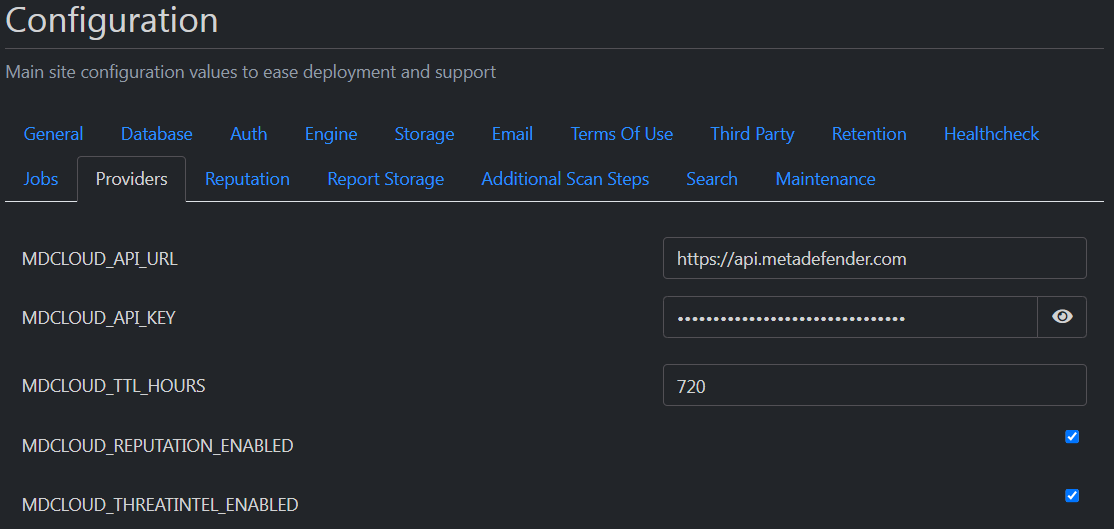
1. Configure Reputation Providers (use your MDCLOUD_API_KEY):
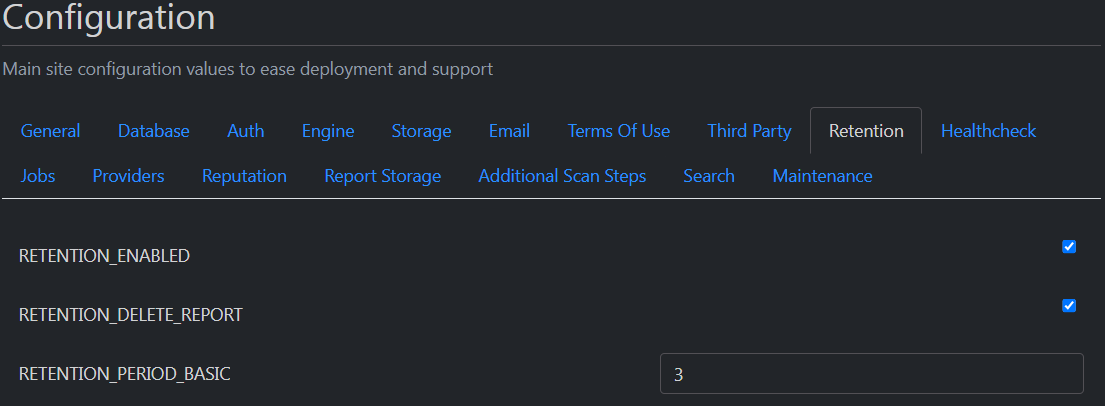
2. Configure a short retention period for samples and scan reports (e.g. 3 days):
3. Disable Trends-related jobs that might lead to a database bottleneck (Statistics tab):

4. Disable other non-essential jobs (Reports tab):

5. Configure "Finalize finished reports with hanging subtasks" job to run "Every 2 minutes" (Scan tab):
